



During Apple’s WWDC 2025 keynote today, the company revealed iOS 26 and the new, unified operating system naming structure, introduced a framework allowing any app on iOS to use Apple Intelligence, and more.
The new operating system will be available for download for free on applicable devices this fall, likely in September.
“This year’s event was not about disruptive innovation, but rather careful calibration, platform refinement and developer enablement – positioning itself for future moves rather than unveiling game-changing technologies in the present,” said Francisco Jeronimo, vice president of analyst firm IDC, in an email to TechRepublic.
- Apple emphasizes translucent design with Liquid Glass
- iOS 26 brings slightly expanded generative AI features and Phone quality of life updates
- Foundation Models framework lets app developers take advantage of on-device AI
- MacOS Tahoe 26 comes with Liquid Glass look and slight AI upgrades
- VisionOS 26 lets Vision Pro users work together more easily
- New iPadOS lets users resize windows
- Developer features will be in beta in the fall
Apple emphasizes translucent design with Liquid Glass
Apple is standardizing its operating system naming across devices and tying the names to the release year, with 2026 bringing the new design language to iPadOS, macOS, watchOS, tvOS, and visionOS. iOS also comes with a new design language, which Apple calls Liquid Glass. It’s the biggest redesign since iOS 7, said Craig Federighi, Apple SVP Software Engineering.
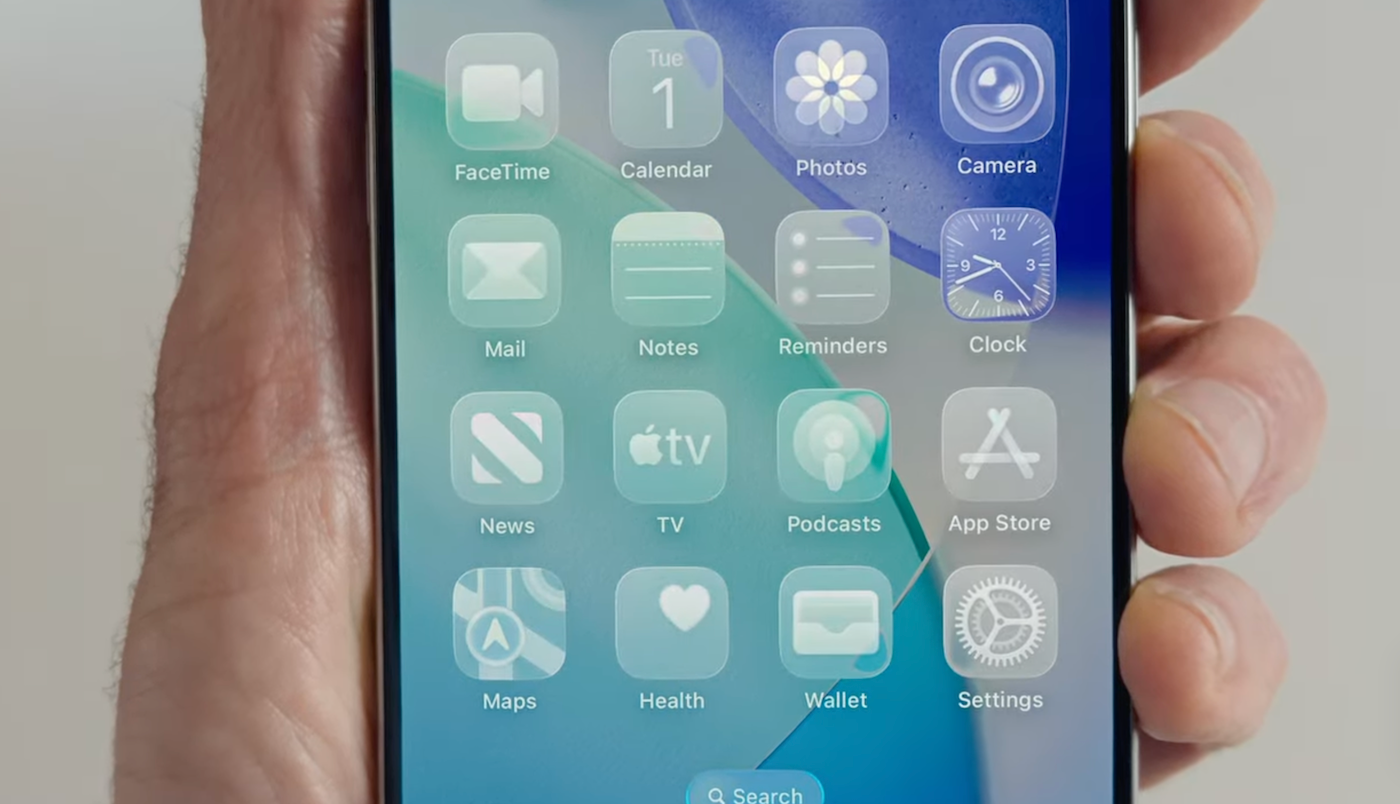
On macOS, the next operating system will be macOS Tahoe 26. The Liquid Glass design makes app icons and widgets look transparent, and refracts images behind UI elements.
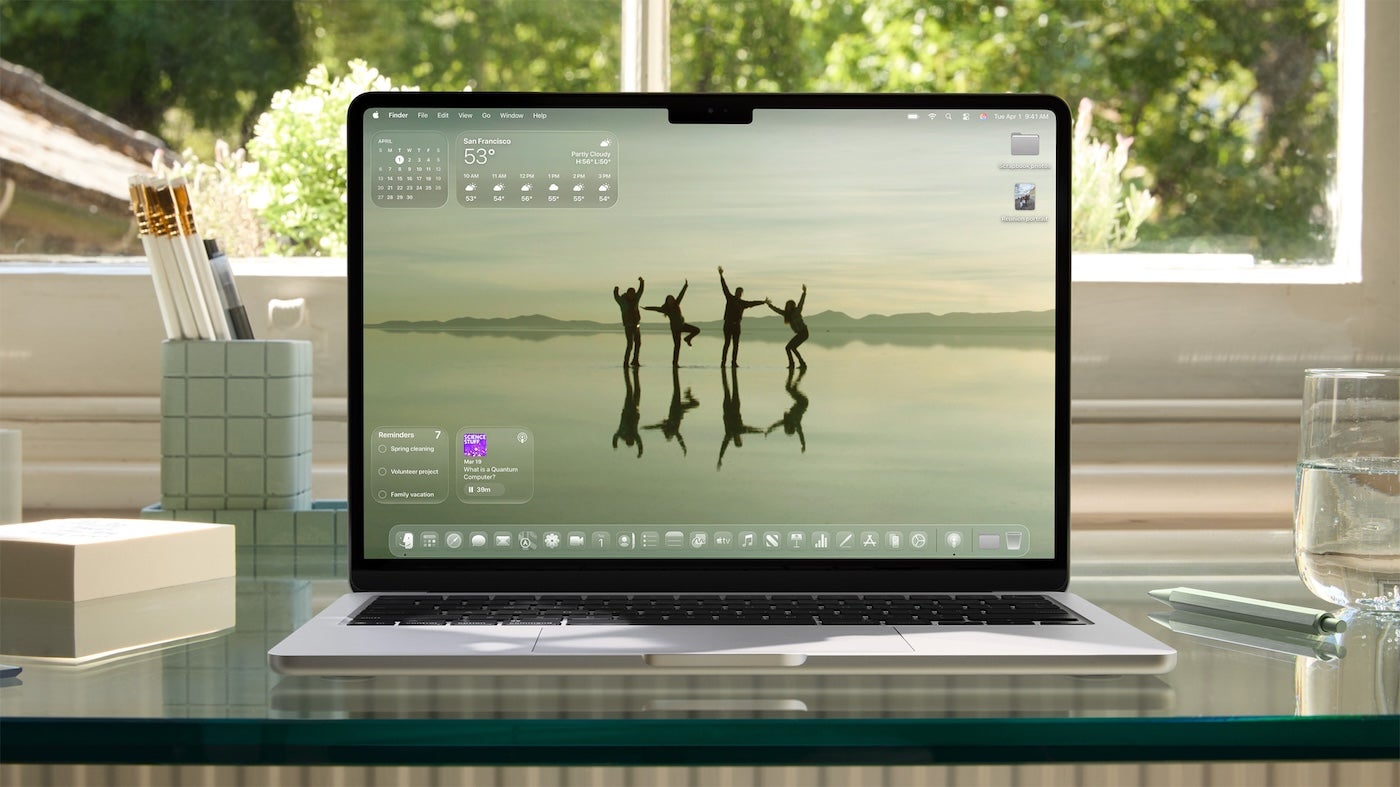
Liquid Glass changes the appearance of floating design elements depending on context and content. More design elements now feature rounded edges to echo the rounded edges of the hardware. The color of elements morphs with the content and appears to float above apps, changing between views. The lock screen, dock, and mobile notifications will be transparent and appear to float above content.
iOS 26 brings slightly expanded generative AI features and Phone quality of life updates
The Phone app will have a new layout, with Favorites at the top of a consolidated menu. iOS 26 will screen incoming calls, automatically answering calls from unknown numbers without notifying the user. If the caller shares their name and reason for calling, the phone will display a transcript of the greeting and the user can pick up. Another new feature, Hold Assist, automatically detects hold music and listens for a live agent, ringing again when the phone assistant hears a real person.
Similarly, Messages will screen for spam and unknown numbers and automatically exile unknown senders to a spam folder. They won’t appear as notifications. On the other hand, the phone can detect time-sensitive messages from unknown numbers, like alerts from restaurants that a table is ready.
Genmoji in Image Playground is getting a slight upgrade, with the ability to combine emoji. It has ChatGPT integration with its own artistic styles, too. Essentially, AI-generated images will be more broadly available in Image Playground. Developers can add the feature with the Image Playground API.
In Messages, Apple is adding background colors and designs that are shared with both people in the call. Thanks to Apple Intelligence’s image creation, users can generate a background, too. Users will also be able to add polls and Apple Cash requests in chats. Plus, typing indicators will now work in group chats. Apple Intelligence will be able to perform live translation in Messages, too, and developers can link to live translation through an API.
Foundation Models framework lets app developers take advantage of on-device AI
Apple employees allegedly saw the AI news that would be announced at WWDC 2025 as a “letdown,” with few major changes. As revealed on June 9, most changes to Apple Intelligence are indeed small, with one exception: a framework allowing any app developer to add Apple Intelligence to what they create.
The major additions to Apple Intelligence across devices are:
- Live Translation in Messages, FaceTime, and Phone.
- Mix emoji together or apply a distinct art style to Image Playground pictures with ChatGPT.
- Visual Intelligence now applies to any content displayed on the iPhone screen.
- Workout Buddy on Apple Watch uses AI to analyze physical performance.
Perhaps most importantly, developers can now hook their apps to the on-device foundation model powering Apple Intelligence. Using the Foundation Models framework, app developers can add AI features with no cost for cloud API.
“We think this will ignite a whole new wave of intelligence experiences in the apps you use every day,” said Federighi.
Members of the Apple Developer Program can start testing out these new features today. A public beta will open in July. Apple Intelligence is available on iPhone 15 Pro and later and iPad and Mac models with M1 and later, in select languages.
One thing Apple never announced? The revamped Siri that was supposed to bring the digital assistant into the generative AI era.
MacOS Tahoe 26 comes with Liquid Glass look and slight AI upgrades
macOS Tahoe 26, available this fall, brings the Liquid Glass aesthetic to the desktop and laptop. Along with Apple Intelligence features detailed below, macOS Tahoe has a redesigned Spotlight search bar with AI flair. Spotlight can suggest actions based on the user’s usual activities, or run shortcuts which users can set using natural language. For example, a shortcut could enable a user to compare the content of a recording with notes from the same event, with one button, using the onboard AI.
In addition:
- The Phone app will reside in macOS Tahoe.
- Folder colors can be changed.
- A dedicated Apple Games app will sit within macOS Tahoe.
Must-read Apple coverage
- Nearly 7 in 10 iPhone Owners Plan iPhone 17 Upgrade
- Apple Prepares AI-Powered Siri Upgrade With Google Search Integration
- Apple’s Xcode 26 Beta Now Supports GPT-5 and Claude
- Apple’s Vision Pro Adoption Stalled As Content Released ‘Drip by Drip’
VisionOS 26 lets Vision Pro users work together more easily
Changes coming to the Vision Pro headset include:
- Spacial widgets let users pin items like clocks or weather displays in their physical environment.
- Shared Spatial Experiences let users watch movies together or work on the same project.
- Personas, Vision Pro’s avatars, have been polished for more accurate hair, lashes, and complexions. Users can choose from a selection of glasses for their Persona.
- Spatial Scenes add a three-dimensional look to two-dimensional pictures. Some businesses, like Zillow, have already applied this effect to some images on their sites through the Spatial Scene API.
New iPadOS lets users resize windows
On the tablet front, iPadOS 26 brings the same Liquid Glass design language and Apple Intelligence features as on other devices. Some other quality of life upgrades were designed to make working on collaborative projects easier:
- Easily resize app windows and open multiple windows at once.
- See Files in the Files app in more detail with more customization and a collapsible or expandable List view.
- Run time-consuming processes in the background while the Background Tasks alert keeps you updated on their progress.
In addition, developers can now customize how the menu bar appears in their own apps for iPadOS.
Developer features will be in beta in the fall
Developers making apps for iOS 26, iPadOS 26, macOS Tahoe 26, watchOS 26, and tvOS 26 will have some new options. Foremost is the Foundation Models framework mentioned above, which can quickly hook developers up to Apple Intelligence using Swift.
Xcode 26 adds LLM connections
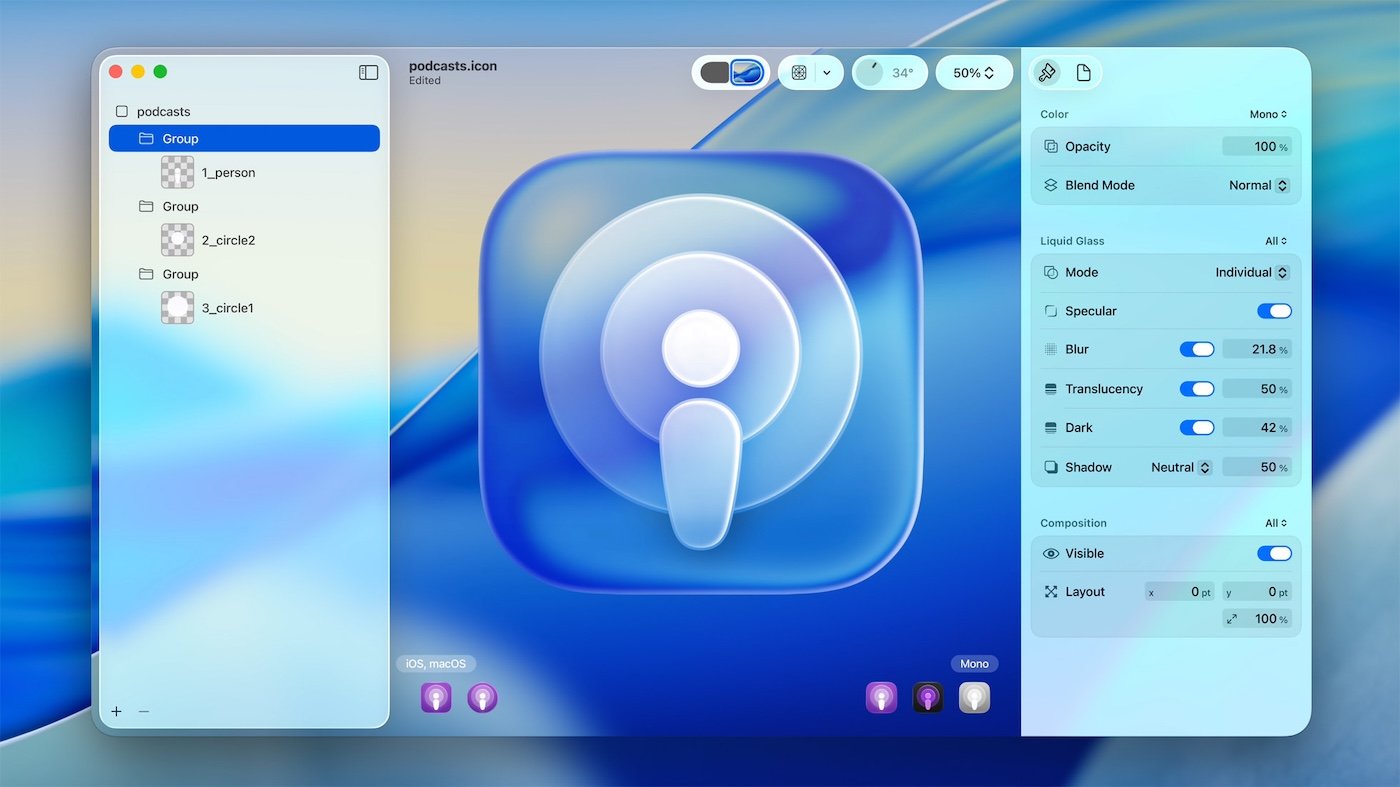
Xcode 26 connects directly to large language models (if the developer chooses to do so), enabling them to code, test, and write documentation. It works with ChatGPT, local models (if used on a Mac with Apple silicon), or any models for which developers have API keys. Coding Tools in Xcode 26 respond to natural language prompts, as well as suggesting actions based on activity. A new Icon Composer app gives developers and designers a place to work on icon design, including taking advantage of the Liquid Glass aesthetic.
App Intents supports visual intelligence
App Intents is Apple’s portal for integrating content into specific features like Siri, Spotlight, widgets, or controls. Now, App Intents supports visual intelligence, expanding the AI querying feature to any image an app can display.
Declared Age Range API gives developers an option to moderate content
Another new feature, the Declared Age Range API, lets developers prompt users to share their age range, enabling app makers to partition content that may not be suitable for younger children.
Swift 6.2 includes support for WebAssembly and more
Lastly, Apple’s app-building programming language Swift has reached version 6.2. The new version offers:
- Support for WebAssembly.
- Improved interoperability with other languages, such as C++ and Java.
Swift 6.2 also enables developers to configure modules or individual files to run on the main actor by default, resulting in more seamless compilation of single-threaded code.
All of these developer options are available for testing now, with a public beta coming in July.