

- Best overall: Square
- Best for highly customizable payment workflows: Stripe
- Best for tailored POS setups: Clover
- Best for interchange-plus pricing: Helcim
- Best for e-commerce businesses with in-person sales: Shopify
Finding the right credit card payment app is crucial as the need for secure, scalable, and feature-rich payment solutions grows. With tools designed to streamline operations, improve customer experiences, and support diverse payment methods, these apps empower businesses to stay competitive in an increasingly digital business environment.
Related: Best mobile credit card processing solutions
Top credit card payment apps comparison
The credit card payment apps below are my top picks based on pricing, app features, user experience, and my own hands-on testing and research.
These apps are available for Apple and Android devices and offer ways to accept credit card payments. While some credit card processing apps only offer limited functionality, the top six apps all provide levels of scalability, whether in terms of volume processing, additional business tools, or bigger POS setups.
| Our rating (out of 5) | Starting monthly cost | Tap to Pay | Transaction fee | Integration options | |
|---|---|---|---|---|---|
| Square | 4.46 | $0 | iPhone & Android | 2.6% + $0.10 | APIs, third-party integrations, Square App Marketplace |
| Stripe | 4.31 | $0 | iPhone & Android | 2.7% + $0.05 | APIs, extensive third-party integrations |
| Clover | 4.31 | $14.95 | iPhone only | 2.6% + $0.10 | APIs, App Market plugins |
| Helcim | 4.28 | $0 | iPhone only | Interchange + 0.40% + $0.08 | APIs, limited third-party integrations |
| Shopify | 4.18 | $39 | iPhone & Android | APIs, Shopify App Store |
Square: Best overall
Our rating: 4.46 out of 5

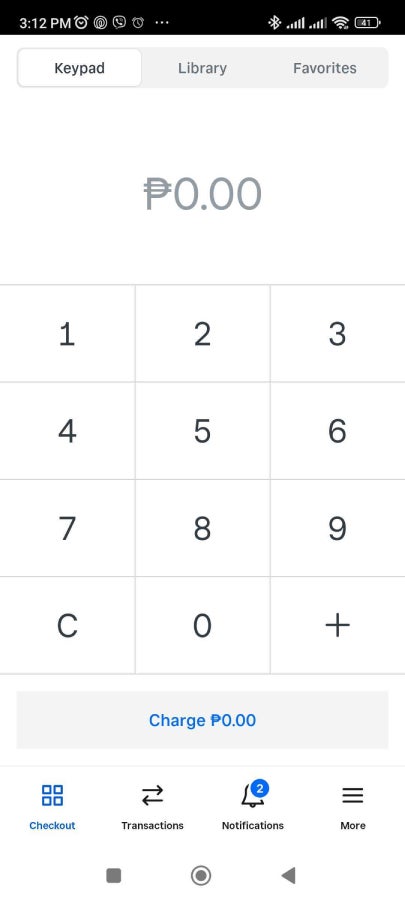
Square is a leader in the credit card payment app space, offering a seamless blend of hardware, software, and payment processing that caters to businesses of all sizes. Its robust ecosystem includes everything from a free point-of-sale (POS) app to advanced tools for inventory management, team coordination, and customer engagement.
What sets Square apart is its ease of use combined with powerful features, like Square Online for e-commerce and built-in integrations with accounting and marketing platforms. Unlike many competitors, Square doesn’t charge monthly fees for its core services, making it an ideal choice for businesses seeking affordability without compromising functionality or scalability.
Why I chose Square
When it comes to easy and affordable ways to accept credit card payments, Square is one of my go-to’s. There are no upfront costs to use the payment app, and its seamless integration of POS systems, payment processing, and ecommerce tools ensures you can handle both in-person and online transactions effortlessly. With support for Tap to Pay on both iPhone and Android, Square makes accepting contactless payments simpler than ever, eliminating the need for additional hardware in many cases.
Although Square has paid add-ons, I think its free features are impressively robust. It covers essential needs, such as sales tracking, customer management, and inventory control. These free tools allow you to start small and scale as needed without a heavy upfront investment.
Pricing
- App subscription — $0 per month.
- Account fee — $0 per month.
- Processing fees.
- In-person — 2.6% + $0.10.
- Online — 2.9% + $0.30.
- Manually entered — 3.5% + $0.15.
- Invoices — 3.3% + $0.30.
- Minimum cost for additional hardware — $0 (free magstripe reader)
Visit Square
Features
- Free Square account includes POS, mobile app, invoicing, virtual terminal, and payment links for online transactions.
- Square supports Tap to Pay on both iOS and Android, allowing contactless payments without additional hardware.
- Includes a free mobile card reader with every signup; in-person transaction rates are transparent and competitive.
- Robust reporting, inventory management, and customer engagement tools are built into the app at no extra cost.
- Offers add-ons like payroll, marketing, and team management tools at affordable prices for growing businesses.
Pros and cons
| Pros | Cons |
|---|---|
|
|
Stripe: Best for highly customizable payment workflows
Our rating: 4.31 out of 5

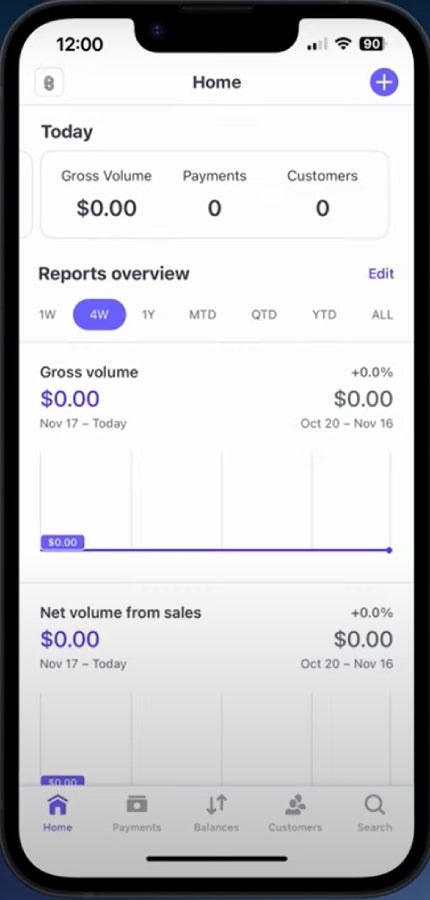
The Stripe Dashboard app is a powerhouse for businesses that require highly customizable payment workflows. Unlike many competitors, Stripe’s app empowers developers and tech-savvy businesses with robust APIs, enabling tailored payment experiences across various platforms. Its advanced features include real-time insights into payment activity, fraud detection tools, and streamlined management of subscriptions and invoices.
What sets it apart is its unparalleled scalability—whether you’re processing a few transactions or managing global payment operations, Stripe adapts seamlessly. With support for over 135 currencies and payment methods, it’s an excellent choice for businesses with diverse customer bases or international ambitions.
Related: Best international merchant accounts
Why I chose Stripe
For businesses that require flexible and customizable payment workflows, I think Stripe is an unbeatable choice. Its robust APIs and developer-friendly tools make it easy to design tailored payment solutions that integrate seamlessly with your existing systems.
Whether you’re handling subscriptions, marketplace payments, or one-time transactions, Stripe’s flexibility ensures that your workflow aligns perfectly with your business needs. Plus, with support for Tap to Pay on both iOS and Android, Stripe simplifies contactless payments, reducing the need for additional hardware.
While Stripe offers premium add-ons, its core features—like real-time payment tracking, advanced fraud detection, and multi-currency support—are highly valuable on their own. These tools enable businesses of all sizes to scale effortlessly, manage international transactions, and maintain control over their payment processes with minimal friction.
Pricing
- App subscription — $0 per month.
- Account fee — $0 per month.
- Processing fees.
- In-person — 2.7% + $0.05.
- Online — 2.9% + $0.30.
- Manually entered — 3.4% + $0.30.
- Invoices — 3.1% + $0.05.
- Minimum cost for additional hardware — $59 (Stripe Reader M2)
Visit Stripe
Features
- Highly customizable payment workflows through advanced APIs.
- Multi-currency support for seamless international transactions.
- Real-time payment tracking and analytics.
- Advanced fraud detection with machine learning tools.
- Options for subscription management and recurring billing.
- Integration with over 100 third-party apps and tools.
- Scalable infrastructure suitable for startups and enterprises.
- Supports digital wallets like Apple Pay and Google Pay.
- Flexible invoicing tools for B2B and B2C payments.
- Custom branding options for a professional checkout experience.
Pros and cons
| Pros | Cons |
|---|---|
|
|
Clover: Best for tailored POS setups
Our rating: 4.31 out of 5

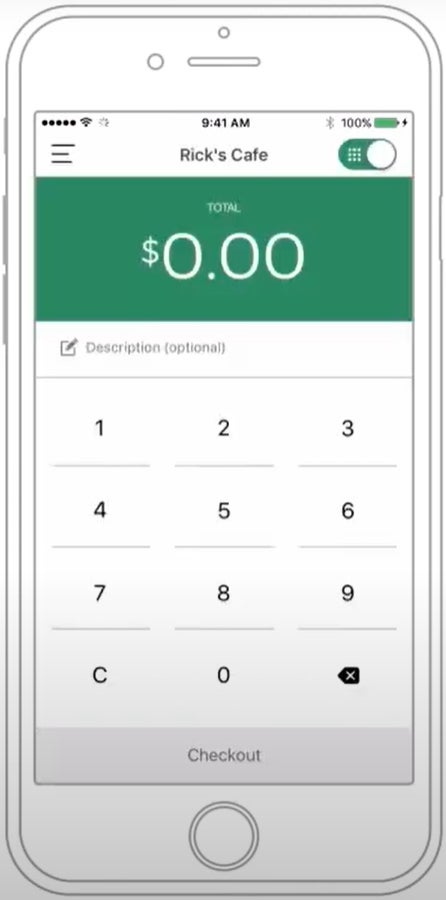
Clover stands out for its flexibility in tailoring POS setups to the specific needs of various businesses. The Clover Go app, paired with its compact card readers, enables businesses to accept payments on the go, while its cloud-based dashboard provides real-time insights into sales, inventory, and customer trends.
One of the things that sets Clover apart is its App Market, offering a wide array of third-party integrations and add-ons to customize the system for restaurants, retail, or service-oriented businesses. This adaptability, combined with robust hardware options and an intuitive user interface, positions Clover as an ideal solution for businesses seeking scalable and personalized payment workflows.
Why I chose Clover
Clover stands out as the best choice for businesses that need a tailored POS setup. I think it’s especially valuable that, unlike other systems that require businesses to piece together various services and hardware, Clover offers specific plans designed for different types of businesses. Whether you’re in retail, food service, or another industry, Clover’s packages come with the right combination of features, software, and hardware, allowing you to get started quickly without the guesswork.
Like Stripe, I find Clover to be very customizable. While Stripe offers this through its robust APIs and developer tools, Clover offers a pick-and-mix approach with its App Marketplace. It offers a wide variety of apps that can be seamlessly integrated into your system. This makes Clover a highly adaptable choice, especially for businesses looking for specific functionalities without a complex setup process.
Pricing
- App subscription — $0 per month.
- Account fee — starts at $14.95 per month.
- Processing fees.
- In-person — 2.6% + $0.10.
- Online — 3.5% + $0.10.
- Manually entered — 3.5% + $0.10.
- Minimum cost for additional hardware — $199 (Clover Go)
Visit Clover
Features
- Tailored POS plans for different industries (retail, food service, professional services, etc.).
- Customizable hardware and software options for seamless setup.
- App Marketplace with a wide selection of tools to enhance functionality.
- Accepts credit card, debit card, and contactless payments (including Tap to Pay on iPhone).
- Real-time inventory tracking and sales reporting.
- Employee management tools, including scheduling, and performance tracking.
Pros and cons
| Pros | Cons |
|---|---|
|
|
What's hot at TechRepublic
- Blackpoint Cyber vs. Arctic Wolf: Which MDR Solution is Right for You?
- Why AWS Sellers Choose Deepgram Over Other Voice AI Tools
- SS&C Intralinks DealCentre AI vs. Datasite: Which platform is built for the future of dealmaking?
- SS&C Intralinks FundCentre AI vs. Juniper Square: Which platform better supports modern private markets fund managers?
- Verito vs. Rightworks: Which IT Provider Is Best for Your Firm?
Helcim: Best for interchange-plus pricing
Our rating: 4.28 out of 5

Helcim is an excellent option for businesses seeking transparent and cost-effective payment solutions, thanks to its interchange-plus pricing model. Unlike providers that bundle fees into flat rates, Helcim passes through direct interchange costs with a small markup, offering clear savings for businesses with higher transaction volumes, especially with its automatic volume discount.
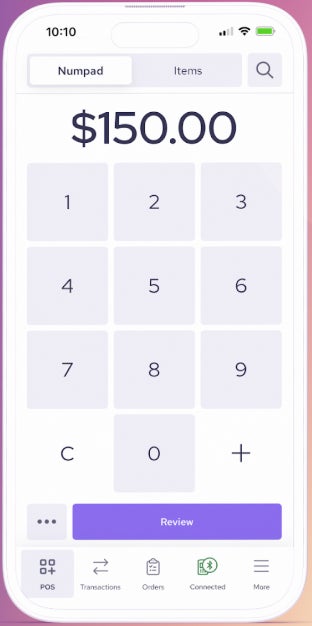
The Helcim app enhances this value by providing an all-in-one platform that includes payment processing, invoicing, and customer management tools. With no monthly fees and support for a wide range of payment methods, including Tap to Pay on iPhone, Helcim is particularly appealing for growing businesses that want affordability without sacrificing advanced features or scalability.
Why I chose Helcim
For businesses prioritizing cost-effectiveness, Helcim is an excellent choice. Its interchange-plus pricing model is a key differentiator—no other payment apps on this list offer the same pricing structure. Aside from interchange-plus pricing, I like that Helcim offers automatic volume discounts, allowing businesses to save on processing fees as they grow.
Another reason I chose Helcim is its commitment to providing tools that scale with your business. From multi-user accounts to its support for Tap to Pay on mobile devices, Helcim simplifies operations without adding unnecessary costs. Unlike many competitors, Helcim includes all its features—without monthly fees or extra charges—making it a comprehensive, budget-friendly solution.
Pricing
- App subscription — $0 per month.
- Account fee — $0 per month.
- Processing fees (based on monthly transaction volume):
- In-person:
- $0 to $50K — Interchange + 0.40% + $0.08.
- $50K to $100K — Interchange + 0.35% + $0.07.
- $100K to $500K — Interchange + 0.25% + $0.07.
- $500K to $1M — Interchange + 0.20% + $0.06.
- $1M+ — Interchange + 0.15% + $0.06.
- Keyed and online:
- $0 to $50K — Interchange + 0.50% + $0.25.
- $50K to $100K — Interchange + 0.45% + $0.20.
- $100K to $500K — Interchange + 0.35% + $0.20.
- $500K to $1M — Interchange + 0.25% + $0.15.
- $1M+ — Interchange + 0.15% + $0.15.
- In-person:
- Minimum cost for additional hardware — $99 (Helcim Card Reader)
Visit Helcim
Features
- Transparent interchange-plus pricing for cost-effective payment processing.
- Automatic volume discounts for growing businesses.
- No monthly fees; all features are included at no additional cost.
- Multi-user account access for collaborative team management.
- Support for Tap to Pay on iPhone.
- Custom-branded invoices and checkout pages to enhance professionalism.
- Built-in inventory management tools to streamline operations.
- Advanced fraud prevention features to safeguard transactions.
- Comprehensive reporting and analytics for tracking business performance.
Pros and cons
| Pros | Cons |
|---|---|
|
|
Shopify: Best for e-commerce businesses with in-person sales
Our rating: 4.18 out of 5

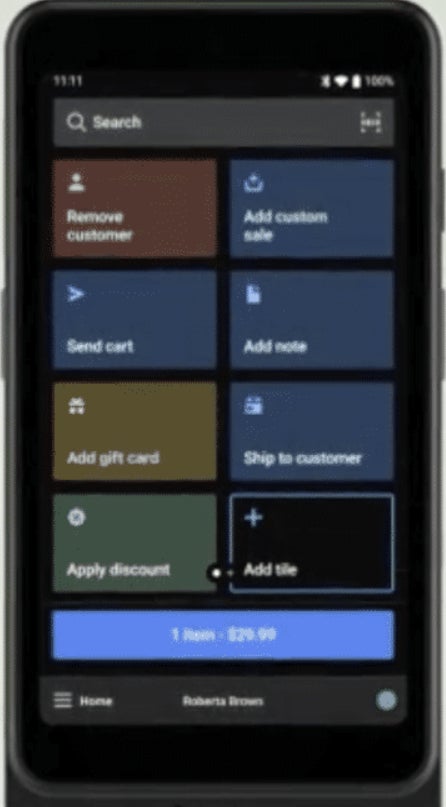
Shopify’s payment app seamlessly bridges the gap between online and in-person sales, making it an exceptional choice for ecommerce businesses with physical retail operations. What sets Shopify apart is its deep integration with its e-commerce platform, allowing merchants to manage inventory, track sales, and analyze customer data across channels from a single dashboard.
The app also supports Shopify POS, offering flexible hardware options and enabling businesses to accept payments in-store or on the go. With tools like built-in fraud prevention, dynamic checkout customization, and multi-channel syncing, Shopify ensures a streamlined and efficient payment experience for growing businesses.
Why I chose Shopify
For e-commerce businesses with in-person sales, I think Shopify is an excellent option, especially for existing Shopify e-commerce businesses. Its ability to unify online and offline sales channels is a significant advantage, especially for businesses that want seamless inventory management and customer data tracking. Shopify’s payment app integrates effortlessly with its ecommerce platform, making it easy to handle transactions, manage products, and analyze sales performance all in one place.
Another key reason I chose Shopify is its versatility. Whether you’re operating a pop-up shop, a retail store, or an online marketplace, Shopify’s POS system offers flexible hardware options and supports Tap to Pay for both Android and iPhone. Its built-in fraud prevention tools and advanced customization options add layers of security and functionality.
Pricing
- App subscription — $0 per month.
- Account fee — starts at $39 per month.
- Processing fees.
- In-person — 2.6% + $0.10.
- Online — 2.9% + $0.30.
- Minimum cost for additional hardware — $49 (Shopify Tap & Chip Card Reader).
Visit Shopify
Features
- Integrated payment processing with Shopify Payments.
- Unified online and offline sales through a central dashboard.
- Support for Tap to Pay on iPhone and Android devices for mobile payments.
- Customizable checkout experiences to align with your brand.
- Advanced inventory management to track stock across multiple channels.
- E-commerce integration with tools for product listings, shipping, and order management.
- Built-in fraud prevention tools for secure transactions.
- Flexible hardware options for retail and in-person sales.
- Comprehensive reporting and analytics for sales and customer insights.
Pros and cons
| Pros | Cons |
|---|---|
|
|
How do I choose the best credit card payment app for my business?
Selecting the right credit card payment app depends on your business’s specific needs and growth goals. Here are the key factors to consider:
- Pricing model: Look for transparent pricing that aligns with your transaction volume and payment preferences. Consider whether a flat rate, interchange-plus, or tiered pricing structure works best for your budget.
- Supported payment methods: Ensure the app supports major credit cards, digital wallets (e.g., Apple Pay, Google Pay), and contactless payments to accommodate your customers’ preferences.
- Features and tools: Advanced tools like inventory management, reporting, fraud prevention, and customer management can streamline operations and improve efficiency.
- Integration options: Ensure the app integrates seamlessly with your existing POS system, e-commerce platform, or accounting software to maintain consistency across your workflows.
- Scalability: As your business grows, the app should offer features or add-ons that support increased transaction volumes, multiple users, and additional locations.
Methodology
To determine the best credit card payment apps, I evaluated over 15 options based on factors crucial for businesses of all sizes and industries. Each app was assessed using the following criteria:
- Pricing (20%): I analyzed the cost structure, including transaction fees, subscription costs, and any hidden charges, ensuring the apps provide transparent and competitive pricing for businesses.
- App features (30%): Each app was assessed for its payment processing capabilities, including support for various payment methods, fraud detection, recurring billing, reporting tools, and integrations with POS systems or e-commerce platforms.
- User experience (30%): I considered the ease of use, onboarding process, and overall design of the apps, focusing on how well they cater to daily operations and scalability for growing businesses.
- Expert score (20%): Based on my research, industry knowledge, and hands-on experience, I assigned a score reflecting each app’s performance, popularity, integrations, and pricing.
My evaluation involved reviewing product documentation, pricing structures, user feedback, and available demo environments. The goal was to recommend credit card payment apps that excel in functionality, user-friendliness, and value for businesses across industries.