


Recent data shows that 90% of businesses have expanded internationally or plan to within the next year. That process involves a lot of legal red tape, and that’s just for hiring — international payroll comes with its own set of compliance requirements that change from one country to the next. That’s why the kind of payroll software you use is so important, and why I tested dozens of the top solutions to narrow it down to the best of the best.
My verdict:
- Deel: Best overall
- Rippling: Best for global automation
- Papaya Global: Best for growing businesses
- Oyster: Best for compliance
- Remote: Best for extensibility
- How do I choose the best international payroll service for my business?
- Best global payroll services FAQs
- How I picked the best global payroll software
Deel: Best overall
My rating: 4.64 out of 5

Why I chose Deel
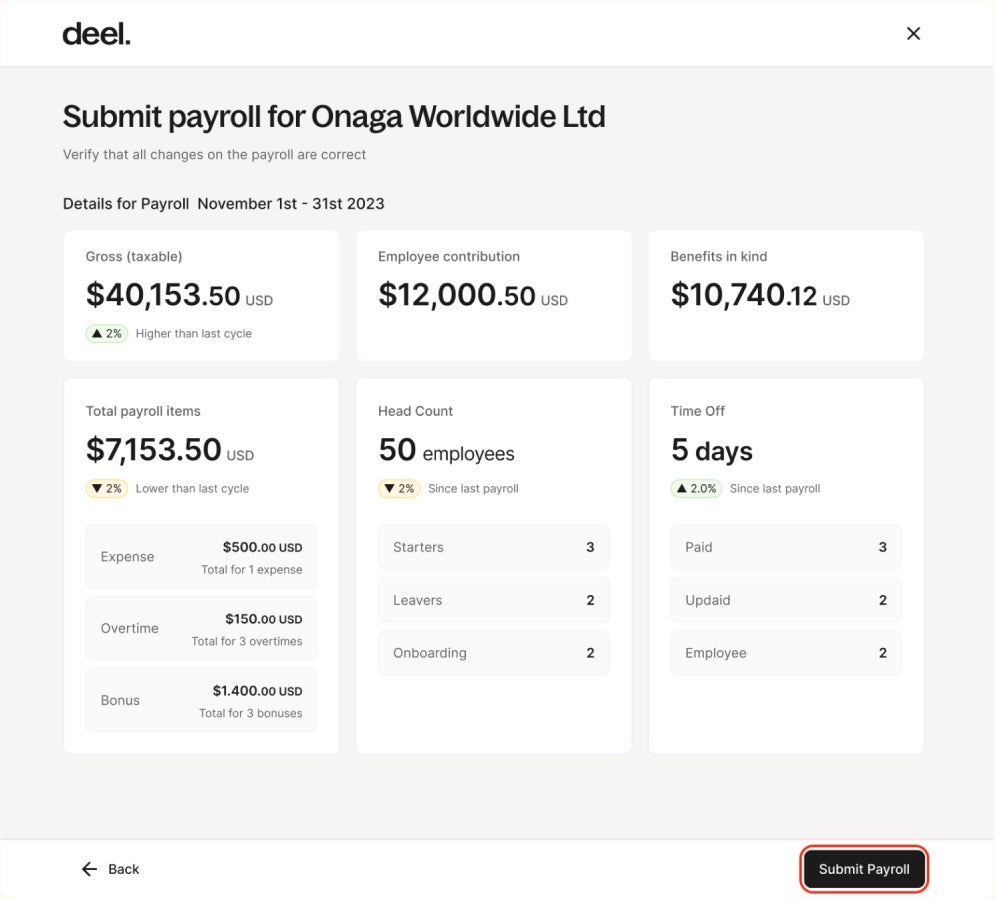
I chose Deel as best overall because it offers something for all globally expanding businesses (and budgets). For example, its free plan gives you tools to manage all HR processes for a global workforce, from ensuring compliance with local regulations to managing time-off requests and automating processes like onboarding and offboarding employees. For larger companies looking to expand rapidly, Deel’s EOR plan enables hiring in over 150 countries without requiring you to build an entity in each, all while ensuring localized compliance support.
I also like that the platform serves both companies poised to hire globally immediately and those that simply want a provider that can offer that support when they’re ready. For example, Deel offers both a US Payroll plan for domestic hiring and a separate Payroll plan with tools for international hiring. This means companies can start wherever they are, and then upgrade or add plans as their needs become more complex.
Additionally, I appreciate that Deel offers multiple avenues for companies to save money as your business grows. For example, its free plan equips small businesses with tools to prepare for scaling globally, even before they have the budget to expand. With Deel, you can access tools such as global cost calculators, misclassification quizzes, and local law comparisons that can help you plan and make informed decisions before actually hiring your first global employee. Coupled with its ease of use, these tools make Deel stand out for me as the best overall.
Deel pros and cons
| Pros | Cons |
|---|---|
| It offers a free HR plan with tools to manage global workforces, automate HR processes, and ensure compliance with localized insights. | Some plans can be cost-prohibitive for small companies. |
| Its PEO service gives employers access to Fortune 500 employee benefits plans at affordable prices. | Some competitors, such as Oyster, allow you to hire in more than Deel’s 150 countries. |
| Some competitors allow you to pay in more currencies than Deel does. |
How much does Deel cost?
Deel offers eight plans ranging from free to $499 per month. Many of its plans use per-person pricing, meaning final prices can add up quickly based on the number of employees or contractors you onboard. Here is an overview of its plans:
- Deel HR: This free plan includes tools to manage your global HR workforce needs, including staying compliant with local regulations, managing time-off requests, creating people directories and organizational charts, storing signed documents, and automating HR processes.
- Deel US Payroll: At $19 per user per month, this plan gives you the tools to run payroll within the United States, including on-demand expert compliance support; automated W-2, W-4, and 1099 new hire filings; new hire registrations; and instant tax and wage calculations.
- Deel Engage: At $20 per employee per month, this plan offers tools for managing your employee performance, including learning management, career development and employee goal setting, and performance reviews.
- Deel Payroll: Priced at $29 per employee per month, this plan allows you to run payroll internationally with in-house payroll experts and also handles local tax filing with authorities.
- Deel Contractor: For $49 per month, this plan allows you to hire, manage compliance, and pay contractors in over 150 countries.
- Deel US PEO: Starting at $70 per employee per month, this plan offers HR, payroll, and benefits administration support in all 50 U.S. states. It also gives you access to affordable Fortune 500 benefits.
- Deel EOR: At $499 per month, this plan allows you to expand employee hiring to over 150 countries without having to build an entity in each location.
- Deel Immigration: While you must request a custom quote to learn pricing for this plan, it is designed to support hiring and relocation for immigrant employees from over 40 countries, including the management of their visa and green card requirements.
Learn more about Deel and its alternatives
Rippling: Best for global automation
My rating: 4.24 out of 5

Why I chose Rippling
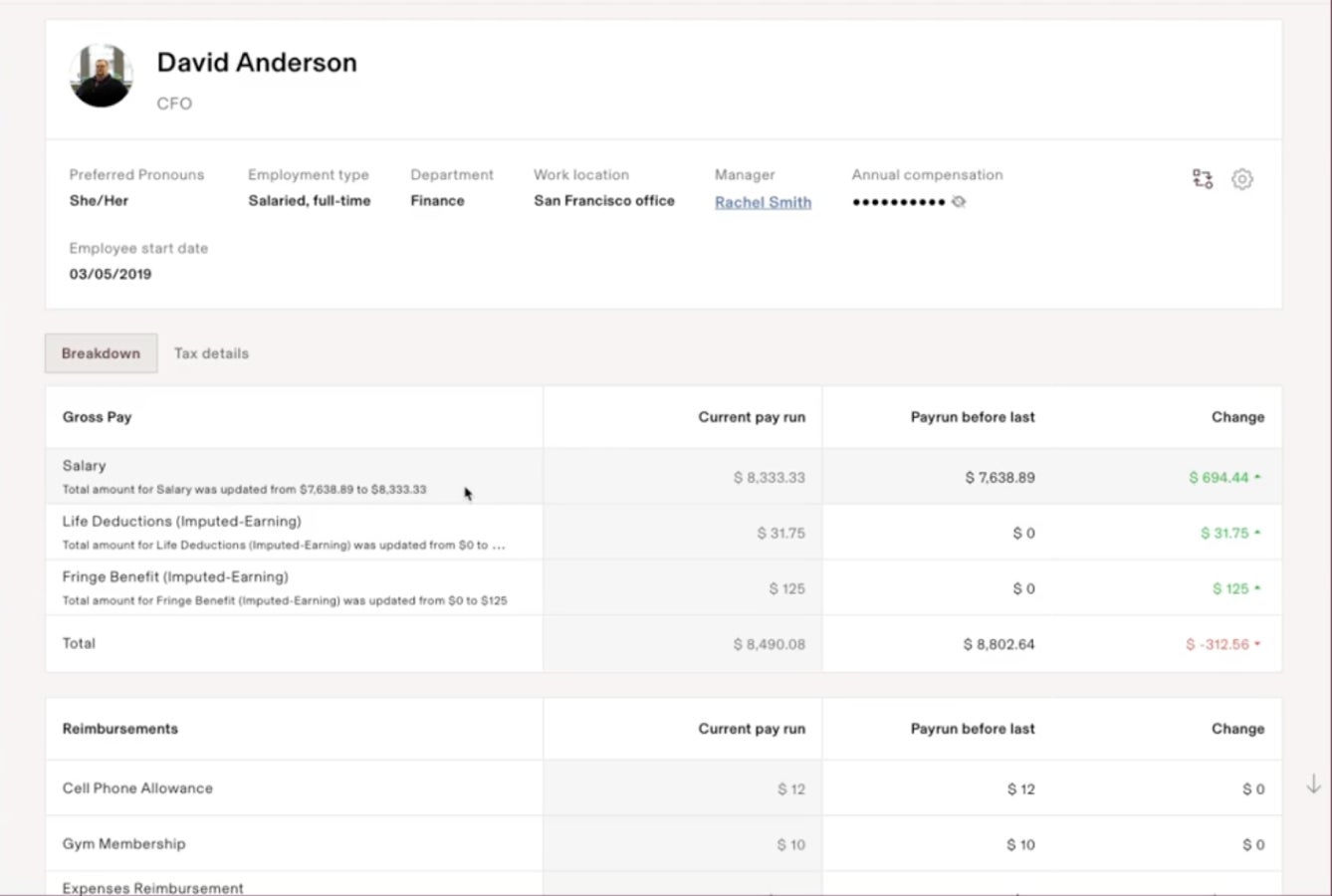
When it comes to automation, Rippling is second to none in my experience. It creates a literal ripple effect of automation whenever you make changes to employees’ profiles, ensuring they are always set up for success while keeping you compliant with labor and tax laws, even globally. Setting up these automations is as simple as filling out forms. You can create custom triggers tailored to your workforce to ensure your relevant processes are automated.
In addition, Rippling’s streamlined approach to workforce management creates an employee experience that cuts down on frustrations and helps employees succeed. One example is making sure they always have the equipment they need for their roles at their fingertips. When promoted, all the perks associated with that change are immediate and automatic, boosting their satisfaction with their career development. Services like Rippling’s PEO and EOR ensure employees receive competitive benefits plans tailored to their roles and locations, no matter where they are in the world.
Rippling pros and cons
| Pros | Cons |
|---|---|
| Automates 90% of your hiring, payroll, workforce management, and HR processes. | Features can be overly complex for small businesses. |
| Offers financial management tools that help global companies keep tight control of their bottom lines. | Expensive compared to many competitors. |
| Device management tool allows for automated employee device management and security across the globe. | Offers little pricing transparency. |
| Offers no free plan. | Offers no free plan. |
How much does Rippling cost?
Rippling offers very limited pricing transparency around its products, publishing only that its Rippling Platform starts at $8 per user per month. Further, a Rippling Platform subscription is required before you can access other modules in its HCM, Rippling Spend, and IT suites and you must request a custom quote to receive information on these products. This is partly because it offers many modules that let you create a highly customized feature package for your company’s needs. These modules include:
- Rippling Platform: This platform is a required purchase to access Rippling’s modules that allow you to automate processes across each product suite and view cohesive analytics for a global workforce.
- Rippling HCM: This module helps you automate domestic and global payroll, including filing federal, state, and local taxes; workers compensation payments; and garnishments. It also includes:
- Time and attendance
- Benefits administration
- Flex benefits
- ACA and Cobra administration
- Recruiting
- Learning management
- Headcount planning
- Performance management
- Employee surveys
- HR Help desk modules
- PEO: Part of the Rippling HCM suite, Rippling’s PEO gives you access to Fortune 500 benefits at affordable pricing and tools to automate state unemployment tax registrations.
- EOR: Also under Rippling’s HCM product suite, the EOR service allows you to hire employees in over 185 countries at a lower cost than handling it independently. You can also use it to automate compliance, pay people in their local currencies, provide locally relevant employee benefits, and create a standardized yet regionally appropriate employee experience.
- Rippling IT: This module offers two options, allowing you to manage company app access and security while providing relevant technology to your global workforce.
- Inventory management: Part of the IT product suite, this module ensures company employee devices are shipped, stored, and retrieved as needed, even across the globe.
- Rippling Spend: Rippling Spend includes three modules: a corporate card module for issuing and managing corporate cards, an expense management module for paying employee reimbursements and controlling spend, and a bill pay module for paying vendors via various methods.
Learn more about Rippling
Check out this Rippling Review: Features, Pricing, Pros & Cons
Papaya Global: Best for growing businesses
Our rating: 4.27 out of 5

Why I chose Papaya Global
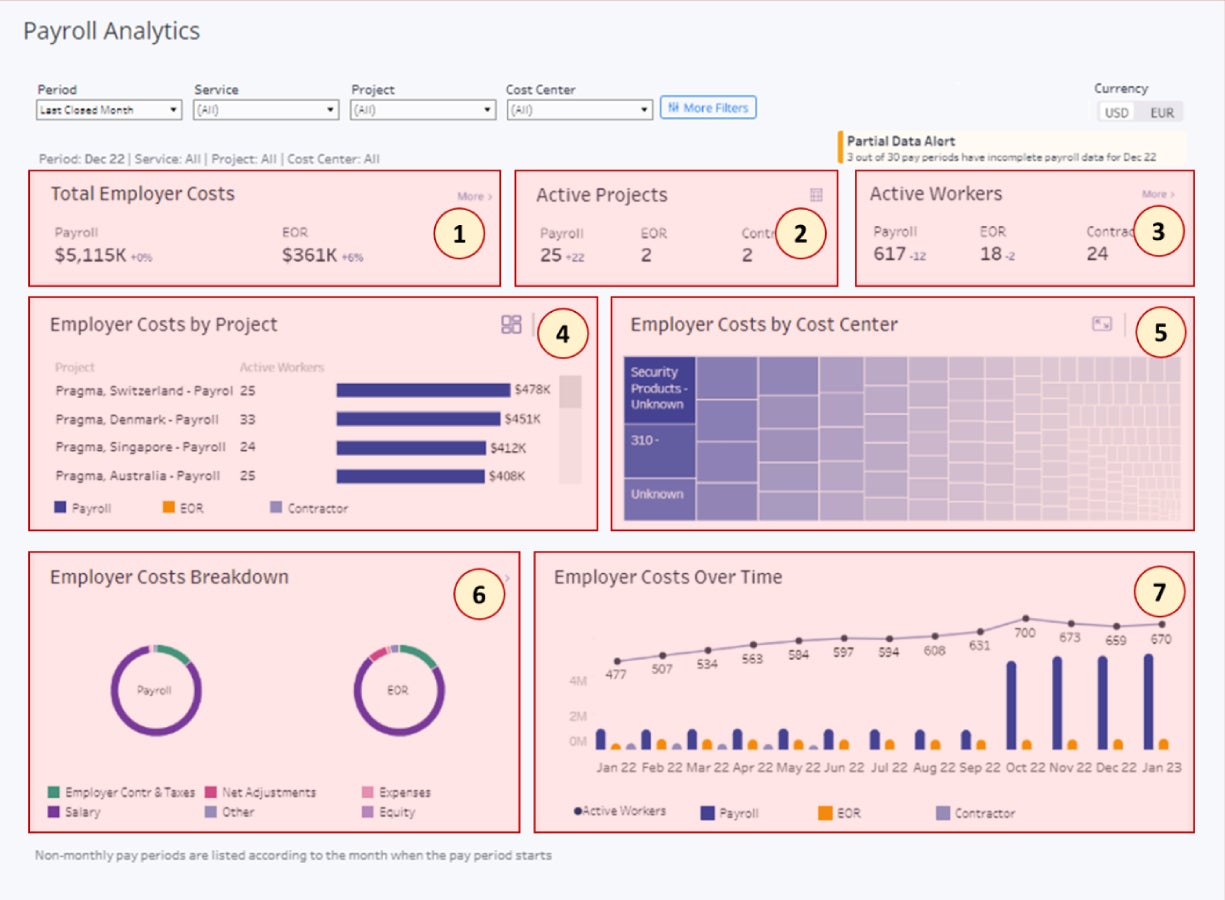
Papaya Global is best for growing businesses because it offers volume discounts. For example, its payroll plans start at $25 per user per month for 101 to 500 employees. However, this price drops to $15 per employee per month for companies with more than 1000 employees. If you’re a large-volume employer, you can call to request a custom quote for more volume discounts. This pay-less-as-you-grow model is a unique feature that no other competitor on this list offers.
Papaya Global’s Agent of Record (AOR) services also create a secure and efficient framework for hiring contractors worldwide. For example, its AOR service offers contractor classification services, so you don’t have to navigate local laws on your own, along with guaranteed compliance, contractor record keeping for seven years, liability coverage, and ongoing compliance checks. You can also hire contractors in over 160 countries and pay them in 100 different currencies as needed.
Papaya Global pros and cons
| Pros | Cons |
|---|---|
| Offers per-employee volume discounts for payroll plans. | Per-employee rates for its payroll plans are relatively expensive for small businesses. |
| Agent of Record (AOR) service offers unique efficiencies and safeguards services for contractor companies. | There is no free plan. |
| Supports payments to contractors and employees in over 160 countries and 100 currencies. | Limited integrations compared to some alternatives. |
| Offers automated payroll processing in local currencies. | Not well-suited for very small companies, as its Grow Global plan requires a minimum of 101 employees. |
| Provides 24/7 support. |
How much does Papaya Global cost?
Papaya Global offers three payroll processing plans designed to scale with the number of employees you anticipate using the platform.
- Grow Global: This plan starts at $25 per employee per month and accommodates 101 to 500 employees. It includes coverage of up to four entities, full liability coverage, and payment disbursements. However, this plan is only for businesses with existing local entities needing a payroll platform.
- Scale Global: This plan is $20 per user per month and accommodates 501 to 1000 employees. The price for this plan decreases as the number of users increases. It also includes coverage for up to 10 entities in addition to all the features offered in the Grow Global plan. Like Grow, this is only suited for companies with existing entities in a country.
- Enterprise Global: This plan, designed for larger organizations, is priced at $15 per employee per month and requires a minimum of 1,000 employees. It includes features that are also available with the Scale Global plan.
For larger companies, you can request a custom quote to receive more volume discounts as you grow.
EOR Plan
Papaya Global offers an EOR service for $599 per employee per month. This plan includes:
- Automated onboarding
- 24/7 support
- A local compliance guarantee
- Full liability coverage
- An employee portal
- A contract generator
- Access to a certified CPA firm
- Agent of Record
Papaya’s Agent of Record plan costs $200 per contractor per month. It handles contractor hiring, classification, and payments. Specifically, it includes:
- Contractor classification services
- Contractor management services
- A local compliance guarantee
- Contractor payments
- Seven years of contractor record-keeping
- Compliance checks
- Legal Support
- Full liability coverage
- A country knowledge base
Contractors
Priced at $30 per contractor per month, this plan manages contractor onboarding and payment processing. Its features include:
- Contract payment request management tools
- One-click approvals
- Tools to avoid contractor misclassification
- The ability to pay contractors in over 100 currencies
- Record-keeping and reporting
- Automated recurring invoicing
- Bulk payments
- Standardized invoicing
Learn more about Papaya Global
- Papaya Global Review: Pricing, Features, Pros and Cons
- The Top Papaya Global Competitors and Alternatives
More payroll coverage
- A Complete Guide to Payroll Software
- The Best International Payroll Services
- The Best Payroll Software
- Choosing a payroll service: A guide for business leaders
- Verito vs. Rightworks: Which IT Provider Is Best for Your Firm?
Oyster: Best for compliance
Our rating: 3.59 out of 5

Why I chose Oyster
I chose Oyster because of its advanced global coverage, risk protection, and other contractor hiring support. You can choose an add-on to the Contractor plan that covers up to $500,000 in misclassification risk protection. This feature allows you to quickly onboard contractors in minutes, manage contractor workforces with ease, convert contractors to employees when necessary, and ensure contracts comply with regulations in more than 180 countries. This coverage outshines many competitors. For example, Deel only allows you to hire contractors in 150 countries compared to Oyster’s over 180 country coverage.
In addition, Oyster offers ways to save money if you’re serving under-resourced or at-risk populations. For example, Oyster for Refugees helps you find refugee talent and hire them at a discounted or free price point. Non-profit organizations looking to hire global talent can also benefit from these special discounts.
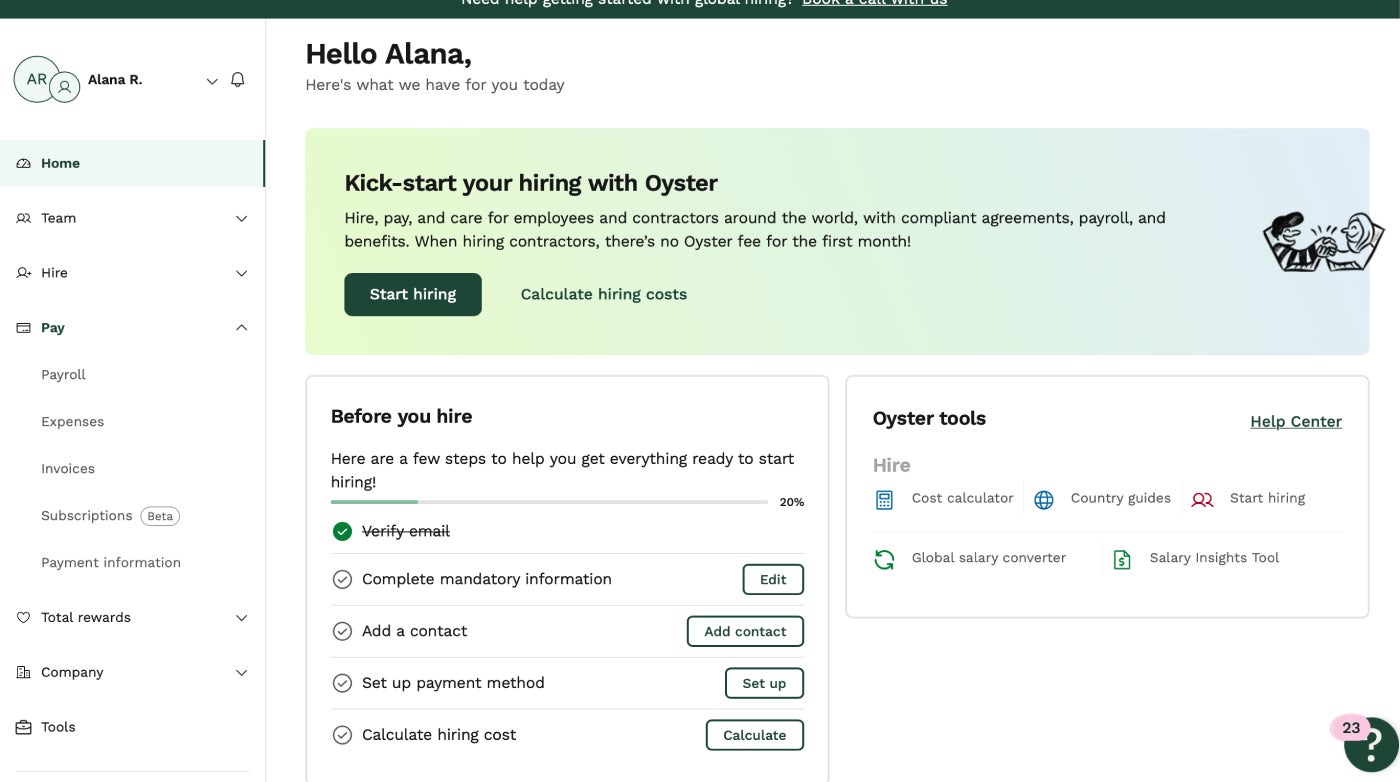
I also found the platform to be intuitive to use, even for small businesses with minimal payroll software experience. When I signed up for an account, I was immediately taken to a hiring dashboard with a preparation checklist that outlined each step I needed to start hiring employees or contractors. Each checklist item included an action button that directed me to the tools I needed to complete each action. The home dashboard includes tools that help me make informed decisions. I also had access to tools such as a cost calculator, country guides, and a global salary converter.
Oyster pros and cons
| Pros | Cons |
|---|---|
| Hire and pay contractors in over 180 countries. | Has fewer complementary payroll features than some competitors, such as employee device management and expense management modules. |
| Offers discounts for serving under-resourced or at-risk populations | Expensive compared to some alternatives. |
| Access contractor misclassification risk protection of up to $500,000. | Has no free plan. |
| The contractor plan comes with a 30-day free trial. | Benefits plans are only available via an add-on. |
| Pay employees in a choice of over 140 currencies. |
How much does Oyster cost?
Oyster offers four plans with different price ranges, plus a number of add-ons starting at $25 per employee per month. Here is an overview of available plans and add-ons:
- Contractor: For $29 per contractor per month (after the 30-day free trial), you can use this plan to hire, pay, and manage contractors in over 180 countries and more than 140 currencies. Its tools include a platform for onboarding contractors and managing expenses and time-off requests.
- Global Payroll: This plan is in beta but is currently $25 per employee per month. It allows you to pay employees you’ve directly hired in up to 15 countries, access payroll specialist support, generate payslips and reports, and integrate workflows with your HRIS.
- EOR: This plan is $699 per employee per month. You can use it to hire full-time employees in over 130 countries, onboard talent within a two-day time frame, pay employees in over 140 currencies, and access employment analytics and support.
- Scale: This plan requires a quote to learn pricing details. It has a minimum user count of five full-time users. Users enjoy Oyster’s EOR service, along with tools to scale the hiring process, such as bulk onboarding, the ability to reuse seats for free, and dedicated support managers. It also comes with reduced annual EOR rates.
In addition to its paid plans, Oyster offers a number of add-ons for enhanced functionality. These plans require a custom quote to learn pricing details. They include:
- Benefits packages: You can use this add-on to offer employees pre-created local and global benefits packages and enroll new employees in those plans. However, this is only available with the EOR and Scale plans.
- Salary insight: This add-on gives you access to salary bands for global teams and tools to build compensation packages within relevant salary ranges across over 130 countries. This is available for all plans.
- Visa sponsorship: This add-on offers support for global candidates to obtain a visa. It comes with expert immigration support and an efficient application process. This is only available with the EOR and Scale plans.
- Oyster Shell: This add-on gives you protection against employee and contractor misclassification risks of up to $500,000. This is only available with the Oyster Contractor plan.
Learn more about Oyster
Remote: Best for extensibility
My rating: 4.16 out of 5

Why I chose Remote
Although Remote lacks some features competitors offer, such as IT management solutions and a PEO (like Rippling and Deel), the solutions it provides are robust. For example, you can hire employees in over 200 countries and integrate the platform with over 5,000 tools. Examples of integrations include Zapier, BambooHR, and HiBob. Remote also offers an API, allowing you to create custom integrations. Unlike some competitors, these integrations come at no additional cost, even with the free plan.
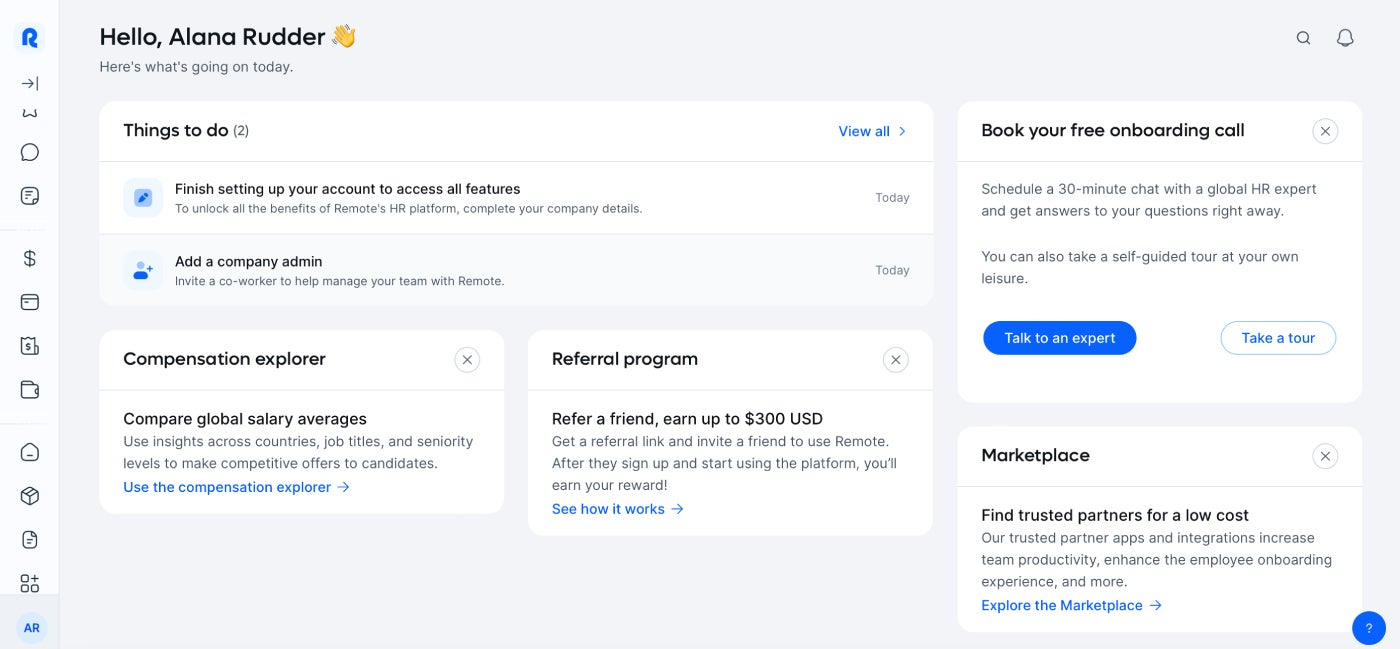
When I tested the software, I found it very user-friendly, even for small business owners with limited technical experience. The dashboard, for example, includes a to-do list to guide you through the steps you need to take to set up the platform and add employees. The left-hand menu places all tools at your fingertips, eliminating the hassle of drop-down submenus to find the tools you need. Remote also provides tools to make your job easier, such as a cost calculator and a salary explorer.
Adding integrations is simple. To set one up, you just click “Integrations” from the left-hand menu, then select “Add” under the application tile of your choice. From there, the platform walks you through a step-by-step form to fill out to successfully integrate Remote with the app and any internal data. You don’t need technical experience for this setup.
Remote pros and cons
| Pros | Cons |
|---|---|
| There’s no minimum member count. | Offers limited currency options for paying global talent. |
| You only pay for the contractors you’re actively engaging. | Its payroll plan is expensive. |
| Offers an API for custom integrations. | Plans have few frills, such as device management tools or a PEO. |
| Offers localized benefits plans. | |
| Provides a Free HR plan. | |
| Allows hiring in over 200 countries. | |
| Integrates with over 5,000 applications. |
How much does Remote cost?
Remote offers six plans ranging from free to $599 per month (billed annually). These plans allow you to source and hire global talent, run payroll, and manage HR tasks. Here is an overview of what each plan includes:
- EOR: At $599 per month (billed annually), this plan gives you access to tools that help you hire and pay a global team without having to build an entity in individual countries. It comes with localized benefits plans, two-to-three-day new hire onboarding, compliance tools, and a satisfaction guarantee.
- Payroll: The Payroll plan costs $50 per employee per month. It gives you one platform for consolidating payroll across multiple countries, ensures local compliance for all countries where you’re hiring, offers direct support from Remote’s local payroll experts, handles all your taxes and labor authority reporting, and ensures on-time and compliant payroll processing.
- Contractor management: At $29 per contractor per month, this plan gives you tools to compliantly onboard and pay contractors in more than 200 countries and territories. It includes tools to approve invoices, pay contractors with one click or via auto-pay, and access contractor reporting.
- HR Management: Remote’s Free HR Management plan provides a centralized platform to manage all employees. It comes with guided onboarding and offboarding, employee profiles, document management tools, time and attendance tracking, expense management and reimbursements, and an access to self-service employee portal and mobile app.
- Remote talent: This $119 per month plan offers tools for sourcing global talent, including shareable open roles and transparent recruitment process. It helps you connect with diverse, qualified candidates worldwide that align with your company’s needs.
- Contractor Management Plus: This plan includes all tools and features of the Remote Contractor Plan, plus indemnity protection, compliance with local laws, and the ability to work with contractors in over 200 countries and territories. It also provides tools to create, edit, and sign compliance contracts.
Learn more about Remote
Read our Remote Payroll Review: Features, Pricing, Pros & Cons.
How do I choose the best international payroll service for my business?
Apart from analyzing features, assessing pros and cons, and considering costs, the best way to find the right international payroll outsourcing service for your business is to get hands-on experience with multiple products before making a final choice.
Most global payroll services don’t offer free trials, though some notably allow you to create a free account and explore the software on your own before paying a fee.
For the most part, global payroll companies require you to set up a customized demo where a sales representative will walk you through the program’s dashboard and offer you a tailored quote. The payroll system you choose will have a massive impact on your company’s bottom line, your employees’ experience with your company, and the amount of time you have to spend dealing with paychecks and tax regulations—so make sure to ask questions like the following during your demo before committing to a global payroll provider:
- What does your ideal customer look like in terms of sizing and industry?
- What are your customers’ most frequent pain points and how do you plan to address those in the future?
- Which features do your customers appreciate the most? Which features are you planning to add in the future?
- Can I access a trial version of your software before committing to a plan?
- Do you offer white-glove setup and data migration assistance for new customers?
- What is the ideal use case for your payroll software?
- Does your software integrate with the specific personnel, HR, and financial tools our business currently uses?
Feel free to consult our guide to choosing and setting up a payroll system as you sort through your payroll options to find the best global payroll service for your business.
Best global payroll services FAQs
What does a global payroll provider do?
A global payroll provider offers a centralized platform and tools to hire and pay employees and contractors worldwide. Many solutions offer EOR services that allow you to hire employees or contractors in foreign countries without having to set up an entity in each location. As they do, they provide local expertise to help you stay compliant with local tax and labor laws, tools for local payment methods and currencies, and access to benefits plans to attract top global talent.
What is the global payroll process?
Hiring employees globally often requires you to either work with an EOR to hire the candidate on your behalf or establish a legal entity in the country where you’re hiring. The process also involves setting up payroll to pay your new hire in their local currency and in compliance with local labor laws. From there, you need to pay local taxes in accordance with the country’s regulations. To avoid penalties due to non-compliance, hiring an EOR is the most cost-effective and efficient option other than building your own entity in each country where you plan to hire.
What is the best global payroll provider?
Deel is the best global payroll provider overall, but your company’s position and needs may require something different. Here are some example scenarios:
- Rapid growth: Consider a provider like Papaya Global, which offers volume discounts for hiring abroad.
- Hiring contractors: Oyster specializes in contractor management solutions.
- Scaling global hiring and payroll: Rippling provides advanced automation tools to streamline your efforts.
How I picked the best global payroll software
I tested dozens of payroll software solutions and evaluated each based on user reviews, pricing, customer support, platform and interface, global payroll services, and global payroll features. Each category contributed to a final scoring system, comparing how providers stack against competitors. I rated the solutions based on their strengths and weaknesses in each area to identify the top seven global payroll solutions. From there, I narrowed the list down to the top five. Here is how each feature set influenced the final scoring:
- Platform and interface: This was the most heavily weighted category, comprising 30% of the total score. It focused on how user-friendly the platform is for employers and employees, the ease of customization for business needs, and whether step-by-step workflows are provided for common payroll and HR processes.
- Global payroll services: Contributing 25% of the overall rating, this criteria looked at the breadth of global payroll features, including the number of countries supported, currencies processed, and the platform’s ability to handle local tax and compliance obligations.
- Customer support: The solution’s customer support accounted for 15% of the overall score. I considered the range of support channels, availability of assistance, hours of operation, and the overall quality of service.
- Pricing: I looked at each provider’s pricing structure and value for money compared to competitors. This accounted for 15% of the overall scoring for each solution.
- User reviews: Customer feedback accounted for 5% percent of the overall score. This included evaluations from review sites like Capterra and G2, focusing on how well users rated the software.