

POS hardware is the physical equipment that keeps your checkout process running smoothly. Think card readers, receipt printers, barcode scanners, and even full touchscreen terminals. These tools don’t just process payments — they help you manage sales, track inventory, and keep everything running efficiently.
The right point of sale equipment can speed up transactions, reduce errors, and create a better customer and employee experience. Whether you’re running a retail store, restaurant, or service-based business, having the right setup can make all the difference. In this guide, I’ll walk you through the best POS hardware options to help you find the perfect fit.
Best point of sale hardware options
| Square | |||||
| Shopify POS | |||||
| Toast | |||||
| Clover | |||||
| Lightspeed |
Components of a POS system
A POS system is more than just a cash register — it consists of multiple hardware components that streamline sales, inventory, and customer interactions. While some components are essential, others depend on your business needs. Below, I go through the key POS hardware components, their purpose, and estimated costs.
POS terminal
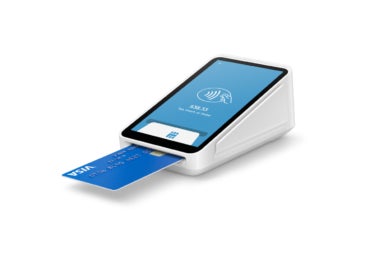
A POS terminal is the central hub of a POS system, where transactions are processed. It can be a traditional countertop device, an all-in-one touchscreen register, or a cloud-based software running on a tablet or computer.
- Must-have or optional? Essential for all businesses
- Best for: Retail stores, restaurants, service providers — any business that processes in-person sales
- Estimated cost: $300 – $1,500 for basic to premium models; software subscriptions may add $30 – $300 monthly
Card readers
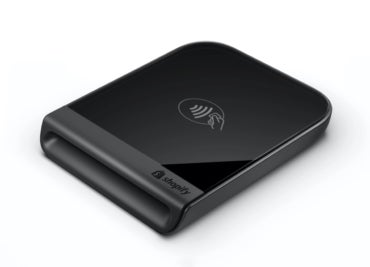
Card readers allow businesses to accept credit and debit card payments, including chip, swipe, and contactless (NFC) transactions.
- Must-have or optional? Essential for businesses accepting card payments
- Best for: Brick-and-mortar stores, food trucks, pop-up shops, and service providers
- Estimated cost: $50 – $300 for basic readers; advanced models with PIN pads and tap-to-pay can cost $500+
Cash drawers
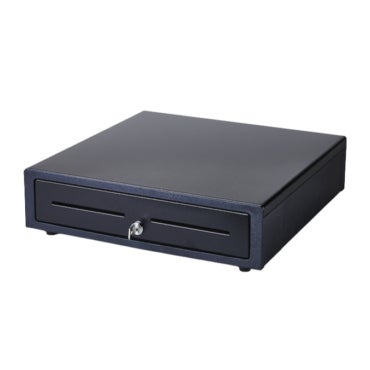
A secure storage unit for handling cash transactions; it is often connected to the POS system and automatically opens when needed.
- Must-have or optional? Optional, but necessary for businesses accepting cash
- Best for: Retail stores, restaurants, and any business that still handles cash payments
- Estimated cost: $50 – $300, depending on size and security features
Barcode scanners
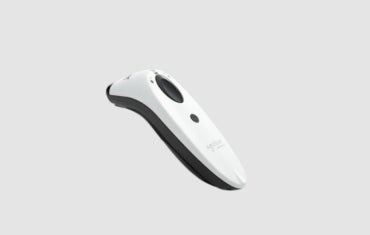
Used to scan product barcodes for quick item entry, inventory tracking, and checkout efficiency.
- Must-have or optional? Optional, but highly recommended for retail businesses with large inventories
- Best for: Retail stores, warehouses, and supermarkets
- Estimated cost: $100 – $500 for wired and wireless models
Receipt printers
Prints transaction receipts for customers and internal records. These devices can be thermal (no ink required) or impact/dot matrix (for kitchen environments).
- Must-have or optional? Optional, but essential for businesses that provide paper receipts
- Best for: Retail stores, restaurants, service businesses
- Estimated cost: $100 – $400, depending on type and connectivity
Tablet stands
Holds tablets securely for businesses using iPad or Android-based POS systems, providing stability and ease of use.
- Must-have or optional? Optional, but recommended for businesses using tablet-based POS systems
- Best for: Small businesses, cafes, and pop-up shops
- Estimated cost: $50 – $200
Customer-facing displays
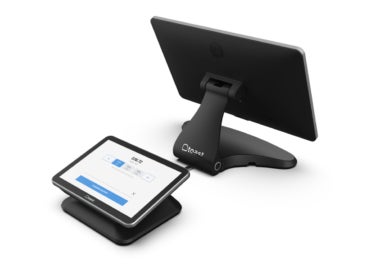
Screens that show transaction details, prices, and promotional messages to customers during checkout.
- Must-have or optional? Optional, but useful for transparency and engagement
- Best for: Retailers, restaurants with self-checkout options, and high-volume businesses
- Estimated cost: $200 – $600, depending on size and features.
Barcode label printers
Creates barcodes for products, improving inventory management and checkout efficiency.
- Must-have or optional? Optional, but necessary for businesses managing their own product labeling
- Best for: Retailers, warehouses, and manufacturing businesses
- Estimated cost: $200 – $700
Kitchen display systems
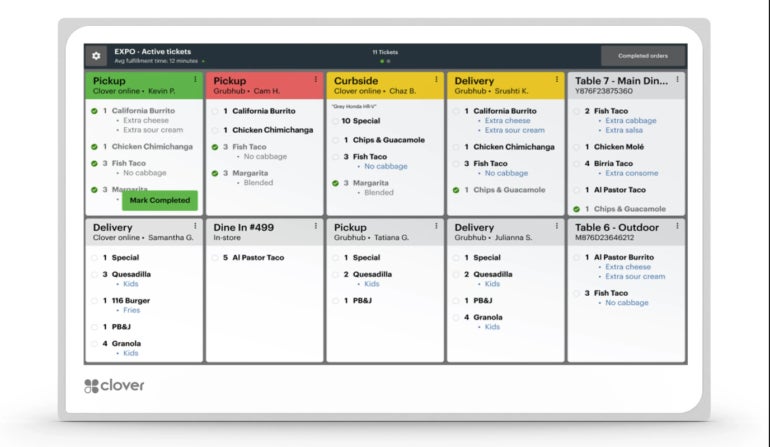
Digital screens that replace paper tickets in restaurant kitchens, streamlining order processing.
- Must-have or optional? Optional, but crucial for fast-paced restaurant operations
- Best for: Restaurants, quick-service chains, and food trucks
- Estimated cost: $500 – $1,500 per screen, plus software fees
Mobile POS solutions
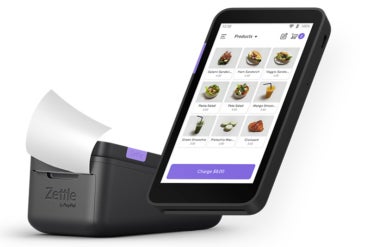
Handheld, tablet-based mobile POS systems that allow businesses to process transactions anywhere in-store or on the go.
- Must-have or optional? Optional, but increasingly popular for flexibility
- Best for: Restaurants, field service providers, and mobile businesses
- Estimated cost: $200 – $1,000 for hardware; software costs vary by provider
Self-service kiosks
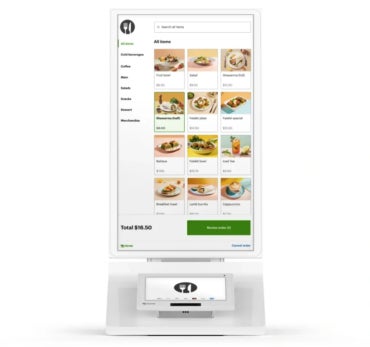
Interactive touchscreens that allow customers to place orders or complete transactions without cashier assistance.
- Must-have or optional? Optional but enhances customer convenience and reduces labor costs
- Best for: Quick-service restaurants, fast food chains, and large retailers
- Estimated cost: $200 – $7,000 per kiosk
Related: Best Retail POS Systems
What's hot at TechRepublic
- Blackpoint Cyber vs. Arctic Wolf: Which MDR Solution is Right for You?
- Why AWS Sellers Choose Deepgram Over Other Voice AI Tools
- SS&C Intralinks DealCentre AI vs. Datasite: Which platform is built for the future of dealmaking?
- SS&C Intralinks FundCentre AI vs. Juniper Square: Which platform better supports modern private markets fund managers?
- Verito vs. Rightworks: Which IT Provider Is Best for Your Firm?
Key factors to consider when choosing POS hardware
Choosing the right POS hardware is about finding a system that fits your business needs. Your POS hardware should support your daily operations, scale with your growth, and integrate with your existing tech stack.
Consider transaction volume, business size, and customer experience needs. Do you need a mobile POS for tableside orders? A customer-facing display for transparency? Security, durability, and long-term costs are also critical factors.
Here are the key factors to evaluate:
Scalability & performance
Your hardware should handle increasing transaction volumes, multiple users, and multi-location needs. Cloud-based sync and fast processing power are crucial for growing businesses, especially those with seasonal demand spikes.
Integration capabilities
Your POS hardware should seamlessly integrate with your POS software, payment processors, and other business tools like inventory management, accounting software, and ERPs. Compatibility is crucial — some systems only work with proprietary software, while others support third-party integrations.
If your business relies on a specific CRM, e-commerce platform, or custom-built software, ensure your POS hardware can support API connections or direct integrations to streamline operations.
Security & compliance
POS systems handle sensitive payment data, so security should be a top priority. Look for hardware that supports EMV chip card payments, NFC/contactless transactions, and end-to-end encryption.
Compliance with the PCI-DSS (Payment Card Industry Data Security Standard) ensures the protection of customer payment information. Advanced fraud detection and tokenization features are also essential for businesses handling high-value transactions or operating in regulated industries.
Durability & longevity
POS hardware is a long-term investment, and durability is key—especially for businesses with high customer traffic. Restaurants need spill-resistant touchscreens, while retailers may require rugged barcode scanners and receipt printers that can handle continuous use.
Consider build quality, manufacturer warranties, and industry-specific design features that enhance reliability. Investing in high-quality hardware reduces replacement costs and minimizes downtime due to equipment failure.
Total cost of ownership (TCO)
The upfront cost of POS hardware is just one part of the equation. Factor in software licensing fees, maintenance costs, potential hardware upgrades, and long-term service contracts. Some providers offer bundled hardware and software plans with predictable monthly fees, while others require larger upfront investments.
Where to buy POS hardware
Choosing the right place to purchase POS hardware is just as important as selecting the hardware itself. You’ll want a reliable supplier that offers high-quality products, fair pricing, and strong customer support. Below are some of the best places to buy POS hardware and the pros and cons of different purchasing methods.
Reputable Online and Local Suppliers
When buying POS hardware, it’s best to go with well-known, reputable suppliers that offer warranties, responsive customer support, and easy returns. Some of the most common sources include:
- Direct from POS providers: Companies like Square, Clover, and Lightspeed sell hardware tailored to their systems. Buying directly ensures full compatibility.
- Tech retailers and marketplaces: Amazon, Best Buy, and Staples carry a variety of POS hardware options with customer reviews and competitive pricing.
- Specialty POS hardware vendors: POS providers with a variety of POS options focus solely on POS equipment, offering expert advice and enterprise-level solutions.
- Local business supply stores: Some local IT and office supply stores carry POS hardware and may provide in-person support and setup assistance.
Pros and Cons of Online vs. In-Store Purchases
| Factor | ||
|---|---|---|
| Product variety | ||
| Pricing & discounts | ||
| Convenience | ||
| Customer support | ||
| Shipping & availability |
For businesses prioritizing convenience and selection, online shopping is often the best choice. However, if you prefer hands-on testing or need immediate setup, purchasing in-store from a local supplier may be more beneficial.
Cost breakdown of POS hardware
Investing in POS hardware requires more than just purchasing a terminal — it involves factoring in the costs of additional peripherals, software, and potential hidden fees. While some businesses may opt for budget-friendly solutions, others may prioritize premium hardware with advanced features. Understanding the total cost of ownership (TCO) is crucial to making an informed decision that aligns with your business needs and long-term growth.
Estimated costs by business type
Below, I break down the typical costs of essential POS hardware components for some business setups, highlight hidden fees to watch out for, and offer tips on balancing quality and budget.
- Mobile business (e.g. food trucks, pop-up shops, market vendors)
-
- Essential hardware: Mobile POS (mPOS) system, card reader, tablet or smartphone
- Estimated cost: $0 – $500
- Additional costs: Data plan for mobile connectivity, charging accessories
- Small food cart or kiosk
-
- Essential hardware: Tablet POS, card reader, cash drawer, receipt printer
- Estimated cost: $200 – $1,500
- Additional costs: Sturdy tablet stand, extra receipt paper rolls
- Retail store (single location)
-
- Essential hardware: POS terminal, barcode scanner, card reader, receipt printer, cash drawer
- Estimated cost: $700 – $3,500
- Additional costs: Barcode label printer, inventory management software integration
- Full-service restaurant
-
- Essential hardware: POS terminal, kitchen display system (KDS), receipt printer, card reader
- Estimated cost: $2,500 – $6,000
- Additional costs: Customer-facing display, self-service kiosk (if applicable)
- Multi-location or enterprise business
-
- Essential hardware: Multiple POS terminals, enterprise-grade barcode scanners, inventory tracking system, receipt printers, card readers
- Estimated cost: $10,000+ per location
- Additional costs: Custom integrations, ongoing IT support, software licensing fees
Hidden fees to consider
- Software subscriptions: Monthly or annual fees for POS software
- Payment processing fees: Transaction fees for credit/debit card payments
- Extended warranties & support: Additional coverage for hardware maintenance
- Upgrade costs: Newer hardware and technology replacements over time
Setting Up and Maintaining Your POS Hardware
Choosing the right POS hardware is only the first step — proper installation, maintenance, and timely upgrades are essential for ensuring smooth business operations. A well-maintained system reduces downtime, improves transaction efficiency, and extends the lifespan of your hardware.
Here’s a quick guide to setting up and maintaining your POS Hardware:
| Pre-installation |
|
| Installation |
|
| Maintenance |
|
| Common issues & fixes |
|
Upgrading your hardware over time
As businesses grow, their POS needs change. Upgrading your hardware at the right time ensures smooth operations, prevents system slowdowns, and keeps your business competitive. If your system frequently crashes, lags, or can’t handle increased transaction volume, it may be time for an upgrade.
Outdated hardware can also become a security risk, as older systems may no longer support the latest compliance requirements or software updates. Expanding businesses may need cloud-based POS terminals, additional kiosks, or customer-facing displays to improve efficiency and customer experience.
To upgrade cost-effectively, consider leasing POS hardware instead of purchasing outright, allowing for easier upgrades while reducing upfront costs. Some vendors offer trade-in programs, providing discounts on newer models when you return outdated equipment.
If a full system replacement isn’t necessary, modular upgrades — such as swapping out barcode scanners, touchscreen displays, or card readers — can enhance performance without overhauling your entire setup.
Future trends in POS hardware
POS equipment is evolving rapidly to meet the growing demands of businesses and consumers. Emerging technologies are shaping the future of transactions by enhancing efficiency, security, and customer experience. Here are some key trends to watch:
AI-powered POS systems
Artificial intelligence (AI) is transforming POS hardware by automating processes and improving decision-making. AI-driven features include:
- Smart inventory management: AI-powered POS terminals can predict stock shortages and automatically reorder products.
- Personalized customer interactions: AI-enabled customer-facing displays suggest products based on purchase history.
- Fraud detection: Machine learning algorithms detect suspicious transactions in real time.
- Dynamic pricing: AI analyzes demand, competitor pricing, and other factors to adjust prices in real time, maximizing profitability.
Self-service kiosks & smart checkout systems
The demand for self-checkout continues to grow, with businesses investing in smart kiosks that reduce wait times and improve customer experience.
- AI-powered self-checkouts: Automatically recognize items without requiring barcode scanning.
- Voice-activated POS systems: Customers can place orders or process transactions using voice commands.
Sustainable & eco-friendly POS hardware
Sustainability is becoming a priority, and POS manufacturers are focusing on energy-efficient and eco-friendly hardware:
- E-receipts & paperless transactions: Reduces waste and improves record-keeping.
- Solar-powered POS terminals: Useful for outdoor vendors and businesses in remote areas.
- Recyclable & modular POS components: Enables businesses to upgrade without replacing entire systems.
Augmented reality (AR) and virtual reality (VR) in POS systems
AR and VR are making their way into POS hardware, enhancing customer engagement:
- AR-powered product displays: Customers can visualize products before purchasing.
- VR training for staff: Interactive simulations improve employee training on POS systems.
Frequently asked questions (FAQs)
What is the lifespan of POS hardware?
The lifespan of POS hardware typically ranges from five to seven years, depending on usage, maintenance, and technology advancements. High-quality, commercial-grade hardware can last longer with proper care, while rapidly evolving payment technologies may require upgrades sooner. Regular software updates and routine maintenance can help extend the lifespan of your POS system.
How do I troubleshoot common hardware issues?
To troubleshoot POS hardware issues, restart the device, check all cable and network connections, and ensure software is up to date. If the problem persists, test with another device or use built-in diagnostics. For unresolved issues, contact your POS provider or hardware manufacturer for support.
What are the top brands for POS hardware?
Some of the top brands for POS hardware include Square, Clover, Toast, Lightspeed, and Shopify, known for their all-in-one solutions. For enterprise-level businesses, Elo, Zebra, and Star Micronics offer high-performance terminals, barcode scanners, and receipt printers. The best choice depends on your business needs, budget, and software compatibility.