


Key takeaways:
- A payment gateway is a technology that allows businesses to capture, authenticate, and encrypt online payment information from customers.
- If you want to accept payments online as a business, you’ll need a payment gateway.
- Choosing the right payment gateway depends on your business model, budget, and preferred features and support.
If you’re a newly minted small business owner, you’ve likely heard the terms “payment gateway” and “payment processor” used interchangeably. And while most modern payment processors include a built-in payment gateway, they’re technically different.
In this guide, I’ll explain how a payment gateway works and whether you need to set one up. Rest assured, if you’re using platforms like Stripe or Shopify, you’re already covered.
What is a payment gateway?
A payment gateway acts as the middleman between your website or point-of-sale (POS) system and a payment processor. Think of it as the digital equivalent of a point-of-sale terminal in a brick-and-mortar store.
When customers enter their payment information on your website, the payment gateway authenticates and encrypts the data to protect it from fraud. It then sends the encrypted information to the payment processor. From there, the data is transmitted to the customer’s bank to approve or decline the payment.
Without a payment gateway, your online store can’t securely accept payments. Thankfully, this technology is usually packaged with most e-commerce platforms, such as Shopify and WooCommerce.
Types of payment gateways
Payment gateways come in various forms, each geared for different business needs. These are the main types and common examples:
Hosted payment gateways
Hosted gateways redirect customers to a secure page outside your website to complete the payment. The shopper is then sent back to your site after their payment is processed.
This type is straightforward to set up, making it ideal for beginners. However, the downside is that redirecting customers away from your site disrupts the checkout experience. Indeed, jumping from your site to PayPal and back creates extra friction at a crucial moment.
- Examples of this payment gateway: PayPal offers a hosted solution that’s easy to set up and widely recognized by consumers. Shopify users can use its built-in solution, simplifying the setup process.
- Average cost: Starts around 2.9% + $0.30 per transaction, with no monthly fees
Self-hosted payment gateways
Self-hosted gateways allow you to collect payment information directly on your website. This in-house approach grants you full control over the checkout process.
However, this strategy requires higher technical expertise and strict adherence to the Payment Card Industry (PCI) standards. Plus, you’ll still need to work with a third-party company to build your system.
- Examples of this payment gateway: Square combines a payment gateway with POS software, making it a solid choice for brick-and-mortar stores that also sell online. Authorize.net is also an excellent pick for businesses needing a self-hosted gateway with top-notch fraud prevention tools.
- Average cost: Costs vary significantly, with average monthly prices starting at $25 to upwards of $100+, along with transaction fees and setup costs.
API/Non-hosted payment gateways
With API gateways, customers stay on your website throughout the entire checkout process. You integrate the gateway via an application programming interface (API), which delivers a seamless user experience.
This setup promises more flexibility and branding opportunities. But it also requires advanced technical know-how. Many people resort to hiring freelance software engineers using sites like Upwork and Fiverr to build out and maintain this system.
- Examples of this payment gateway: Stripe is a great for open source API for custom-developed payment gateways.
- Average cost: Starting around $25 to $200 monthly and transaction fees of 2.9% + $0.30 per transaction
Local bank integration gateways
These are gateways connected directly to a local bank. As a result, you’re entirely dependent on one financial institution.
This method isn’t common among e-commerce businesses based in the U.S., but they’re widespread in countries with lower credit card penetration. Regardless of geographic location, they’re often more complex to set up but typically boast low transaction fees. Some people also value the local aspect as a matter of personal preference.
- Examples of this payment gateway: Most mobile banking apps
- Average cost: Varies based on the bank’s pricing but can be lower than other types
What's hot at TechRepublic
- Blackpoint Cyber vs. Arctic Wolf: Which MDR Solution is Right for You?
- Why AWS Sellers Choose Deepgram Over Other Voice AI Tools
- SS&C Intralinks DealCentre AI vs. Datasite: Which platform is built for the future of dealmaking?
- SS&C Intralinks FundCentre AI vs. Juniper Square: Which platform better supports modern private markets fund managers?
- Verito vs. Rightworks: Which IT Provider Is Best for Your Firm?
How does a payment gateway work?
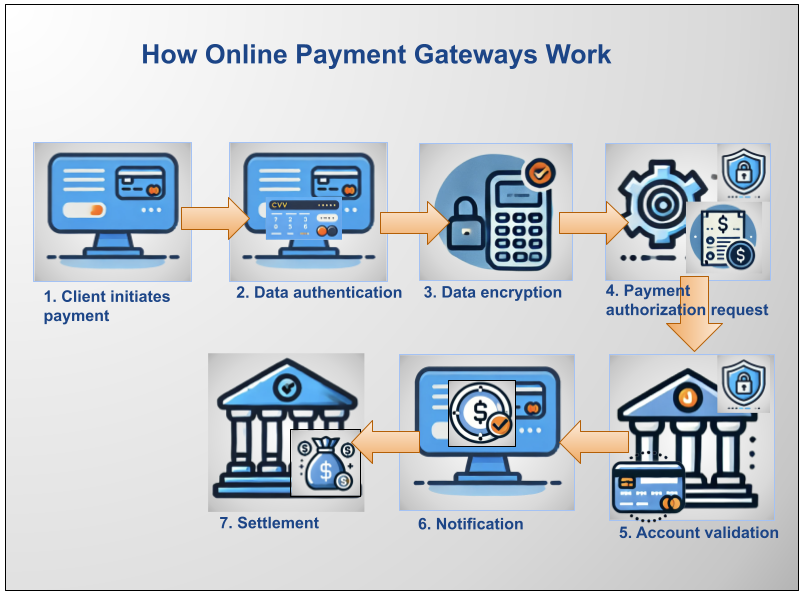
Here’s how the payment gateway works, step-by-step:
- Step 1: A customer selects a product or service and enters their payment details.
- Step 2: Information entered is authenticated to ensure the identity of the user.
- Step 3: The payment gateway encrypts the sensitive information to protect it from fraud.
- Step 4: The gateway sends the encrypted information to the payment processor.
- Step 5: The payment processor communicates with the customer’s bank to approve or decline the transaction.
- Step 6: The gateway sends a confirmation (or decline) to both the merchant and the customer.
- Step 7: If approved, the funds are moved from the customer’s bank to the merchant’s account.
Payment gateway vs. payment processor
A payment gateway facilitates data communication and encryption, whereas a payment processor handles the actual transaction. The processor takes the payment information captured via the gateway, communicates with the customer’s bank, and ensures the transfer of funds from buyer to seller.
In simple terms:
- Payment gateway: Manages secure data transmission.
- Payment processor: Oversees the transaction itself.
Many providers, like Stripe or PayPal, marry these services so you don’t have to set up each one separately. This combination makes it easier for small business owners as you can get both functions in one package.
Read more:
How to choose the right payment gateway for your business
Here’s how you can select the best payment gateway for your business:
Consider your business model
For online-only businesses, hosted or API-based gateways are more suitable since you won’t have to handle in-person bank cards.
Meanwhile, brick-and-mortar shops with e-commerce components are better candidates for gateways integrated with POS systems. That way, you can process physical credit and debit cards.
Also, consider the types of payments you plan to accept — for example, if you’d like to accept cryptocurrency payments, you’ll need extensive integration and cryptocurrency support.
See: The best crypto payment gateways for businesses
Evaluate your budget
Some advanced gateways require more custom programming and ongoing maintenance, resulting in more expenses. Meanwhile, simpler options like Shopify Payments only charge for credit card processing costs. Carefully examine the fine print to determine if you can afford your preferred provider.
Think about user experience
A seamless checkout process can reduce cart abandonment rates. Choose a gateway that offers a fast, secure, and smooth user experience. Shopify and PayPal both offer a one-click payment feature that accelerates the checkout process. Custom API integrations that eliminate sending customers elsewhere can also reduce friction.
Ensure security compliance
Confirm that the gateway provider complies with PCI standards to keep your customers’ data safe. Otherwise, you run the risk of being exposed to potentially devastating data breaches and fraud.
Review customer support
Search for a provider that boasts top-notch customer service, especially if you’re new to online payments. Real client reviews on sites like Trustpilot can help you reckon a company’s support quality.
FAQ
What is a payment gateway, and how does it work?
A payment gateway is a technology that transmits payment information securely from a website to a payment processor. It authenticates payment data, encrypts the information before sending to the payment processor, and ensures that payments are completed safely.
Who needs a payment gateway?
Any business looking to accept online or mobile payments needs a payment gateway. If you’re setting up an e-commerce store or offering online services, you’ll need one.
Is it necessary to have a payment gateway?
Yes, if you want to accept online payments. If you use platforms like Stripe, Shopify, or PayPal, the gateway is already included.
How do you get a payment gateway?
Sign up with a payment service provider like Stripe, PayPal, or Authorize.net. They will guide you through the setup process. Many providers are simple enough that you can opt to install it on your own.
What is an advantage of a payment gateway?
It allows you to accept payments securely, which builds trust with your customers and boosts sales.
What is a disadvantage of a payment gateway?
Fees can add up, particularly for small businesses with tight margins. Additionally, technical setup can be challenging for self-hosted or API-based gateways.