


Key takeaways:
- The Linear vs Jira comparison favors Jira for enterprise engineering teams that require customizable workflows, advanced sprint reporting, and multi-team release planning.
- Linear suits software development teams that prioritize streamlined issue tracking, recurring cycles and AI-assisted coding.
- Jira provides broader enterprise capabilities, while Linear requires less configuration. Compare security requirements and total costs before deciding.
- Linear vs Jira at a glance
- Linear vs Jira pricing
- Issue tracking & workflow customization
- Agile planning & sprint management
- Product roadmaps & portfolio management
- AI & agent capabilities
- Developer integrations & DevOps workflows
- Reporting & engineering analytics
- Enterprise security and administration
- Can you migrate from Jira to Linear?
- What transfers when you import Jira projects into Linear?
- Can Jira and Linear run together during migration?
- Linear & Jira alternatives
- Final verdict: Should your team choose Linear or Jira?
- FAQs
Linear vs Jira at a glance
 Linear |  Jira |
|
| My rating | ||
| Best for | ||
| Monthly starting fee (billed annually) | ||
| Issue tracking | ||
| Agile planning | ||
| Product roadmaps | ||
| AI | ||
| Developer integrations |
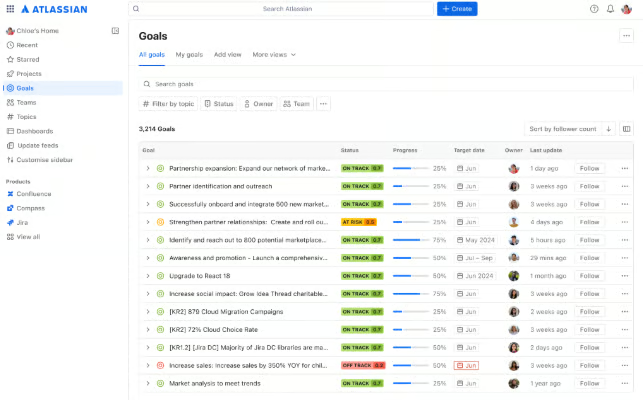
Jira dashboard
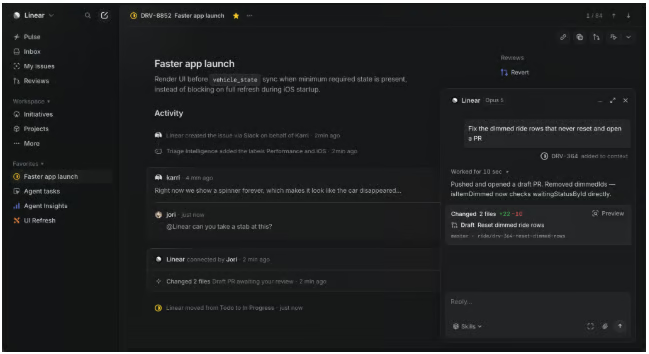
Linear dashboard
Linear vs Jira pricing
Winner: Jira. Jira generally offers lower subscription costs, although its per-user rates vary by team size. While Linear charges a fixed fee per user, Jira uses volume-based pricing. Jira Standard starts at $9.05 per user per month for a team size of 100, with the rate decreasing to $7.91 per user for a 300-person team.
| Plan | Linear | Jira |
| Free | $0; unlimited members, 2 teams, 250 issues | $0; up to 10 users, unlimited work items |
| Entry-level paid | Basic: $10/user/month | Standard: $9.05/user/month* |
| Advanced | Business: $16/user/month | Premium: $18.30/user/month |
| Enterprise | Custom quote | Custom quote |
| AI capabilities | Linear Agent included; some capabilities require AI credits | Rovo included in paid plans; usage allowances vary |
| SAML SSO and SCIM | Enterprise | Atlassian Guard Standard add-on for eligible non-Enterprise plans |
For AI usage fees, all Linear plans include access to its agent platform, but certain coding sessions require AI credits. Jira includes Rovo in paid plans, with monthly credit allowances that vary by subscription tier. Organizations expecting extensive agent activity should evaluate these allowances before comparing total costs
How much will your organization pay?
The cost of Linear versus Jira depends on your team size and the subscription tier required to support its development workflows.
| Linear | Jira | |||
| 25 developers | Issue tracking, sprint planning, Git integrations | Basic: $3,000/year | Standard: $2,250/year | Jira |
| 100-person engineering organization | Multiple teams, portfolio planning, AI capabilities | Business: $19,200/year | Premium: $ 9,050/year | Jira |
| 250-person enterprise deployment | SSO, SCIM, centralized administration, security controls | Enterprise: Custom quote | Premium: $43,500/year + Atlassian Guard Standard | Compare quotes |
Jira has lower subscription costs across the scenarios, although its enterprise deployment requires additional spending on Atlassian Guard. Linear’s Enterprise pricing requires a custom quote, so organizations with advanced security requirements should compare total costs before deciding.
Issue tracking & workflow customization
Winner: Jira. Jira supports more extensive workflow customization through custom issue types, fields, and transition rules. It also allows teams to enforce review and approval requirements before an issue moves to the next stage. Linear provides configurable issue statuses, templates, and automated triage, but its workflows follow predefined status categories that limit process customization.
| Linear | Jira |
|
| Issue tracking | Issues, sub-issues, labels, and priorities | Custom issue types, fields, and hierarchies |
| Workflow customization | Team-specific statuses within predefined categories | Custom statuses, transitions, and workflow rules |
| Issue intake | Templates, triage queues, and automated routing | Custom fields, intake forms, and automation rules |
| Approval workflows | Review statuses and assigned reviewers | Transition restrictions and required-field validation |
| Automation | Automated triage, assignments, and status updates | Conditional transitions, field validation, and automated actions |
However, Jira’s customization also requires additional configuration and maintenance, especially when teams use different workflow schemes. Linear reduces admin complexity through standardized processes, making it suitable for engineering teams that follow consistent development practices.
Agile planning & sprint management
Winner: Jira. Sprint reporting and release forecasting give Jira an advantage for organizations that need to assess delivery commitments across engineering teams. Its Scrum and Kanban capabilities include velocity charts and sprint reports, which help managers evaluate planned versus completed work.
By comparison, Linear supports recurring development cycles, with automatic issue rollover and capacity estimates based on historical velocity.
| Feature | Linear | Jira |
| Sprint planning | Recurring cycles lasting 1–8 weeks | Configurable sprints with Scrum backlogs |
| Capacity planning | Estimates capacity using the previous three cycles | Velocity reports and capacity planning through Jira Plans |
| Backlog management | Issue prioritization, triage, and automatic rollover | Backlog ranking, sprint assignment, and issue estimation |
| Sprint reporting | Cycle progress graphs, scope changes, and completion metrics | Burndown chart, burnup, velocity, and sprint reports |
| Estimation | Fibonacci, linear, exponential, and T-shirt sizing | Story points and time-based estimates |
| Release forecasting | Project completion estimates based on historical velocity | Release burndown, version reports, and planning forecasts |
Linear estimates upcoming cycle capacity based on three completed cycles, while Jira uses historical velocity reports and advanced planning features to forecast future work. If a production incident interrupts a sprint, both platforms show its effect on planned work.
Linear’s cycle graph tracks scope changes and completion, whereas Jira’s burndown and sprint reports help assess unfinished commitments and their potential impact on release schedules.
Product roadmaps & portfolio management
Winner: Jira. Jira Plans (formerly Advanced Roadmaps) helps engineering teams assess how resource constraints and project delays affect release schedules through dependency tracking, capacity planning, and scenario forecasting. Teams with less complex planning requirements can use Linear’s initiatives, milestones, and project timelines to monitor progress toward company objectives.
| Feature | Linear | Jira |
| Product roadmaps | Project timelines, initiatives, and milestones | Timelines and multi-team plans |
| Portfolio management | Initiatives group related projects by objective | Custom hierarchies connect initiatives, epics, and team-level work |
| Dependency management | Visualizes blocking relationships between projects | Tracks dependencies across teams and work items |
| Capacity planning | Shows project schedules and team cycles | Plans work against team capacity and velocity |
| Scenario planning | Manually adjusts timelines and dependencies | Models alternative schedules before applying changes |
| Progress reporting | Project health updates and initiative progress | Cross-team progress views and dependency reports |
Jira has an advantage when project delays require changes to release schedules across multiple engineering teams. For example, if a backend API delay threatens a mobile app release, Jira evaluates alternative schedules based on team capacity before revising delivery dates. Linear, on the other hand, can identify the dependency and flag scheduling conflicts but lacks comparable scenario planning.
AI & agent capabilities
Winner: (Tie) Jira for enterprise-wide AI workflows; Linear for AI-assisted development. Jira’s Rovo supports custom agents that automate tasks across Atlassian apps and retrieve data from connected knowledge sources. Linear focuses more on software development, where teams can assign issues to AI coding agents that investigate bugs and create draft pull requests for developer review.
| Feature | Linear | Jira |
| AI assistant | Linear Agent answers questions and updates issues or projects | Rovo Search and Chat retrieve information and summarize work |
| AI coding agents | Investigate issues, generate code, and create pull requests | Rovo Dev supports coding assistance and pull request reviews |
| Task automation | AI-driven triage and agent delegation | Custom Rovo agents and automation rules |
| Human accountability | Original assignee retains responsibility for delegated issues | Agents execute configured actions under available permissions |
| Integrations | Coding agents, Slack, and MCP-connected tools | Atlassian apps, third-party tools, and MCP integrations |
When developers assign a reported bug to an AI coding agent, Linear tracks the investigation and resulting draft pull request within the issue, while the assigned developer reviews the proposed changes. Jira’s Rovo agents support other project activities through automation rules, such as updating related work items and generating project summaries across Atlassian apps.
Developer integrations & DevOps workflows
Winner: Jira. Jira connects development activity to project tracking through GitHub and GitLab integrations, with access to build results and deployment history. Linear also syncs issues with pull requests and automates status updates, but Jira provides CI/CD reporting capabilities for tracking changes through deployment.
| Feature | Linear | Jira |
| GitHub integration | Links issues to commits and pull requests; supports code reviews | Links work items to branches, commits, and pull requests |
| GitLab integration | Links issues to merge requests and automates status changes | Tracks merge requests, builds, and deployments |
| Workflow automation | Updates issue statuses based on pull request activity and target branches | Automates issue transitions based on development events |
| CI/CD visibility | Supports pipeline-based status automation through integrations | Displays build results and deployment history |
| API and webhooks | GraphQL API and webhooks | REST APIs and automation webhooks |
| Release tracking | Tracks issue completion and project milestones | Connects development activity to deployments and releases |
For organizations managing deployments across multiple repositories, Jira helps identify which changes have completed code review but remain undeployed. While Linear can reflect development progress through branch-specific status rules, teams may need separate CI/CD tools to investigate build failures or deployment delays.
Reporting & engineering analytics
Winner: Jira. Jira provides Scrum reports and customizable dashboards for evaluating sprint performance, while its cross-team planning capabilities help managers forecast releases and assess capacity constraints. Linear focuses on engineering metrics such as cycle time, issue throughput, and project completion forecasts based on historical velocity.
| Feature | Linear | Jira |
| Agile reporting | Cycle graphs, scope changes and completion rates | Sprint reports, burndown, burnup and velocity charts |
| Engineering metrics | Cycle time, lead time, issue age and triage time | Cycle time, workflow status and cumulative flow analysis |
| Project forecasting | Estimates completion dates using historical velocity | Release forecasts and capacity-based planning through Jira Plans |
| Custom reporting | Filterable Insights and dashboards | Configurable dashboards, reports and marketplace extensions |
| Portfolio reporting | Initiative health and project progress updates | Cross-team reporting through Jira Plans and dashboards |
If issue completion increases but the expected release date keeps getting pushed back, Linear’s project graphs can determine whether new work has expanded the project’s scope. Jira provides sprint reports to investigate unfinished commitments, while Jira Plans lets managers assess whether team capacity or dependencies are affecting upcoming releases.
Enterprise security and administration
Jira supports SAML SSO, SCIM provisioning, and org-wide audit logs through Atlassian Guard, with additional security features on Premium and Enterprise plans. Organizations can also manage security settings across Atlassian apps and select data residency regions, including the UK and Canada, to meet data storage requirements.
Linear also supports SAML SSO and SCIM provisioning on its Enterprise plan, although its data residency options are limited to US and EU hosting regions.
| Feature | Linear | Jira |
| SSO and provisioning | SAML SSO and SCIM on Enterprise | SAML SSO and SCIM through Atlassian Guard |
| Permissions | Workspace roles, private teams and guest access | Configurable project permissions and roles |
| Audit logs | 90-day retention on Enterprise | Org-wide audit logs through Atlassian Guard |
| Data residency | US or EU hosting regions | Multiple regions, including UK, Canada and Australia |
| Network security | IP restrictions on Enterprise | IP allowlisting on Premium and Enterprise |
| Administration | Workspace admin and third-party app approvals | Centralized administration across Atlassian apps |
Can you migrate from Jira to Linear?
Yes, you can migrate from Jira to Linear using its built-in import tool, which transfers existing issues and projects into a Linear workspace. Teams can migrate selected projects or use Jira Sync to maintain updates between both platforms during a phased rollout. However, organizations with heavily customized Jira workflows should review field mappings and permissions before migration.
What transfers when you import Jira projects into Linear?
Linear’s Jira importer transfers issue details, comments, and supported relationships, with Jira epics mapped to Linear projects. Sprint data maps to Linear cycles, although custom fields, user permissions, and project boards require separate configuration.
| Issues and comments | Imported with supported issue details and attachments |
| Epics and sprints | Mapped to projects and cycles |
| Issue relationships | Parent-child and supported dependency relationships transfer |
| Assignees and creators | Mapped to Linear users when accounts match |
| Custom fields | Must be recreated using labels or label groups |
| Permissions and boards | Require manual configuration |
Before importing, review any custom fields used for release approvals or compliance reporting. For example, a mandatory security review field may need a replacement workflow in Linear, since importing the issue does not preserve Jira’s original validation requirements.
Can Jira and Linear run together during migration?
Yes. Linear’s Jira Sync supports one-way issue creation or bidirectional synchronization, allowing engineering teams to adopt Linear while other departments continue using Jira. Changes to supported fields, including issue status and priority, can synchronize between connected projects.
However, Jira Sync does not transfer every workflow property. Required fields can prevent issue creation, while unsupported statuses may cause records to show different progress in each platform. Organizations should test these scenarios before rollout, particularly when engineering teams share issues with departments that will remain on Jira.
For phased migrations, enable Jira Sync before importing historical issues so imported records can participate in subsequent synchronization. Teams should also use distinct Jira and Linear issue identifiers to prevent GitHub pull requests from linking to the wrong tickets.
Linear & Jira alternatives
Teams evaluating Linear and Jira may also want to consider project management tools that support software development alongside broader business workflows. monday.com, ClickUp and Wrike address different requirements, from coordinating product launches to managing development requests and approvals.
| Product development connected to business operations |  monday dev | monday dev supports sprint planning, bug tracking, and product roadmaps, with shared workflows for engineering and business teams. |
| Agile planning with integrated documentation |  ClickUp | Combines sprint management, velocity reporting, and Git integrations with collaborative Docs, custom fields, and task dependencies. |
| Request intake and approval workflows |  Wrike | Uses conditional request forms, custom workflows and approval records to manage requests that require reviews from multiple departments. |
monday.com is worth considering when product launches depend on coordination between engineering and business teams. ClickUp suits organizations that want sprint tracking and technical documentation in one workspace. For teams that require request intake and documented approvals, Wrike provides dedicated workflow features, although these capabilities depend on the subscription plan.
Final verdict: Should your team choose Linear or Jira?
Before deciding, test how each platform handles a shared dependency between engineering teams or an unexpected production incident during a sprint. The results can help you determine whether Jira’s customizable workflows and reporting capabilities are necessary or Linear’s standardized workflows can meet your team’s development requirements.
Choose Jira if…
- Your organization manages complex Agile workflows that require custom issue types, approval rules, and workflow transitions.
- Multiple engineering teams need capacity planning, dependency tracking, and release forecasting.
- Enterprise security requirements include centralized user provisioning and data residency options across multiple regions.
- Your team relies on the Atlassian ecosystem for development documentation and project reporting.
Choose Linear if…
- Your engineering teams follow consistent development processes and prefer minimal workflow configuration.
- Developers need automated issue updates through GitHub or GitLab integrations.
- Your team wants to delegate coding tasks to AI agents for bug investigation and draft pull requests.
- Product managers need initiative tracking, project milestones, and roadmaps but have limited requirements for capacity-based portfolio forecasting.
FAQs
Is Linear better than Jira for software development?
Linear is better for engineering teams that prioritize streamlined issue tracking, automated workflows, and AI-assisted coding. Jira suits organizations that require customizable Agile processes, advanced sprint reporting, and multi-team release planning. The right choice depends on your development practices and enterprise requirements.
Is Linear cheaper than Jira?
Jira generally costs less at the entry level, although pricing depends on team size and subscription requirements. Linear Basic starts at $10 per user monthly, while Jira Standard uses tiered pricing. Enterprise security features and AI usage charges can affect total costs.
Does Linear support Scrum and sprints?
Yes, Linear supports sprint-style planning through recurring cycles, which organize development work into time-boxed periods. Teams can estimate capacity, prioritize issues, and track completion across cycles. However, Jira provides dedicated Scrum boards and additional sprint reports, including burndown and velocity charts.
Which has better AI capabilities, Linear or Jira?
Jira is better for AI workflows across business apps through Rovo, which supports knowledge retrieval and custom automation agents. Linear specializes in AI-assisted software development, allowing coding agents to investigate issues and create draft pull requests. The choice depends on whether teams prioritize development automation or broader organizational workflows.
Can Linear and Jira integrate with GitHub?
Yes, both Linear and Jira integrate with GitHub to connect development activity with project issues. Linear can automatically update issue statuses based on pull request activity, while Jira links work items to commits, pull requests, and deployment information through supported integrations.
Can you migrate from Jira to Linear without losing data?
Linear’s Jira importer transfers supported issues, comments, and project data, but a complete migration cannot be guaranteed. Custom fields, workflow rules, and permissions may require manual recreation. Organizations should test imports and verify issue relationships, historical records, and approval requirements before retiring Jira.