


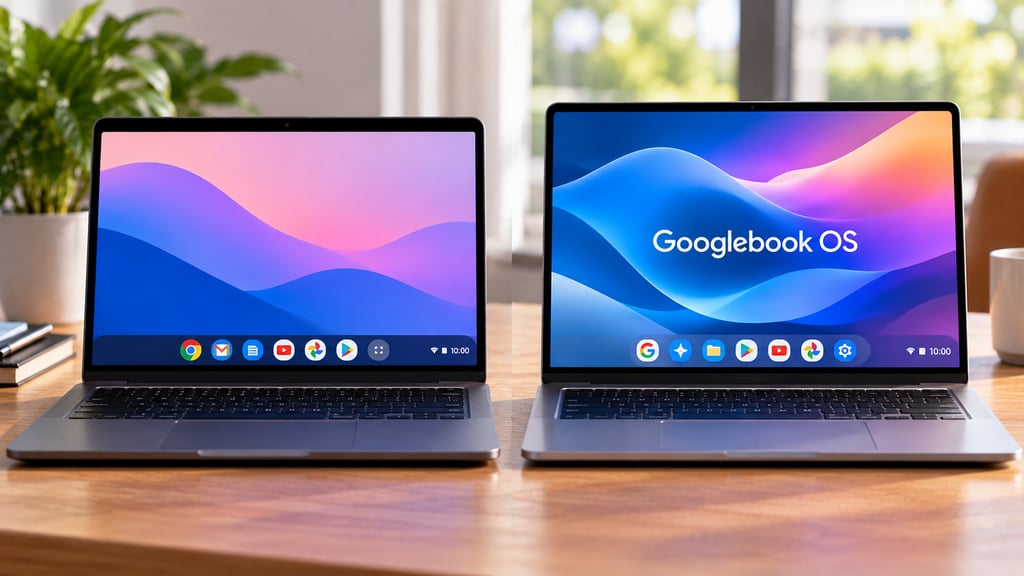
Googlebook OS is Google’s new Android-based laptop operating system, but Chromebook owners do not need to abandon ChromeOS anytime soon. Existing Chromebooks will continue receiving updates according to their support schedules, while many newer models are expected to get a path to Googlebook OS later.
The two platforms will coexist during a long transition. ChromeOS remains the operating system on today’s Chromebook fleet, while Googlebook OS launches first on premium Googlebook laptops with deeper Android integration, Gemini features, and a different approach to apps and device management.
Google says in its ChromeOS transition guidance that ChromeOS devices will continue receiving regular updates and security patches through mid-2034. Individual Chromebooks still have their own support deadlines, so owners should check their specific model before making an upgrade decision.
- ChromeOS vs Googlebook OS at a glance
- Is Googlebook OS replacing ChromeOS?
- Will your Chromebook upgrade to Googlebook OS?
- How are Googlebook OS and ChromeOS different?
- Can Googlebook OS run Windows apps?
- How long will ChromeOS keep getting updates?
- What changes for businesses and schools?
- Should Chromebook owners upgrade now?
ChromeOS vs Googlebook OS at a glance
| Feature | ChromeOS | Googlebook OS |
|---|---|---|
| Current hardware | Chromebooks | Googlebook laptops |
| Software foundation | ChromeOS | Android technology stack with ChromeOS desktop foundations |
| Android apps | ✔ On supported devices | ✔ Native support |
| Desktop Chrome | ✔ | ✔ |
| Linux tools | ✔ On supported devices | ✔ |
| Windows desktop apps | Limited options, not native | ✖ No traditional Windows app support |
| Android phone integration | Phone Hub, Quick Share, Quick Start | Continue On, phone app access, phone file access |
| Device support | Up to 10 years depending on model | Up to 10 years |
| Enterprise management | Mature Chrome Admin controls | Limited at launch; broader controls start in 2027 |
| Existing Chromebook migration | N/A | Many newer commercial models expected to qualify |
Is Googlebook OS replacing ChromeOS?
Eventually, Googlebook OS is positioned to take over Google’s laptop platform, but the change is not immediate.
ChromeOS devices will continue receiving updates through their supported lifetime. Google says current Chromebooks remain valid choices for schools and businesses, and existing Chrome Enterprise Upgrade and Chrome Education Upgrade licenses retain their current management capabilities.
Googlebook OS takes a different technical route. Instead of continuing to build Android functionality into ChromeOS, Google has built the new platform on the Android technology stack while bringing over desktop foundations developed through ChromeOS.
That gives Googlebook OS deeper integration with Android phones and apps while retaining familiar laptop elements such as desktop Chrome and Linux development tools.
Will your Chromebook upgrade to Googlebook OS?
Possibly, but Google has not published the eligibility list yet.
Google says many newer commercial Chromebook models will be capable of moving to Googlebook OS. Devices bought today whose 10-year support lifecycle extends beyond 2034 are among the models Google intends to support through the transition.
The actual migration paths and eligible models will be announced later.
Until then, the most useful number for Chromebook owners is the device’s Auto Update Expiration date, or AUE. Google says the AUE date is the most reliable way to determine how long a Chromebook will continue receiving official updates.
You can find it under Settings > About ChromeOS > Additional details > Update schedule.
ChromeOS devices generally receive updates for 10 years from the platform’s original release date, although some older models require extended-update enrollment to receive the full period.
How are Googlebook OS and ChromeOS different?
Googlebook OS shares some familiar Chromebook capabilities, but Android plays a much larger role.
Google’s Googlebook FAQ confirms that Googlebooks can install Android apps directly from Google Play. Users can also interact with supported apps running on their Android phones without installing them on the laptop.
Googlebook adds deeper phone integration through features such as Continue On, which lets users move supported workflows from phone to laptop, along with access to phone files and apps from the desktop.
ChromeOS already supports Android apps on compatible Chromebooks, along with features such as Phone Hub, Quick Share, and Quick Start. Googlebook OS pushes that integration further because Android is part of the platform’s underlying architecture rather than an additional application layer.
The difference is also reflected in the hardware. Google’s five launch models start at $899, putting Googlebook closer to premium Windows laptops and MacBooks than inexpensive Chromebooks.
Can Googlebook OS run Windows apps?
Not traditional Windows desktop applications.
Google told Computerworld that Googlebook OS does not use Windows emulation or legacy PC compatibility layers. Programs that require a Windows .exe installation will therefore need a Windows PC, a cloud-based alternative, or another compatible version of the software.
That does not mean Microsoft software is absent. Google says the Microsoft 365 app on Googlebook can open, edit, download, and save Word, Excel, Outlook, and PowerPoint files.
Googlebook also includes a Debian-based Linux environment for development tools and command-line software.
Anyone relying on specialized Windows applications should check software compatibility before replacing a Chromebook or Windows laptop with a Googlebook. That trade-off is particularly relevant when comparing laptops for Android users, where deeper phone integration can come at the cost of traditional desktop software support.
How long will ChromeOS keep getting updates?
Google says ChromeOS devices will continue receiving regular updates and security patches through mid-2034.
That date does not automatically mean every Chromebook will receive updates until 2034. Each model still has its own AUE date based on its hardware platform.
Some current models can have support periods extending beyond 2034. Google says qualifying devices in that group will receive transition support to Googlebook OS, although it has not yet explained the exact migration process.
Googlebook hardware has its own update commitment. Google says the new laptops will receive software updates for up to 10 years.
What changes for businesses and schools?
ChromeOS remains the safer option for managed fleets for now.
Organizations can currently use the Google Admin console to enroll Chromebooks, apply device policies, manage users, control apps and extensions, deploy devices through zero-touch enrollment, and produce fleet reporting.
The first consumer Googlebooks do not yet support domain enrollment or the same full device-management stack.
Google says the first major Googlebook management features will begin arriving in the second half of 2027. Its roadmap includes device and user controls, reporting, zero-touch enrollment, and support for third-party enterprise mobility management platforms.
Existing ChromeOS Enterprise and Education licenses remain valid for devices that stay on ChromeOS. Google has not yet published the licensing terms that will apply when an eligible Chromebook moves to Googlebook OS.
For consumers, that management gap is largely irrelevant. For a school or business replacing hundreds or thousands of Chromebooks, it makes ChromeOS the practical platform until Googlebook management catches up.
Should Chromebook owners upgrade now?
There is no need to replace a supported Chromebook simply because Googlebook OS has launched.
First, check the Chromebook’s AUE date. If it still has several years of updates remaining, ChromeOS will continue receiving security fixes and software updates during that period.
Owners of newer Chromebooks should also wait for Google’s eligibility list before assuming their device can or cannot move to Googlebook OS.
A new Googlebook makes more sense for someone who specifically wants deeper Android phone integration, native Android applications, Gemini features, premium hardware, or one of the new platform’s cross-device tools. Googlebooks begin shipping in the US on Oct. 4, with international availability following Oct. 5.
Buyers primarily looking for inexpensive web access, mature ChromeOS management, or an established Chromebook software environment still have plenty of reason to stay with ChromeOS.
For people replacing a laptop now, the decision is less about ChromeOS disappearing and more about which platform fits the next several years of use. ChromeOS remains supported, while Googlebook OS is the direction Google is building toward.
Also read: The Googlebook hardware and software guide covers the launch models, Gemini features, pricing, Android integration, and release details.