
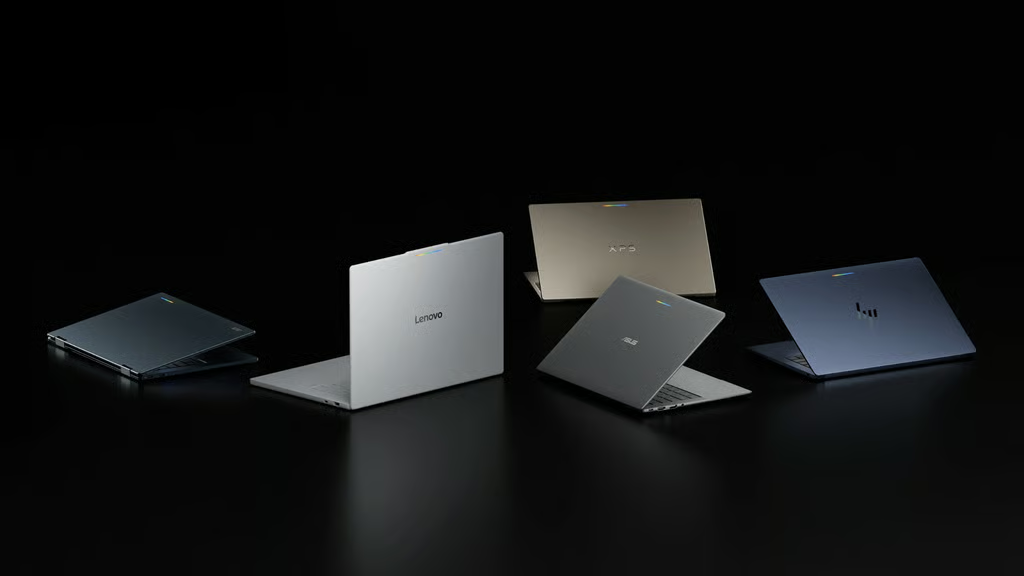


Google has spent more than a decade building laptops around the web. Googlebook represents a much bigger bet: building the laptop around AI and Android.
Googlebook is a new family of premium laptops designed for Gemini Intelligence, combining an Android-based technology stack with desktop foundations developed through ChromeOS. The first models come from Acer, ASUS, Dell, HP, and Lenovo, with prices starting at $899. Devices hit shelves Oct. 4 in the US and Oct. 5 in Canada, the UK, Ireland, France, Germany, and Australia.
That puts Googlebook into direct competition with premium Windows laptops, MacBooks, and higher-end Chromebooks. But the bigger distinction is software. Google is integrating Gemini directly into the laptop interface while making Android phones, apps, files, and services a much larger part of the desktop experience.
TechRepublic has been following Googlebook since Google introduced the Gemini-first laptop platform in May. Here is everything buyers and IT teams need to know about Googlebook.
- What is Googlebook?
- Googlebook models at a glance
- How much does Googlebook cost?
- What is Gemini Intelligence on Googlebook?
- Does Googlebook run Android apps?
- How does Googlebook work with Android phones?
- Does Googlebook work with an iPhone?
- How secure is Googlebook?
- How long will Googlebook receive updates?
- Does Googlebook include Google AI Pro?
- When does Googlebook go on sale?
- Googlebook vs Chromebook: What’s the difference?
- Is Googlebook good for business users?
- Who should consider a Googlebook?
What is Googlebook?
Googlebook is Google’s new premium laptop category built around Gemini Intelligence and Android integration.
It is not a single Google-made laptop comparable to Microsoft’s Surface or Apple’s MacBook. Instead, Google supplies the software platform, while hardware partners, including Acer, ASUS, Dell, HP, and Lenovo, manufacture individual Googlebook models.
Google describes the platform as being built on the Android technology stack while incorporating desktop foundations developed through ChromeOS. Users get a desktop-class Chrome browser, Google Play apps, and Linux development tools, alongside deeper integration with Android phones.
Googlebook therefore sits somewhere between several existing categories:
- It can run Android apps from Google Play.
- It offers a full desktop version of Chrome with browser extensions.
- Developers can access Linux tools and a terminal.
- Gemini is integrated directly into the operating system.
- Android phones can share apps, files, and ongoing tasks with the laptop.
- Hardware starts in premium-laptop territory rather than the low-cost Chromebook market.
TechRepublic previously broke down the differences between Googlebook and Chromebook. Chromebook remains a broad category stretching from inexpensive education machines to Chromebook Plus devices, while Googlebook is positioned as a higher-end platform built much more aggressively around Gemini and Android.
Googlebook models at a glance
Google’s first Googlebook generation includes five manufacturers, each emphasizing a somewhat different use case. Google says the Googlebook portfolio has a baseline of 16GB of RAM, with some configurations offering up to 32GB. The lineup uses Intel Core Ultra or Qualcomm Snapdragon X Elite processors and dedicated neural processing hardware for AI workloads.
| Googlebook | Starting price | Main distinction | Processor | Display | Claimed battery | Weight |
|---|---|---|---|---|---|---|
| Acer Googlebook 14 | $899 | Convertible 2-in-1 | Intel Core Ultra 5 | 14-inch 2.8K OLED | Up to 16 hours | 2.51 lb |
| XPS Googlebook | $999 | Thin, lightweight clamshell | Snapdragon X Elite | 13.4-inch 2.5K LCD | Up to 18 hours | 2.2 lb |
| Lenovo Googlebook 15 | $1,099 | Largest display and productivity focus | Intel Core Ultra 5 | 15.3-inch 2.8K OLED | Up to 13 hours | 2.84 lb |
| ASUS Googlebook 14 | $1,299 | Lightweight premium model | Intel Core Ultra 5 | 14-inch 2.8K OLED | Up to 16 hours | 2.2 lb |
| HP Googlebook 14 | $1,299 | Premium Snapdragon option | Snapdragon X Elite | 14-inch 2.8K OLED | Up to 19 hours | 2.74 lb |
These are Google’s current US starting MSRPs. Retail prices, configurations, and promotions can change, so buyers should check current listings before purchasing.
TechRepublic’s comparison of all five Googlebook models goes deeper into the differences in processors, displays, battery estimates, and form factors.
The Acer is the only convertible in the first lineup, while ASUS and Dell offer the lightest designs. Lenovo offers the largest screen, and HP has the longest published battery estimate among the launch models. Google’s battery figures are based on controlled web-browsing tests, and actual battery life can vary with network conditions, settings, location, and usage.
How much does Googlebook cost?
Googlebook starts at $899 in the US, immediately putting the platform above much of the traditional Chromebook market.
Google’s current US lineup starts at:
- Acer Googlebook 14: $899
- XPS Googlebook: $999
- Lenovo Googlebook 15: $1,099
- ASUS Googlebook 14: $1,299
- HP Googlebook 14: $1,299
Those are starting MSRPs, so configurations, retailer pricing, and promotions can affect what buyers actually pay.
The $899 Acer Googlebook 14 is currently the least expensive entry point to the platform. Google lists it with:
- Intel Core Ultra 5 processor
- 16GB RAM
- 512GB storage
- 14-inch 2.8K OLED touchscreen
- Wi-Fi 7
- Stylus support
- Convertible design
That pricing matters because Googlebook is not really trying to replace the $200 Chromebook. For buyers whose primary goal is inexpensive web access, ChromeOS remains the considerably cheaper route. Googlebook is targeting customers who might otherwise consider a premium Chromebook, MacBook Air, Surface laptop, or other thin-and-light Windows PC.
TechRepublic’s guide to the best laptops for Android users in 2026 shows the trade-off clearly: Googlebook offers unusually deep Android integration, while Chromebook and Windows options can provide lower prices or broader desktop software compatibility.
What is Gemini Intelligence on Googlebook?
Gemini Intelligence is the umbrella Google uses for AI features integrated directly into Googlebook.
Instead of requiring users to repeatedly open a separate chatbot window, Google is trying to make Gemini available within standard desktop workflows. Google says Gemini can understand text, images, and what is happening on screen, then perform actions when the user requests them.
Some of the headline features include:
Magic Pointer
Magic Pointer turns the mouse cursor into an entry point for Gemini.
Wiggling the pointer activates Gemini around the content currently on screen. Users can then select text, images, or other items and ask Gemini to explain, compare, organize, or act on them.
For example, Google says a user could select information from the screen and ask Gemini to help organize a calendar or work with selected images without first copying everything into another AI application.
Rambler
Rambler is Google’s AI-enhanced voice-to-text tool.
Users can speak naturally rather than dictating polished sentences. Rambler is designed to remove filler words, clean up phrasing, and organize spoken thoughts into structured text.
Google says it can transform a spoken stream of consciousness into:
- Meeting notes
- Action items
- Checklists
- Structured summaries
- Messages
- Draft documents
It also supports multilingual speech, including switching between languages during the same input.
Create My Widget
Create My Widget lets users create desktop widgets with natural-language prompts.
Instead of manually building a widget or installing one from an app store, a user could describe the information they want displayed and let Gemini build the interface.
Google gives examples ranging from sports-score trackers to countdown widgets.
Gemini tasks and automation
Googlebook also brings existing Gemini capabilities into the laptop, including Gemini Live, task automation, and proactive suggestions based on what’s currently happening on screen.
Google says some longer-running Gemini tasks can continue processing after the laptop lid is closed.
For a wider explanation of Google’s AI ecosystem, TechRepublic’s Google Gemini Cheat Sheet covers Gemini models, features, pricing, and availability across Google’s products.
Does Googlebook run Android apps?
Yes.
Googlebook provides access to Google Play and can run Android applications directly on the laptop. Google says users can run apps including creative tools, entertainment services, and other software designed for Android.
The platform is also designed to support more conventional desktop workflows.
Google says Googlebook includes:
- Desktop-class Google Chrome
- Chrome extensions
- Android apps
- Linux terminal access
- Developer tools
- Microsoft 365 app support for opening, editing, downloading, and saving Word, Excel, Outlook, and PowerPoint files
- Creative applications including Adobe Photoshop and Lightroom
- Cloud gaming through GeForce NOW
That gives Googlebook a broader application story than early Chromebooks, which were heavily dependent on browser-based software.
However, companies should not assume that every traditional Windows or macOS program has a Googlebook equivalent. Organizations that depend on specialized Windows applications, proprietary VPN clients, industry-specific software, hardware drivers, or internal desktop tools should verify compatibility before deploying the platform broadly.
How does Googlebook work with Android phones?
Android integration is one of Googlebook’s biggest selling points.
Googlebook and Android share an Android foundation, allowing Google to create tighter connections between phone and laptop.
Google’s advertised cross-device features require setup and an Android phone running Android 17 or later. That requirement applies to the phone-integration features Google highlights for Googlebook, including Cast My Apps, Continue On, and direct access to phone files.
Continue On
Continue On lets users resume supported phone activities on a Googlebook.
A task started on an Android phone can be continued on Googlebook, allowing users to move between the two devices without restarting the activity.
Phone file access
Googlebook can access files and photos from a connected Android phone.
Google calls this feature Quick Access. For example, a screenshot stored on the phone can be accessed from the laptop without first manually transferring the file.
Cast My Apps
Cast My Apps allows users to open and interact with apps from their Android phone directly on Googlebook.
That can let users handle a quick task from a phone app without leaving the laptop screen.
All three features require setup and an Android phone running Android 17 or above, according to Google’s current US Googlebook documentation.
TechRepublic’s coverage of Android 17’s biggest new features explains how Gemini Intelligence, multitasking, privacy, and cross-device capabilities are changing Google’s broader Android ecosystem.
Does Googlebook work with an iPhone?
Googlebook can still be used by iPhone owners, but its headline phone-to-laptop integration is designed around Android.
Google specifically advertises Cast My Apps, Continue On, and Quick Access for Android phones, with setup and Android 17 or later required for those features.
An iPhone owner can still use Chrome, web applications, Google Workspace, supported apps, Gemini features, and the rest of the Googlebook experience that does not depend on an Android phone. However, buyers should not expect Google’s advertised Android cross-device features to work with an iPhone unless Google adds support in the future.
For buyers interested in Googlebook specifically because of its phone-to-laptop integration, the phone they already use is therefore an important consideration.
How secure is Googlebook?
Google says Googlebook uses security foundations inherited from ChromeOS along with hardware-backed protection.
The platform includes Google’s Titan security hardware, defense-in-depth protections, and on-device malware detection. Google also says Googlebook includes an isolated Linux environment using a security-certified pKVM hypervisor, allowing developers to run Linux tools and autonomous agents separately from other parts of the system.
Individual models can add their own hardware security features. For example, Google’s Lenovo Googlebook specifications list:
- Titan C2 security module
- Fingerprint reader
- Facial authentication
- Physical webcam shutter
Security teams should still evaluate Googlebook within their own identity, endpoint management, application, and compliance requirements.
Google is also changing how Android applications and administrators assess device security. TechRepublic recently examined Google’s more granular Android security-state tools, which let software distinguish among the patch statuses of different Android components rather than relying exclusively on a single security patch date.
How long will Googlebook receive updates?
Google says Googlebook OS will receive regular feature drops and software updates for up to 10 years.
That is especially relevant for business buyers evaluating lifecycle costs. A laptop with a long support window can stay deployable longer, although organizations should still consider battery degradation, hardware performance, vendor warranty periods, and application support separately from Google’s operating-system update commitment.
Does Googlebook include Google AI Pro?
Eligible Googlebook buyers can receive 12 months of Google AI Pro, including 5TB of cloud storage. Google says the offer applies to eligible devices purchased and activated on or after Oct. 1, 2026, in supported countries.
The offer must be redeemed by March 31, 2027, at 11:59 p.m. PT. A valid payment method is required at signup. Unless canceled, Google AI Pro renews after the trial at $19.99 per month or the then-current subscription price, plus applicable taxes.
Eligibility restrictions apply, and returning the Googlebook may result in cancellation of the subscription.
That makes the first-year bundle worth considering when comparing Googlebook with similarly priced laptops, but buyers should separate temporary subscription benefits from the long-term value of the hardware itself.
When does Googlebook go on sale?
Google opened Googlebook preorders on Sept. 21, 2026.
Google says devices hit shelves:
- Oct. 4: United States
- Oct. 5: Canada, United Kingdom, Ireland, France, Germany, and Australia
Availability varies by manufacturer and country.
Googlebook vs Chromebook: What’s the difference?
Googlebook and Chromebook share several capabilities, including Chrome, Android apps, Linux support, Gemini features on compatible devices, and connections with Android phones.
The difference lies primarily in how Google positions and builds the platforms. Chromebook remains Google’s broad laptop ecosystem, ranging from inexpensive education machines to premium Chromebook Plus hardware. Googlebook is a new premium category built around a higher hardware baseline, Gemini Intelligence, the Android technology stack, and deeper cross-device integration.
| Feature | Googlebook | Chromebook |
|---|---|---|
| Positioning | Premium, AI-first laptop category | Budget through premium |
| Starting price | $899 | Entry models can cost significantly less |
| AI | Gemini Intelligence deeply integrated | Gemini capabilities vary by device |
| Android apps | Yes | Yes |
| Android phone integration | Cast My Apps, Continue On, and Quick Access, requiring Android 17+ | Existing cross-device features such as Phone Hub and Quick Start |
| Chrome | Desktop-class Chrome | Chrome |
| Linux tools | Yes | Available on supported Chromebooks |
| Hardware baseline | At least 16GB RAM across the launch portfolio | Specifications vary widely |
| Manufacturers | Acer, ASUS, Dell, HP, and Lenovo at launch | Broad manufacturer ecosystem |
The distinction is therefore not that Googlebook can do things Chromebooks categorically cannot. Modern Chromebooks already support many Android, Gemini, Linux, and cross-device capabilities.
Instead, Googlebook represents Google’s attempt to package those technologies into a premium computing category designed from the outset around Android, Gemini, and tighter phone-to-PC integration.
Is Googlebook good for business users?
Potentially, but the answer depends heavily on the organization’s software stack.
Googlebook could make sense for employees whose work already centers on:
- Google Workspace
- Chrome
- Web applications
- Android applications
- Cloud services
- Linux development tools
- Gemini and AI-assisted workflows
The platform could be particularly appealing to organizations that already issue compatible Android phones and use Google’s productivity ecosystem.
The bigger questions arise around legacy desktop software.
Before deploying Googlebook, IT teams should verify:
- Required business application compatibility
- VPN and networking support
- Endpoint management capabilities
- Identity and access requirements
- Printer and peripheral compatibility
- Security and compliance policies
- Specialized Windows or macOS software
- Android 17+ availability if employees need Googlebook’s phone-integration features
- Gemini data-governance requirements
Googlebook may therefore be less of a universal PC replacement and more of a new endpoint option for organizations whose applications have already moved toward the browser, cloud, and Android.
Who should consider a Googlebook?
Googlebook makes the most sense for buyers already living heavily inside Google’s ecosystem.
It could be a strong fit for:
- Android 17+ phone owners who want Google’s cross-device features
- Google Workspace users
- People who want Android apps on a larger screen
- Developers who use Linux and web-based tools
- Users interested in deeply integrated Gemini features
- Buyers who want premium Chromebook-like simplicity with more local storage and higher-end hardware
It may be a weaker fit for:
- iPhone users looking specifically for deep phone-to-laptop integration
- Android users with older phones who specifically want Googlebook’s new cross-device features
- People who depend heavily on Windows-only applications
- Gamers who require native Windows PC titles
- Organizations with untested endpoint-management requirements
- Buyers simply looking for the cheapest laptop possible
Googlebook’s real test will be whether the combination of Android integration and built-in AI proves useful enough to justify entering another computing platform.
Google already has an enormous Android ecosystem and an established Chromebook business. Googlebook attempts to bridge those worlds while making Gemini part of everyday desktop computing rather than another application users have to open.
For buyers and IT teams, the key question is less about whether Googlebook is simply “better” than a Chromebook and more about whether a premium laptop built around Android + Chrome + Gemini fits the applications, devices, and workflows they already use.
Also read: Google is expanding its AI security push with new memory protections designed to keep sensitive AI data locked even from Google.