



Six people, six OneDrive accounts, and potentially 6TB of cloud storage. That’s long been one of Microsoft 365 Family’s selling points. Now, Microsoft is replacing those separate allowances with just 2TB for everyone to share.
The new limit took effect for new subscriptions on October 8, 2026. Existing subscribers generally have until their first renewal on or after May 2, 2027, before the change applies. For families with years of photos, videos, and documents spread across multiple accounts, that could mean some difficult storage decisions.
There’s an upside: one family member can use more than 1TB if others need less. But for households already using several terabytes, that flexibility won’t replace the capacity they’re losing.
Who gains flexibility — and who loses storage
Under Microsoft’s revised storage policy, up to six Family members now share 2TB instead of receiving 1TB each.
Consider a household where one person needs 1.5TB and everyone else collectively uses 300GB. The previous individual limit couldn’t accommodate that heavy user, but the new pool can. A family using 3TB collectively, however, would need to free up space or purchase more storage.
Existing subscribers generally retain their current allowances until renewal. Upgrading to another eligible plan, such as Microsoft 365 Premium, can trigger the transition earlier, while downgrading alone does not.
Files remain private despite the shared allowance. Subscription owners can see each member’s total storage consumption after the transition but cannot access their individual files without permission.
Some existing subscribers in eligible markets may also receive complimentary transitional storage, although Microsoft has not published a universal allowance or complete eligibility criteria.
Households exceeding the new limit can continue accessing existing files for up to one year while addressing excess usage. However, Microsoft’s general OneDrive over-quota guidance warns that accounts above their limits may face restrictions on uploads, editing, and syncing. Microsoft has not fully clarified how those restrictions apply during the transition.
Where to check storage before the switch
Families should start by adding up each member’s OneDrive usage and comparing the total with the new 2TB allowance. Until the shared-storage dashboard becomes available, members need to check their consumption individually.
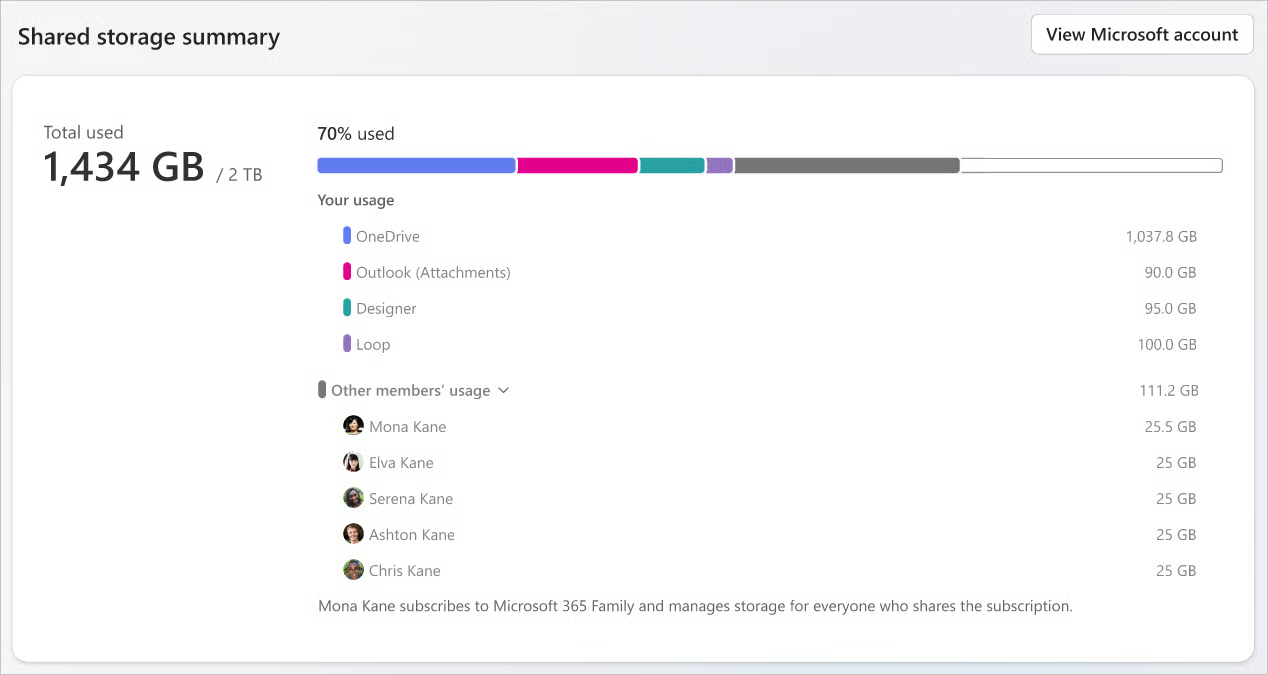
Clearing unnecessary files can help. Microsoft’s cloud storage guidance explains that items in the OneDrive Recycle Bin also count toward storage usage.
Another option is moving older photos and videos to local storage. Google’s Android-to-Windows photo backup feature offers automatic media copying for supported devices, although availability remains limited.
Local files need protection, too. TechRepublic’s Windows 11 Security Cheat Sheet explains safeguards such as BitLocker and device encryption. Important files should also have a separate backup in case a computer fails.
Apple users should check device compatibility before relying on OneDrive for future backups. Microsoft plans to end OneDrive app updates for iOS 18, potentially affecting older iPhones and iPads.
Families needing more capacity can purchase OneDrive storage add-ons, bringing eligible subscriptions to a maximum of 10TB. Microsoft 365 Pro also offers 5TB of shared storage at an additional subscription cost.
A household using 1TB across six accounts may barely notice the change. One storing 4TB faces a different problem. Checking combined usage before renewal will reveal whether the new flexibility is enough or whether it’s time to find more storage.
Read more: Microsoft is also removing eight OneDrive Copilot shortcuts from File Explorer, changing how eligible users access AI-powered file tools in Windows.