


Google is making it easier for Android users to back up photos and videos directly to Windows PCs without relying on cloud storage.
The company has introduced an automatic media backup capability through Google Play services version 26.43, expanding Quick Share beyond manually initiated file transfers. The feature is designed to let supported Android devices copy selected media to Windows computers automatically.
For users managing growing photo and video collections, the update could provide a convenient way to maintain local copies without paying for additional cloud storage. However, device compatibility and the availability of some features remain unclear.
How the feature would work
Google acknowledged the feature on Nov. 2, months after Android Authority first spotted it in an April teardown of Google Play services.
According to Google’s November system services release notes, the feature, listed under the Device Connectivity section of Google Play services version 26.43, allows Android phones to automatically back up photos and videos to Windows PCs using Quick Share.
Notably, AndroidAuthority’s first teardown revealed that the feature promised audio sharing, but per Google’s recent acknowledgment, it appears that won’t be rolling out, at least for now.
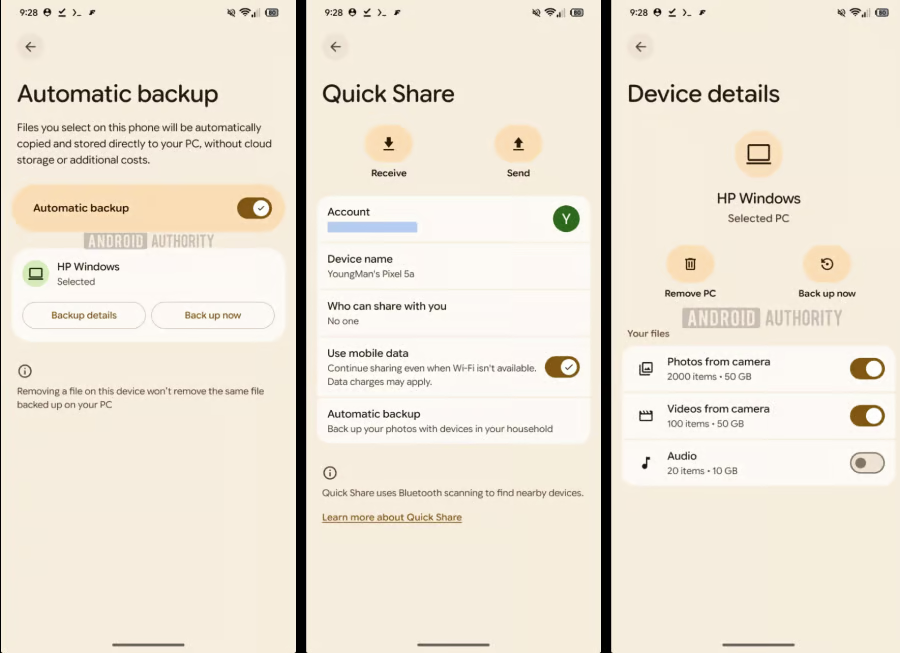
The feature builds on Quick Share’s existing ability to transfer files between nearby devices, but replaces the need for users to initiate every transfer manually.
Based on details Android Authority uncovered during its earlier investigation, users will start the setup process through the Quick Share app on their Windows PCs, and both devices must be signed in to the same Google Account. They must also be on, nearby, and connected to the same local network for automatic transfers to work.
Once configured, users can select the folders they want backed up, and the system will automatically copy them from their Android phones to their Windows computers.
For instance, someone who regularly takes pictures and records videos with their Android phone could have those files copied to their Windows PC without manually selecting and transferring them each time. Users can also start a transfer whenever they want instead of waiting for the scheduled backup.
Unlike Google Photos, which uploads media to Google’s cloud storage infrastructure, Quick Share’s backup feature transfers files directly to the computer. This means users can keep separate copies of their media without buying extra cloud storage or relying on an internet-based backup service.
More Google coverage
- New Google Search AI Mode is ‘Total Reimagining,’ Says CEO Sundar Pichai
- In Major Ruling, Judge Finds Google ‘Willfully Acquired and Maintained Monopoly Power’ Over Digital Ad Market
- Google’s Big Bet on Nuclear Energy: ‘The Race to Power AI-Driven Data Centers is Accelerating’
- Computer History Museum Releases Original AlexNet Code: Why It Matters
Who’s getting access and who isn’t
Android Authority’s earlier teardown found that Samsung smartphones were excluded from automatic backup, and a more recent investigation by the publication also identified exclusions affecting Samsung PCs.
The exclusions are particularly notable given Samsung’s position in the Android ecosystem and its range of Windows laptops. However, Google has not provided a confirmed explanation for the restrictions, leaving it unclear whether they stem from differences in Samsung’s Quick Share implementation, software compatibility, or other technical considerations.
For supported devices, access is expected to follow Google’s usual gradual rollout process. The company has also not announced a complete list of supported devices or regions. Although the feature appears in Google Play services version 26.43, that does not necessarily mean it is immediately available to all eligible users.
Until Google provides more information, users should treat the compatibility details uncovered through earlier software investigations as provisional.
What the update means for users
By automatically copying media to a Windows PC, the feature reduces the need for users to pay for cloud storage just to preserve their growing photo and video collections. It could also appeal to privacy-conscious individuals who would prefer keeping personal media on storage they control.
The feature could also benefit enterprises that issue Android work phones alongside Windows computers.
Enterprises that need to retain certain photos and videos for documentation, operational records, or internal reference could use automatic local backups to keep those files on company computers without necessarily sending them to cloud storage. However, such arrangements would still need appropriate access controls, retention policies, and device security measures.
The update also has some practical limitations. Users need a PC with enough storage to accommodate growing backups, which can become expensive or inconvenient for people with limited storage.
Unlike cloud-based backups, local transfers also do not provide remote access to backed-up files. Users who want continuous remote access may need to set up a remote-access solution, which could require an always-on Windows computer acting as a server.
Whether the feature succeeds will depend on how its intended users weigh these trade-offs.
The feature gives Android users another option for managing their media rather than replacing cloud storage outright. Its usefulness will depend on device compatibility, storage capacity, and how reliably automatic transfers work once the rollout becomes widely available.
More Google news: The company is rolling out a fix for Android Auto connectivity problems affecting some Samsung Galaxy phones running One UI 9, following reports of failed connections, unexpected disconnections, and stuttering after the update.