


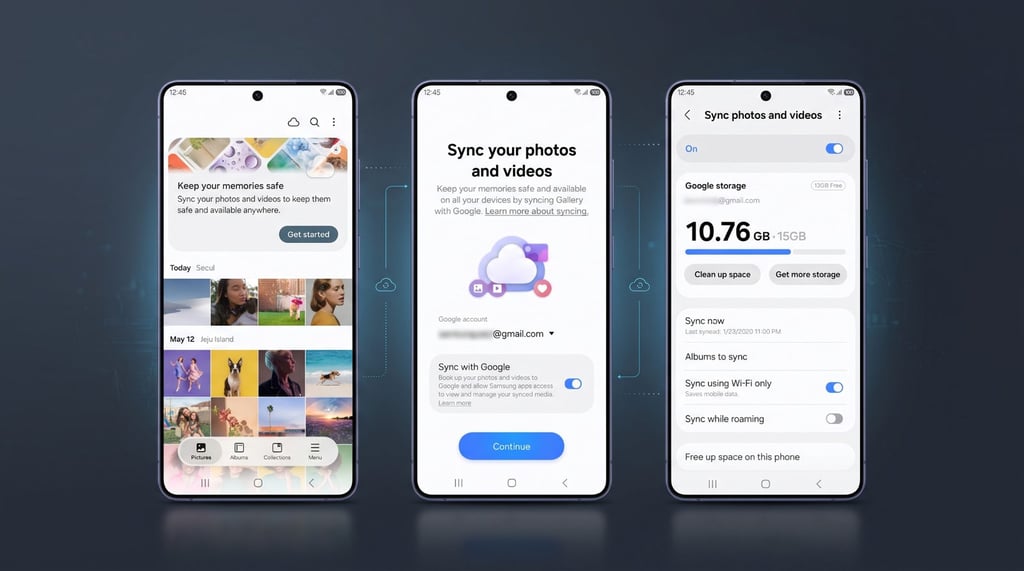
A photo deleted from Samsung Gallery can now disappear from Google Photos, too, even if it was uploaded to the cloud.
Samsung confirmed the behavior in its November 10 announcement of Gallery sync with Google storage. The integration lets supported Galaxy devices access photos and videos across connected phones and tablets, but deletions can also affect cloud copies. It replaces Samsung Gallery’s former OneDrive integration, which ended September 30, 2026.
How photo deletions affect Samsung Gallery and Google Photos
Deleting a synchronized photo or video in Gallery also removes it from linked Google storage and other connected Galaxy devices, according to Samsung’s official announcement. Each device must use the same Samsung and Google accounts with syncing enabled.
Deletion works in both directions. Google’s support documentation confirms that removing a synced item from Google Photos also affects Samsung Gallery. Deleted files can be restored across both apps while they remain in the trash. Permanently deleted items cannot be recovered through the normal restoration process.
Some exceptions apply. Deleting one of several copies in Samsung Gallery may leave the Google Photos version intact. Edited photos can also be stored separately from their originals, allowing one version to remain after the other is deleted.
The integration does not cover a user’s entire Google Photos library. Photos backed up before Gallery Cloud Sync was enabled do not automatically appear in Samsung Gallery.
Google’s separate automatic Android photo backup feature for Windows PCs could provide another way to preserve media on supported devices. However, preliminary findings suggest Samsung phones may be excluded, and wider compatibility remains unconfirmed.
Galaxy eligibility, setup, and storage options
Samsung says Gallery sync is initially available on select Galaxy phones and tablets running One UI 9, based on Android 17. Support is expanding in phases, with availability varying by device and market.
Google currently requires Android 17, a compatible Samsung device, and a personal Google account. Google Workspace and supervised accounts are not supported.
Galaxy owners can check which Samsung phones are receiving One UI 9, although installing Android 17 does not guarantee access to Gallery sync.
On eligible devices, open Gallery and select Menu > Settings > Sync photos and videos, then enable Sync with Google. Samsung’s setup guide explains how to select additional albums. Only the Camera album is selected by default.
TechRepublic’s Android Cheat Sheet also covers Android versions, software updates, and device compatibility.
Samsung’s Free up space feature removes local originals after successful synchronization while preserving cloud copies. Thumbnails remain visible in Gallery, and originals can be downloaded when needed. Users can reclaim device storage without deleting synchronized files.
Gallery sync uses Google account storage shared with Gmail, Google Drive, and Google Photos. Accounts include up to 15 GB free, with additional capacity available through Google One. Media uploaded through Gallery sync retains its original quality, which can consume more storage.
Photos previously synchronized through OneDrive remain accessible through Microsoft’s app or website, but Samsung does not automatically transfer them to Google storage.
Before clearing device storage, Galaxy owners should confirm their photos have finished syncing and use Free up space to retain cloud copies. Deleting a synchronized photo directly from Gallery can remove it from Google Photos as well.
Read more: Owners of older Samsung devices can check which Galaxy phones may miss Android 17 before expecting access to One UI 9 features.