


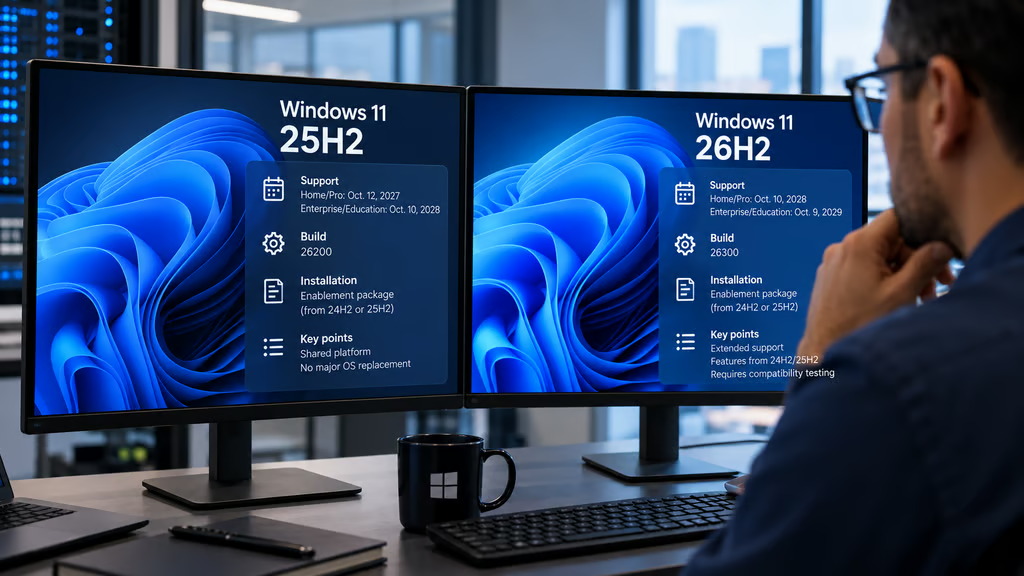
Windows 11 26H2 is available for eligible PCs running 25H2 and 24H2, but upgrading won’t necessarily make those devices faster. For IT administrators, the biggest differences involve support deadlines, installation requirements, and compatibility testing.
Microsoft released 26H2 on Sept. 29, 2026, using servicing technology designed to minimize installation time. The update activates functionality already delivered through cumulative updates, typically requiring one restart.
Windows 11 26H2 vs 25H2: Key differences
Both versions share the same underlying Windows platform, so 26H2 isn’t a major operating system replacement.
Microsoft’s Windows 11 release information identifies 26H2 as build 26300, compared with build 26200 for 25H2.
The main differences are:
- Installation: Eligible 25H2 and 24H2 devices can move to 26H2 through a small enablement package rather than reinstalling Windows.
- Features: Microsoft says 26H2 includes features already announced for 24H2 and 25H2. It isn’t introducing an entirely separate feature set.
- Support: Home and Pro 26H2 receive updates until Oct. 10, 2028, compared with Oct. 12, 2027, for 25H2.
- Enterprise support: Enterprise and Education 26H2 receive updates until Oct. 9, 2029, compared with Oct. 10, 2028, for 25H2.
The upgrade uses enablement package KB5121794. Devices must meet the required cumulative-update prerequisites before installing it.
Microsoft had previously outlined the enablement-package approach, including why eligible devices can complete the transition without a full operating system replacement.
Windows 11 26H1 follows a separate servicing path and isn’t an intermediate upgrade required before 26H2.
Does Windows 11 26H2 perform better?
Independent testing hasn’t established a consistent performance advantage over 25H2.
PC Games Hardware compared application launch times across File Explorer, Calculator, Notepad, and Paint. Most differences were small, although File Explorer took noticeably longer to render in its 26H2 tests.
Memory testing has produced conflicting results.
Windows Latest reported lower memory consumption on an 8GB laptop after upgrading. Other comparisons found little change or slightly higher usage.
These results involve different hardware and Windows builds, so they don’t establish how 26H2 will perform across an enterprise fleet.
Microsoft has also delivered faster app-launch improvements through updates supporting earlier Windows 11 versions. That makes it important to compare fully patched systems rather than attribute every improvement to 26H2.
Organizations should benchmark representative devices running the latest cumulative updates before expecting measurable improvements.
Compatibility, support deadlines, and upgrade recommendations
Microsoft’s 26H2 release-health dashboard provides the current status of known problems and safeguards.
Early reports identified USB Audio Class 1.0 failures, domain-trust problems involving certain Credential Guard configurations, and black screens in some virtual desktop environments.
Microsoft subsequently marked the virtual-desktop issue resolved through the October security update, KB5127648. Administrators should consult the dashboard for the latest status of other issues before deployment.
Separately, a Microsoft Q&A discussion describes Windows Hello PIN failures, mixed-language interfaces, and third-party application problems in managed environments.
Those reports are useful pilot-test scenarios, but they aren’t confirmation that every 26H2 deployment is affected.
Administrators should also test remote access. Recent Remote Desktop failures have affected some enterprise-managed devices with Administrator protection enabled, including systems running 25H2 and 26H2.
Which Windows 11 devices should upgrade first?
The most urgent group is devices running Windows 11 24H2 Home or Pro.
Those editions reached the end of updates on Oct. 13, 2026. Microsoft recommends moving them to a supported version, either 25H2 or 26H2.
For devices already on 25H2, the decision is less urgent. That version remains supported, allowing administrators to validate 26H2 before scheduling a broader rollout.
A practical deployment sequence is:
- Inventory devices: Identify Windows versions, editions, build numbers, and support deadlines.
- Check prerequisites: Confirm cumulative updates, available storage, management policies, and eligibility for the enablement package.
- Pilot representative systems: Include different hardware models, language packs, security configurations, and business-critical applications.
- Test sign-in and connectivity: Validate Windows Hello, domain trust, Credential Guard, VPN connections, USB audio, Remote Desktop, and virtual desktops.
- Expand gradually: Monitor update failures, help desk tickets, application stability, and rollback requirements before approving additional deployment rings.
For managed fleets, Microsoft Intune and Windows Update for Business can help administrators stage the rollout.
The support extension is the clearest immediate benefit of 26H2. Performance improvements remain workload-dependent, and compatibility should be established through testing rather than assumed from the small installation package.
Organizations already running a stable, supported 25H2 environment can schedule the transition around their normal update cycle. Those still operating unsupported 24H2 Home or Pro devices should prioritize restoring security-update coverage.
Also read: Windows 11 VPN issues persist after the October update, leaving some enterprise connections dependent on a temporary workaround.