


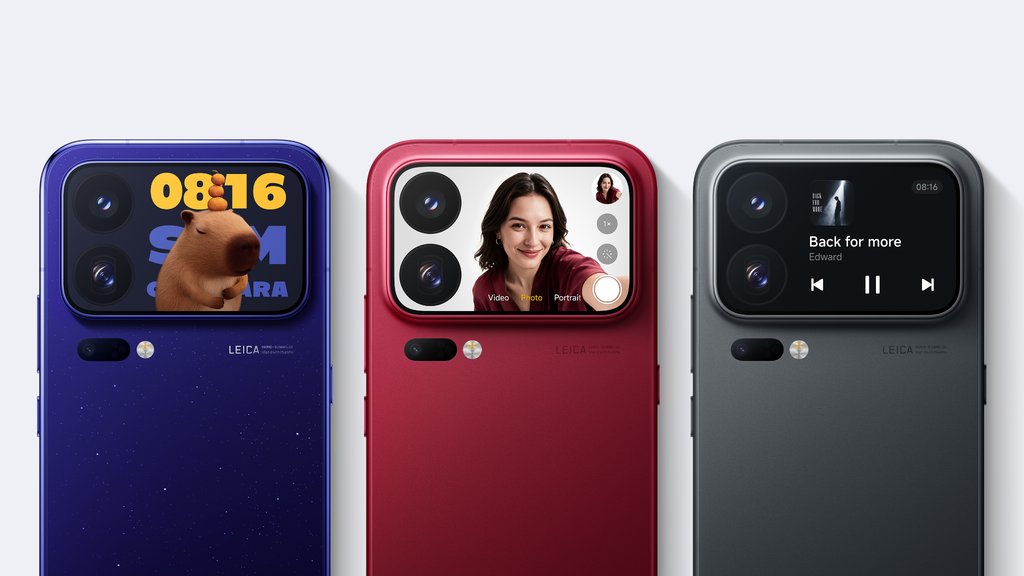
Xiaomi has given its latest phones two screens, but the real party might be happening on the back.
Xiaomi launched the 18 Pro and 18 Pro Max internationally on Nov. 17, following their September debut in China. Both phones come with GenAI Apps for the rear display.
The feature uses generative AI to turn natural-language prompts into lightweight applications that run on the phones’ rear displays. Users can describe what they want and let AI generate the software without writing code themselves. Xiaomi is bringing vibe coding to a screen small enough to sit beside the phone’s rear cameras.
More importantly, the feature gives the secondary display a purpose beyond showing notifications, controlling music, and previewing selfies — functions once used to market rear displays — suggesting Xiaomi wants to redefine what the extra glass is used for.
What GenAI Apps can build
AI on smartphones is familiar territory. Xiaomi’s twist is using it to build small tools for a screen that few developers design for. Xiaomi’s examples include a coin flipper, a reaction-time test, and mini-games. The rear display also supports selected functions from Google Maps, Spotify, and YouTube Music through separate integrations.
How the 18 Pro compares with the 17 Pro
Beyond its AI-generated apps, Xiaomi has packed the 18 Pro with other flagship features.
The camera system pairs a 200MP main sensor with a 200MP periscope telephoto camera offering 3.2x optical zoom and OIS. There’s also a 50MP ultra-wide camera. For video creators, the phone supports Log recording at up to 4K, giving them more flexibility when editing footage.
Other additions include Snapdragon’s latest processor, a dedicated AI button, and a 6,000mAh battery with 90W wired and 50W wireless charging on the international model. Here’s how it compares with its predecessor:
| Feature | Xiaomi 17 Pro | Xiaomi 18 Pro |
|---|---|---|
| Main display | 6.3-inch AMOLED | 6.4-inch AMOLED |
| Rear display | 2.7-inch AMOLED | 2.7-inch AMOLED, GenAI Apps |
| Cameras | 50MP + 50MP + 50MP | 200MP + 200MP + 50MP |
| Processor | Snapdragon 8 Elite Gen 5 | Snapdragon 8 Elite Gen 6 |
| Battery | 6,300mAh, 100W wired | 6,000mAh for EU users, 7,000 for global users, 90W wired |
| Software | HyperOS 3 | HyperOS 4, Privacy Display |
The international 18 Pro has a smaller battery and slower wired charging than the China-market 17 Pro, whose telephoto lens also reaches farther at 5× versus roughly 3.2×. The international 18 Pro Max has a 7,050mAh battery, 100W wired charging, and a larger 2.9-inch rear display.
Still has work to do
As interesting as Xiaomi’s idea sounds, putting AI in charge of building applications doesn’t guarantee that users will get what they ask for.
In Engadget’s hands-on test, generating and refining widgets felt slow. One widget kept displaying a counter even after repeated requests to remove it. Xiaomi also caps how often users can generate apps each month. Its product page gives no specific number and says the limit can change.
What to check before using GenAI Apps on a work phone
Making a widget requires an internet connection. Xiaomi told TechRadar that the finished widgets currently can’t access the internet, third-party apps, or most Xiaomi apps. Xiaomi’s product page gives no details on where prompts are processed or how long they’re kept.
- Start with sample data. Use a generic countdown or checklist. Keep customer names, internal URLs, and other work details out of prompts until your organization can verify how Xiaomi handles them.
- Check the rear screen while the phone is locked. Send a test work notification and see whether the display shows the sender, message preview, or both. Test this separately from widget access because the rear screen also displays notifications from compatible apps.
- Test the controls on an enrolled device. Check whether GenAI Apps can be switched off separately from other rear-screen functions and whether your device policy can enforce that setting. If a widget is meant for use away from Wi-Fi or mobile data, test the finished widget in airplane mode before relying on it.
Read more: If you’re weighing a move between Xiaomi and Samsung, compare how HyperOS 4 and One UI 9 handle AI features, security, and moving your data to a new phone.