


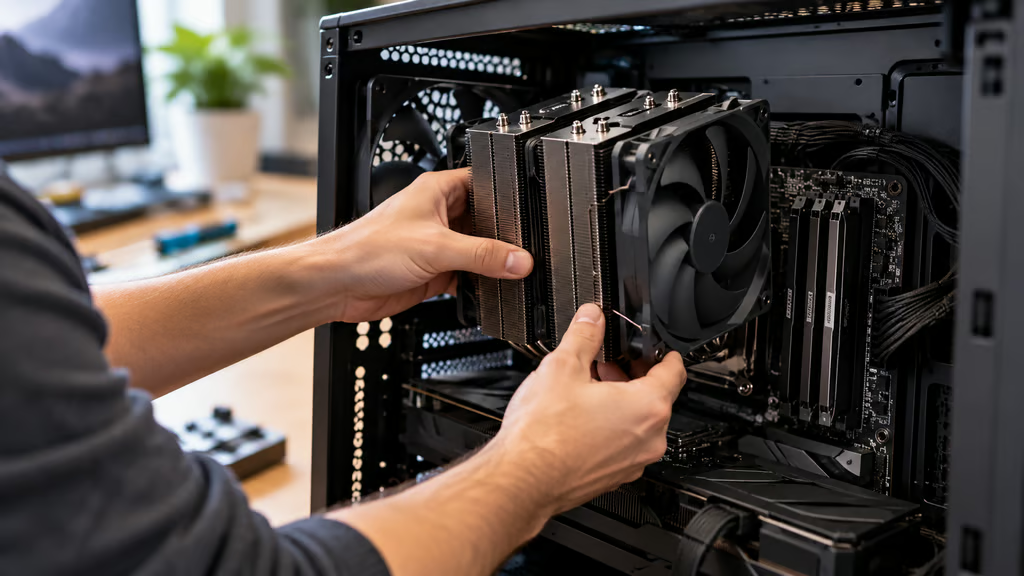
A good CPU cooler needs to keep your processor from throttling under the workloads you actually run while fitting the rest of the system without creating new problems. Socket support comes first, but case clearance, RAM height, radiator space, noise, installation, and price can all change the buying decision.
The ARCTIC Liquid Freezer III Pro 360 is our best overall pick because its combination of high-end thermal performance, strong noise-normalized results, broad mainstream socket support, and aggressive pricing is difficult to match. Thermalright and Noctua offer the strongest air-cooling options here, while Corsair and be quiet! make more sense for buyers who want ecosystem integration or a refillable AIO.
Current Ryzen 9000 systems use AM5, while Intel’s Core Ultra 200 desktop processors use LGA1851. Buyers building around Ryzen should also check the exact socket, board layout, and BIOS support of their AM5 motherboard before ordering a cooler.
- Best CPU coolers at a glance
- How we compared
- 1. ARCTIC Liquid Freezer III Pro 360: Best overall
- 2. Thermalright Phantom Spirit 120 EVO: Best value air cooler
- 3. Noctua NH-D15 G2: Best premium air cooler
- 4. Corsair iCUE LINK TITAN II 360 RX RGB: Best for iCUE builds
- 5. be quiet! Silent Loop 3 360mm: Best refillable AIO
- Air vs AIO: Which CPU cooler should you buy?
- Which CPU cooler should you buy?
Best CPU coolers at a glance
| Pick | CPU cooler | Type | Price | AM5 / LGA1851 | Main fit check |
|---|---|---|---|---|---|
| Best overall | ARCTIC Liquid Freezer III Pro 360 | 360 mm AIO | $99.98 | ✔ / ✔ | 398 x 120 x 63 mm radiator-and-fan assembly |
| Best value air cooler | Thermalright Phantom Spirit 120 EVO | Dual-tower air | $46.90 | ✔ / ✔ | 157 mm cooler height |
| Best premium air cooler | Noctua NH-D15 G2 | Dual-tower air | $149.90 | ✔ / ✔ | 168 mm height; 32 mm standard RAM clearance |
| Best for iCUE builds | Corsair iCUE LINK TITAN II 360 RX RGB | 360 mm AIO | $179.99 | ✔ / ✔ | 394 x 120 x 27 mm radiator + 26 mm fan frame |
| Best refillable AIO | be quiet! Silent Loop 3 360mm | 360 mm AIO | $139.90 | ✔ / ✔ | 397 x 120 x 52 mm including fans |
ARCTIC and Corsair use current manufacturer pricing. Noctua uses its $149.90 US MSRP. Thermalright and be quiet! reflect current US retail pricing. Retailer prices may differ.
How we compared
We focused on the factors that most directly affect the buying decision:
- Cooling: sustained thermal performance and noise-normalized results from independent testing.
- Compatibility: current AM5 and LGA1851 support, cooler height, radiator dimensions, and RAM clearance where relevant.
- Noise: performance at controlled noise levels rather than manufacturer noise ratings alone.
- Installation: mounting hardware, case-space requirements, cabling, and other setup considerations.
- Features: software control, lighting, refillability, fan configuration, and warranty where they materially affect ownership.
- Price and value: current pricing for the exact model evaluated here.
Manufacturer product pages were used for current dimensions, socket support, included hardware, and pricing where available. Independent thermal and acoustic testing was used to judge performance. Results from different test benches are not treated as direct head-to-head measurements.
1. ARCTIC Liquid Freezer III Pro 360: Best overall
The ARCTIC Liquid Freezer III Pro 360 pairs a 38 mm-thick radiator with three 120 mm P12 Pro fans, giving the assembled radiator and fan section a total thickness of about 63 mm.
That extra thickness is the first compatibility check. The cooler supports AM5, AM4, LGA1851, and LGA1700, but a case that accepts an ordinary 360 mm radiator does not automatically have enough clearance for this thicker assembly. The radiator itself measures 398 x 120 x 38 mm.
ARCTIC includes separate mounting hardware for AMD and Intel. Intel installation uses the supplied contact frame, which makes setup more involved than a conventional mounting bracket. The cooler also carries a six-year warranty.
Performance is the reason to accept those fit and installation requirements. Hardware Busters recorded high performance on both Intel and AMD platforms, including strong noise-normalized results. Its testing also found that the high-speed P12 Pro fans can become loud as PWM levels rise, so running the cooler flat out is unnecessary for many systems.
The Liquid Freezer III Pro 360 can be controlled through one combined PWM connection or with separate controls for the pump, radiator fans, and VRM fan.
Choose the ARCTIC Liquid Freezer III Pro 360 if: You want maximum cooling performance from a 360 mm AIO and your case has enough space for its unusually thick radiator-and-fan assembly.
2. Thermalright Phantom Spirit 120 EVO: Best value air cooler
The Thermalright Phantom Spirit 120 EVO is the simplest recommendation here for buyers who want strong cooling without moving to liquid cooling.
Its dual-tower heatsink uses seven 6 mm heatpipes and two 120 mm TL-K12 fans. The complete heatsink stands 157 mm tall, so case CPU-cooler clearance needs to exceed that figure.
Thermalright currently lists support for AM5, AM4, LGA1851, LGA1700, and several older Intel sockets. Tall memory also deserves attention. Tom’s Hardware found that modules around 42 mm tall fit normally, while taller DIMMs may require moving the front fan upward and increasing the effective cooler height.
The Tom’s Hardware review recorded 238W cooled in its unrestricted Core i7-13700K test. More usefully for noise-conscious buyers, the Phantom Spirit 120 EVO cooled 232W in the publication’s 38.2 dBA noise-normalized test, the best air-cooler result in that test set.
Maximum fan speed is considerably louder, so there is little reason to run the fans at full output in a typical system.
Choose the Thermalright Phantom Spirit 120 EVO if: You want high-end air-cooling performance at a much lower price than the premium air coolers and 360 mm AIOs here.
3. Noctua NH-D15 G2: Best premium air cooler
The standard Noctua NH-D15 G2 is a large dual-tower air cooler built around eight heatpipes and two 140 mm NF-A14x25r G2 fans.
It supports AM5, AM4, LGA1851, LGA1700, and several older Intel sockets. Noctua rates the complete cooler at 168 mm tall and backs it with a six-year warranty.
RAM clearance needs more attention. In its standard dual-fan configuration, the NH-D15 G2 allows 32 mm beneath the front fan. Moving that fan upward creates space for taller DDR5 RAM, but every millimeter added to RAM clearance also adds roughly the same amount to the cooler’s installed height. A case that barely clears 168 mm leaves no useful room to raise the fan.
Noctua also sells HBC and LBC versions with different cold-plate curvature, but the standard NH-D15 G2 is the general-purpose version and avoids making the buyer choose a specialized base design without a specific reason.
GamersNexus found the NH-D15 G2 to be one of the strongest-performing air coolers it tested. Its main weakness is value: less expensive air coolers can get close to its cooling performance, and strong liquid coolers can exceed it for similar money.
Choose the Noctua NH-D15 G2 if: You want premium air cooling, a long warranty, and Noctua’s mounting and support ecosystem, and your case and memory have enough physical clearance.
4. Corsair iCUE LINK TITAN II 360 RX RGB: Best for iCUE builds
The Corsair iCUE LINK TITAN II 360 RX RGB is a better fit for buyers who want cooling, lighting, and fan control inside Corsair’s iCUE LINK ecosystem.
This exact model, SKU CW-9061037-WW, supports AM5, AM4, LGA1851, and LGA1700. Its RX360 II Unified Frame RGB fan assembly arrives as a single 360 mm frame, and Corsair provides a six-year warranty.
The radiator measures 394 x 120 x 27 mm, while the unified fan frame is 26 mm thick. Builders should account for both when checking case clearance rather than relying only on a case’s generic “360 mm radiator” support.
The cooler uses Corsair’s FlowDrive 2 pump, pre-applied XTM70 thermal paste, and iCUE LINK connectivity for fan and lighting control. That streamlined cabling is useful in a build already using compatible Corsair components, although it adds less value if the rest of the system sits outside the iCUE LINK ecosystem.
In Igor’s Lab testing with a Ryzen 9 7900X, the TITAN II recorded a 61.8-degree Celsius average delta at a 200W load with the radiator fans noise-normalized to 40 dBA. Running the radiator fans at maximum speed reduced that average delta by only 0.8 degree while raising measured noise to 46.6 dBA.
That small gain makes a tuned fan profile more sensible than simply running the cooler at maximum speed.
Choose the Corsair iCUE LINK TITAN II 360 RX RGB if: You already use or plan to use iCUE LINK hardware and want a modern 360 mm AIO with integrated RGB and centralized control.
5. be quiet! Silent Loop 3 360mm: Best refillable AIO
The be quiet! Silent Loop 3 360mm takes a more traditional approach to premium liquid cooling.
Its radiator-and-fan assembly measures 397 x 120 x 52 mm, with three Silent Wings 4 120 mm PWM high-speed fans. Socket support includes AM5, AM4, LGA1851, LGA1700, TR5, and TR4.
Unlike most sealed AIOs, the Silent Loop 3 includes an accessible refill port and a bottle of coolant. That gives owners a way to top up the loop later instead of treating coolant loss over time as something they cannot address.
The tubes measure 400 mm, and the cooler carries a three-year manufacturer warranty.
Hardware Canucks tested the 360 mm Silent Loop 3 across the Ryzen 7 9800X3D, Ryzen 9 9950X, and Intel Core Ultra 9 285K, including pump-noise and normalized-fan testing.
Choose the be quiet! Silent Loop 3 360mm if: You want a 360 mm AIO with a refillable design, broad AMD and Intel socket support, and conventional motherboard-based fan control rather than a larger software ecosystem.
Air vs AIO: Which CPU cooler should you buy?
Air cooling keeps the hardware simple. The Phantom Spirit 120 EVO and NH-D15 G2 have no pump or radiator to install, and either can handle demanding desktop CPUs when the case provides enough airflow and physical clearance.
Their main constraint is space around the CPU socket. Tall dual-tower heatsinks can interfere with memory or require the front fan to be raised, while the cooler itself must fit beneath the case side panel.
AIOs move most of that bulk to the radiator. That can improve clearance around the CPU socket and provide additional cooling headroom under sustained high loads, but the case needs the correct radiator mounting position and enough thickness clearance.
Front-mounted radiators can also reduce room for long graphics cards. Check the case manufacturer’s clearance figures with the radiator and fans installed rather than relying only on the chassis’s maximum GPU-length specification.
Socket support should be checked against the exact cooler model, not the product family. AM5 and LGA1851 support are standard across all five picks here, but mounting hardware, installation steps, and physical clearance differ substantially.
Which CPU cooler should you buy?
The ARCTIC Liquid Freezer III Pro 360 is the best overall choice if maximum thermal performance is the priority and your case can fit its thick 63 mm radiator-and-fan assembly.
The Thermalright Phantom Spirit 120 EVO is the better value for most air-cooled builds. Its independent performance is unusually strong for its price, but confirm the 157 mm height and memory clearance first.
Choose the Noctua NH-D15 G2 if you specifically want a premium air cooler, long warranty, and Noctua’s mounting ecosystem and are willing to pay substantially more.
The Corsair iCUE LINK TITAN II 360 RX RGB makes the most sense in a Corsair-heavy build where its integrated control and simplified cabling can actually be used.
Pick the be quiet! Silent Loop 3 360mm if you want a refillable 360 mm AIO with broad socket compatibility and conventional control.
Whichever cooler you choose, verify the exact CPU socket, case cooler or radiator clearance, RAM height, and radiator position before ordering. Those measurements decide whether a cooler can be installed correctly regardless of how well it performs on a test bench.
Also read: Cooler clearance starts with the chassis, so compare our best PC cases for 2026 before finalizing the rest of the build.