Discussion Locked
Unofficial Microsoft Office Stuff
0 helpful
326 replies
Closed to new repliesThis discussion is closed. It stays readable, but it takes no new replies.
This is page 2 of the discussion. Read the opening post

After Hours
This is page 2 of the discussion. Read the opening post
by dklippert
What those little graphics mean
There's not much room in an Outlook icon to communicate information.
Robert Sparnaaij, MVP-Outlook, has put together a legend of these tiny pictures with their meanings.
Such as:
What Do The Icons Mean?
For more information see his web site:
How to Outlook
See all Topics
by dklippert
Simple exchange
To transfer data from an Access query or table in another Office program, such as Word, there's no need to manually export the data.
You can also select a whole table, go to Edit>Copy. Switch to Word or Excel and Paste.
It works in the other direction too. Select some Excel data. Switch to Access.
While viewing the Tables Objects, Paste the Excel data. It will form a new table.
See all Topics
by dklippert
ADDENDUM
Best of Clementine
Not lost and gone
Why write new words and lyrics? They're interchangeable.
" You've heard it sung around the campfires! You've lifted your voice to its haunting melody countless times! Now K-Smel records introduces an all-new collection... The Best Of Clementine! "
The words to Clementine can be sung easily to the tune of certain songs
By extension, the words to
by dklippert
Album creations
PowerPoint can be used to produce a photo array. Put the show on DVD's or on the web.
Here is a list of 100 tutorials:
PowerPoint 2003 and Photo Album links
Also:
"Create slideshows using your digital photos. With a single click, you can touch-up, crop, or rotate pictures. Add stunning special effects, soundtracks, and your own voice narration to your photo stories. Then, personalize them with titles and captions. Small file sizes make it easy to send your photo stories in an e-mail. Watch them on your TV, a computer, or a Windows Mobile-based portable device."
For earlier versions:
This add-in program makes it easy and fast to get pictures from your hard disk drive, scanner, or digital camera into a Microsoft PowerPoint presentation.
Creating Photo Albums in PowerPoint 2000
Also:
[Edited entry from 1/24/2005]
See all Topics
by dklippert
WINDOWS
Welcome or Not
Choose not to
If you're a sole user in a home environment, why slow yourself down with a logon screen?
To turn the Welcome screen on or off
You must have a computer administrator account on a computer that is a member of a workgroup or is a stand-alone computer to turn on or turn off the Use the Welcome screen feature. Logging on at the Welcome screen is not available
by dklippert
For all the world to see
A photo gallery is a Web page that contains a collection of photos arranged in a specific layout. Microsoft FrontPage provides four different layouts that you can use to arrange your graphics.

PowerPoint:
"You can use the Web to give others access to your presentation by publishing it to a Web server or another computer that is accessible to those you want to view the presentation with a Web browser. When you publish a presentation, a copy of it is created in a file location you choose. You can publish from a presentation that is in .ppt format or that is saved as a Web page or Single File Web page."

See all Topics
by dklippert
EXCEL
Excel 12
New Limits
Here are a few of the major changes in Excel 12 (Vista?).
The total number of available columns in Excel
Old Limit: 256 (2^8)
New Limit: 16k (2^14)
The total number of available rows in Excel
Old Limit: 64k (2^16)
New Limit: 1M (2^20)
Number of unique colors allowed a single workbook
Old Limit: 56 (indexed color)
New Limit: 4.3 billion (32-bit color)
Number of
by dklippert
Top and bottom
If you need to look at more than one part of a document at once, consider splitting the window.
To split the current window, just go to Window>Split from the main menu.
Another way is to use the splitter control between the file tab channel and the scroll bar for the doc.

To create new windows for the same document, just go to Window>New Window and create as many views on the same document as you would like.
WebJunction.org:
Word Split Window
(Publisher: The Bill and Melinda Gates Foundation)
Also:
Dawn Ontario, Disabled Women's Network:
Split Screen Feature - Microsoft Word
See all
Topics
by dklippert
Why let the sleaze balls have all the fun?
We've traded garbage cans full of unsolicited mail for full blocked or deleted bins.
Here is a site that has information on stopping the bad guys, including information from their perspective.
"A number of far-sighted people have been saving all their spam and have put it online. This is a valuable resource for anyone writing Bayesian filters."
"The links on this page are to companies that provide the infrastructure of spam. It's fairly disgusting reading, but a quick scan will give you some ideas about filtering."
"These articles about spammers are very helpful in understanding how to stop spam. For example, complaining to the ISPs that spammers use does seem to inconvenience them.
And best of all, so does filtering. In one article below, a spammer complains that filters have increased his costs 1,000-fold. That's exactly what we want to hear. New laws and policies may stop spam. Making it unprofitable certainly will."
PaulGraham.com:
Anti Spam
(Paul Graham is an essayist, programmer, and programming language designer)
See all Topics
by dklippert
Print your own
There are a variety of barcodes. POSTNET is used for mailings.
Word includes a POSTNET field:
{ BARCODE \u "LiteralText" or Bookmark \b [Switches ] }
"LiteralText" or Bookmark
Delivery address and ZIP Code. When followed by the \b switch, a bookmark can replace LiteralText.
For example, the bookmark "ENV_ZIPCODE1" represents the address in the active document; it's inserted by the Envelopes and Labels command.
\b
When preceded by a bookmark, uses the ZIP Code information from the address defined by the bookmark.
\f "letter"
Inserts a Facing Identification Mark (FIM), specified by letter: "A" inserts a courtesy reply mark; "C" inserts a business reply mark. "A" is inserted if you select the FIM-A Courtesy Reply Mail check box in the Envelope Options dialog box. To print a business reply mark, display field codes, and change the letter to "C."
\u
Identifies the bar code as a U.S. postal address.
POSTNET delivery point bar codes consist of 62 bars broken down as follows:
For other applications, you will have to either buy a new font, or perform a mail merge with Word.
OfficeBarcode.com
Providing barcode tutorials, plug-ins, FAQs, integration and printing solutions for Microsoft Access, Excel, Word, FrontPage and other Office applications.
List of sites that sell or give away barcode fonts
BarCode 1 Font Page
(Look for POSTNET)
Barcodes for Access or other applications such as Word.
(Barcode clock)
[Edited entry from 1/22/2004]
See all Topics
by dklippert
Practice, Practice
"With the TypingMaster Online Test you can assess your personal typing skills in minutes for free - within your web browser.
Based on the short text typing sample, this Java™ applet will estimate your typing skills including typing speed, accuracy and net speed. You can also receive test results directly to your email address."
MrKent.com
Typing and Ten-key Tests
Also:
CalculatorCat.com
Typing test
Hints and other links.
[Edited entry from 1/15/2004]
See all Topics
by dklippert
Get to the point
Too many PowerPoint shows consist of a massive deck of slides. The audience leaves either overwhelmed or wheeled out unconscious from the overload.
Elliot Massie is the head of the MASIE Center is an international e-lab and ThinkTank located in Saratoga Springs, NY.
He is hosting a seminar called
Learning 2005
One feature of the sessions is a presenter's limit of only 1 page.
Think about this limitation the next time you are asked to lead a meeting.
"Every session at Learning 2005 will be limited to ONE PAGE (a slide, a poster, a mind-map, a single question or even just one word!)
Each facilitator of a case study, discussion, conversation or Radar Screen session will be asked to create a GREAT "1 Pager". It might be a single question such as,
"What is the impact of increased Compliance on Quality and Budget for Training?"
Or, it might be a mindmap of several concepts. Or, a graphic. Or, a simple list of Do's or Don'ts. But, it will just be a "1 Pager"!
Most of our rooms will not be darkened to feature the LCD Projector. Instead, these will be posted on LearningWiki, the open wiki/blog software for the event. A facilitator can link to lots of other resources from their on-line 1 Pager. (And you can add your own ideas, questions or resources.) Many of our session leaders will provide a complete set of text and audio materials (PodCasts) for your optional review prior to the session."
See all
Topics
by dklippert
Free color control
Continuing with its program to reward and verify legal Windows installations, Microsoft is offering another free gadget for the good guys. ICC profiles can be used to match the colors on your monitor to the colors used by your printer.
Microsoft Color Control Panel Applet
The Microsoft Color Control Panel Applet adds a new 'Color' item to the Windows control panel, providing a single place to view and edit color management settings in Windows XP. Using it, you can install and uninstall color profiles, change color profile associations for displays, printers and scanners, view detailed properties for color profiles (including a 3D rendering of the color space gamut), and rename color profiles, keeping the filenames and "internal" names consistent.

International Color Consortium
The ICC was established in 1993 by eight industry vendors for the purpose of creating, promoting and encouraging the standardization and evolution of an open, vendor-neutral, cross-platform color management system architecture and components.
The intent of the International Color Consortium (R) profile format is to provide a cross-platform device profile format. Device profiles can be used to translate color data created on one device into another device's native color space. It allows users to be sure that their image will retain its color fidelity when moved between systems and applications.

Adobe Gamma is installed when Photoshop is loaded.
Color management and color science: Introduction
by Norman Koren
Printer Profiles for sale by Digital Domain Inc.
Ian Lyons
See all
Topics
by dklippert
Move on
If you have an old site that people still address, or a web page that has been moved, see this code and the explanations.
<html><head>
<meta http-equiv="REFRESH" content="3; URL=http://WWW.MiniByteTech.com">
<head><body bgcolor="#FFFFFF" text="#000000">
The new location for this web site is WWW.MiniByteTech.com! You will automatically be redirected in 3 seconds. If your browser doesn't automatically load, click <a href="http://WWW.MiniByteTech.com">HERE</a>.
</body>
</htmlThe operative line is:
<meta http-equiv="REFRESH" content="3; URL=http://WWW.MiniByteTech.com">The value of content is in seconds.
Macalester College St. Paul, MN
How to redirect a web page request
PCMag.com:
Routing Your Web Site Visitors
Help2Go.com:
Redirecting a Web page
ISiteBuild.com:
How to Redirect a Web Page Using a 301 Redirect
WebConfs.com:
Redirect Checker
This tools help you determine if the redirect you have created is Search Engine Friendly.
See all Topics
by dklippert
EXCEL
Graph Data and Shapes
Statistical collection
Betty C Jung has put together a serious collection of tutorials, links, and data sources.
Here are some of the topics:
Charting Data
Data Presentation
Cumulative Frequencies
Fishbone Diagram
Flowcharts
Frequency Distributions
Gantt; PERT Charts
Graphing With Excel
Analyzing and Plotting Data with Excel
Organizational Charts/Mapping
Social
by dklippert
Collection of Word explanations
Shauna Kelly is a Microsoft Word MVP.
She has compiled a gathering of important Word how to's and whys.
For new users of Microsoft Word
Basic concepts - Introduction
Styles in Microsoft Word
Tips for understanding styles
Formatting
How the Styles and Formatting pane works
Numbering, Bullets, Headings, Outlines
How to control bullets
Templates
What is the relationship between a Word document and its template?
Layout
How to keep a figure on the same page as its caption
Sharing Microsoft Word documents
What happens when I send my document to someone else?
Making the most of Word in your business:
Microsoft Word FAQ
See all Topics
by dklippert
Quote
"Architecture is a plant's first defense. Once a caterpillar begins to eat, compounds in its saliva can be recognized by the leaf as a form of attack. Whang, whang, whang. The entire plant goes on alert. A hormonal burst starts a second defense system, a counter attack that may include rushing newly produced toxins to the damaged leaf, as well as compounds that slow a caterpillar's ability to digest the plant as food."
About the Author
Sharman Apt Russell teaches writing at Western New Mexico University. She is also the author of Anatomy of a Rose, Kill the Cowboy and Songs of the Fluteplayer.
She has a unique voice. Inherently complex topics are made enjoyable.
Book Description
From the beastly horned caterpillar, whose blood helps it count time, to the peacock butterfly, with wings that hiss like a snake, Russell traces the butterflies through their life cycles, exploring the creatures' own obsessions with eating, mating, and migrating. In this way, she reveals the logic behind our endless fascination with butterflies as well as the driving passion of such legendary collectors as the tragic Eleanor Glanville, whose children declared her mad because of her compulsive butterfly collecting, and the brilliant Henry Walter Bates, whose collections from the Amazon in 1858 helped develop his theory of mimicry in nature. Russell also takes us inside some of the world's most prestigious natural history museums, where scientists painstakingly catalogue and categorize new species of Lepidoptera, hoping to shed light on insect genetics and evolution.

By Sharman Apt Russell
ISBN 0-7382-0699-7
Perseus Publishing 2003
Also see:
The North American Butterfly Association (NABA)
and,
AmazingButterflies.com:
A Talk with Sharman Apt Russell
[Edited entry from 1/29/2004]
See all Topics
by dklippert
Logon, Logoff, Startup and Shutdown Status Messages
To turn these off:
Start Regedit
Go to
HKEY_LOCAL_MACHINE\SOFTWARE\Microsoft\Windows\CurrentVersion\policies\system
If it is not already there, create a DWORD value named DisableStatusMessages
Give it a value of 1
To turn on:
Locate and then click the following registry key:
HKEY_LOCAL_MACHINE\SOFTWARE\Microsoft\Windows\CurrentVersion\Policies\System
On the Edit menu, point to New, and then click DWORD Value.
Type verbosestatus, and then press ENTER.
Double-click the new key that you created, type 1 in the Value data box, and then click OK.
Quit Registry Editor.
NOTE: Windows does not display status messages if the following key is present and the value is set to 1:
HKEY_LOCAL_MACHINE\SOFTWARE\Microsoft\Windows\CurrentVersion\Policies\System\DisableStatusMessages
[Edited entry from 1/17/2004]
See all Topics
by dklippert
The future came back
Why speculate about the future, when we've already been visited by a representative?
"A tale that disturbed me, concerned me, made me wonder if our world as we know it has less than 15 years left.
It is the tale of John Titor, a self-proclaimed time traveler from the year 2036.
Okay, it sounds crazy. It's not crazy, though . . .it's simply a hoax. It's a compelling hoax, so I decided to write my take on it. After some initial 'what if' excitement about it, the reality set in that this wasn't what it appeared to be. In this piece, I hope to prove relatively clearly that his claims are false both in theory and in fact. He seemed to know enough about physics to pass amongst laymen, but unfortunately he skipped philosophy and economics while he was reading all those physics books.
Since this story just won't seem to die and there is evidence that the same perpetrator is now claiming to be an alien on various boards across the web, I felt it was worth sitting down and analyzing."
Tackling John Titor, Time Traveler

Wikipedia:
John Titor
"John Titor was the name of a purported time traveler from the year 2036. He posted on several time travel-related Internet bulletin boards during 2000/2001, making many vague and seemingly falsifiable predictions about events in the near future and giving an explicit, detailed account of his supposed native time period. Whether or not John Titor was a hoax is a topic of controversy on web-based paranormal discussion boards."
"Someone using the assumed name of John Titor and claiming to be a soldier on a mission from 2036 presented a considerable amount of information on the Web beginning around November 2000 about his mission and time travel machine, his perspective on our society, how our society is going wrong, and how society as we know it will end in a very short but massive global nuclear war in 2015. He's gone now, back to 2036 he said he was going in his last posting on March 24, 2001, and the threads he left across the Web in his five months with us have been slowly evaporating since then."
John Titor Times
A couple of future reports:
The reason the job of President was split into an office of 5 has 4 main reasons. With 5 (presidents), foreign policy is more consistent, power shifting between parties has less of an impact on the overall government, individual strengths between presidents add to the strength of the overall office, and one president is elected for each major area in the United States.
What is the extent of Presidential power in 2036?
The office of President is far more diluted and decentralized than it is here. The powers of the national government are more defined and reside more at the county and state level.
AboveTopSecret.com:
"Although many find it easy to dismiss all this as either science fiction or an elaborate extended hoax, there are those who still read his information and agree that there is something very troubling about John Titor and what he had to say."
Answers.com:
John Titor
" He claimed his time machine — a "C204 time displacement" machine-was created by General Electric. Supposedly, he transported it in a standard motor vehicle (a black, model-year 1966 Chevrolet Corvette Convertible shown in the photographs he provided), and the car also served as his vessel whilst traveling through time (it remained stationary throughout with the engine off). He claimed that the public is fully aware of time travel in his time period, although the extreme skeptics of his day do not believe it exists."
See all Topics
by dklippert
As part of a series on Identity Protection Resources, PayPal has a section on Spoofing or Phishing.
"Many spoof emails look very real. While there are some telltale signs, it can often be difficult to identify fake emails. Whenever you get an email about your PayPal account, the safest and easiest course of action is to open your browser and log in to your PayPal account directly without clicking any links in the email.
Warning signs that an email about your PayPal account are fake include a generic greeting, a false sense of urgency, and links that don't include "https://www.paypal.com" immediately before the first "/".
See all Topics
by dklippert
Add, subtract, convert
Another free prize offered by Microsoft to reward users of legitimate Windows XP, is a neat calculator.
Besides all of the features of the built in calculator, both basic and scientific, this tool converts measurements and currency.
Microsoft Calculator Plus download.

See all Topics
by dklippert
An overview
One of the reasons the Web has expanded so rapidly is the ease of writing simple HTML.
When you want to add more bells and sirens, FrontPage has some built in tools to ease the process.
"In the early 1990s, Web sites were simple. Basic HTML allowed programmers to design sites that relayed basic information to Internet users but that could do little else.
Today, Web sites are often sophisticated and complex. Rather than a static place to present information, Web sites frequently act like business partners, performing complex tasks that can help run and even improve a business or personal endeavor.
To take full advantage of a Web site and truly make it work for you, you need professional coding tools. Microsoft Office FrontPage 2003 provides several new, powerful coding tools that will help you to create dynamic, interactive sites that can do more for you.FrontPage 2003 coding tools can help you to generate clean, efficient code, while also giving you more control over the code. These tools can also help you to increase and apply your knowledge of coding languages.
This article will introduce you to the FrontPage 2003 coding tools and show you how you can use them to code faster and more accurately."
Pump up your Web site
with coding tools
See all Topics
by dklippert
As part of a series on Identity Protection Resources, PayPal has a section on Spoofing or Phishing.
"Many spoof emails look very real. While there are some telltale signs, it can often be difficult to identify fake emails. Whenever you get an email about your PayPal account, the safest and easiest course of action is to open your browser and log in to your PayPal account directly without clicking any links in the email.
Warning signs that an email about your PayPal account are fake include a generic greeting, a false sense of urgency, and links that don't include "https://www.paypal.com" immediately before the first "/".
See all Topics
by dklippert
Add, subtract, convert
Another free prize offered by Microsoft to reward users of legitimate Windows XP, is a neat calculator.
Besides all of the features of the built in calculator, both basic and scientific, this tool converts measurements and currency.
Microsoft Calculator Plus
download.
See all
Topics
by dklippert
An overview
One of the reasons the Web has expanded so rapidly is the ease of writing simple HTML.
When you want to add more bells and sirens, FrontPage has some built in tools to ease the process.
"In the early 1990s, Web sites were simple. Basic HTML allowed programmers to design sites that relayed basic information to Internet users but that could do little else.
Today, Web sites are often sophisticated and complex. Rather than a static place to present information, Web sites frequently act like business partners, performing complex tasks that can help run and even improve a business or personal endeavor.
To take full advantage of a Web site and truly make it work for you, you need professional coding tools. Microsoft Office FrontPage 2003 provides several new, powerful coding tools that will help you to create dynamic, interactive sites that can do more for you.FrontPage 2003 coding tools can help you to generate clean, efficient code, while also giving you more control over the code. These tools can also help you to increase and apply your knowledge of coding languages.
This article will introduce you to the FrontPage 2003 coding tools and show you how you can use them to code faster and more accurately."
with coding tools
See all
Topics
by dklippert
Make it work and look good
Timothy Miller uses the nom de screen of "Jethro" (Moses' Father-in-Law).
His SpyJournal.biz site/blog gives some tips on how to present an Excel solution
Design and layout
One of the easiest ways to set up spreadsheets that calculate or generate results that need to be reported is to separate the function from the form. Just like a shiny exterior on a car hides the internal engine and wiring. I always create my reports and front end menus to look good and generate results and calculations in more functional sheets.
Hiding unnecessary sections
If you must have calculations and working sections visible, then hide the unnecessary bits. Hiding a row or column is only one way of doing this. Using the group function you can rollup whole rows of information, e.g. components that add to a subtotal or constants and variables such as exchange rates, interest rates, and other indexes.
Use of colour and graphics
I like to use the company logo or other graphic as a design element in my spreadsheet. Sometimes I do this by using the corporate colours, other times by using the graphic itself. If I have a spreadsheet with a lot of macro buttons, I may use command objects and use the logo as a picture on the button.
Removing excel components
There are a number of excel components that you can turn off. Menu screens and reports screens may not need horizontal or vertical scroll bars, sheet tabs or row and column headings. Using macro buttons to return to a menu can overcome the need for sheet tabs. Not displaying gridlines will give a clean uncluttered look to a layout, and then using borders as necessary can create emphasis in the right areas.
You'll find the complete text here:
Design Presentation Tips
Also see:
SpreadsheetStyle
See all Topics
by dklippert
A nation's porch light
"Ben Fry is a doctoral candidate at the MIT Media Laboratory. His research focuses on methods of visualizing large amounts of data from dynamic information sources. This work is currently directed towards "Genomic Cartography" which is a study into new methods to represent the data found in the human genome."
He has a fascinating demonstration of data display technique:

Type in a zip code one number at a time to see how zip codes are distributed in the US.
[
Edited entry from 2/1/2004
]
See all
Topics
by dklippert
Audience antagonizers
What are the three most annoying things about bad PowerPoint presentations?
"According to the survey, conducted on the CommunicateUsingTechnology.com web site, the most common complaints are:
- Speakers reading their slides to the audience (62% of respondents cited this item),
- Text on the slides is too small to be readable (46.9%)
- Slides hard to see because of color choice (42.6%) and
- Full sentences were used instead of bullet points (39.1%).
This survey is one of the first to investigate how presentations are seen from the audience point of view.
Of those respondents who see 100 or more presentations per year, more than half said that 50% or more of the presentations they see suffer from one or more of the annoying traits. The costs of poor presentations are in the time wasted by those who attended and in the extra work that must be done to communicate the intended message again since it was not done properly the first time."
CommunicateUsingTechnology.com:
Annoying PowerPoint Survey
[Edited entry from 2/2/2004]
See all Topics
by dklippert
Different picture to every letter in a mail merge
A variation of this technique could also be used with an IF statement to display different pictures based on some criteria, such as Zip code.
- Open the Excel worksheet that you use as the mail merge data source.
- Insert a new column that has a column heading such as Picture.
- For each row of the Excel worksheet, insert in the Picture column the path and the file name of the picture that you want to use for that record of the data source. Additionally, enclose the path and the file name in quotation marks (").
For example, copy the path and the file name of the picture in Windows Explorer. Then, paste the path and file name into the Excel worksheet.
Note The path and the file name of each picture in the Picture column will appear similar to the following example:
"C:\Documents and Settings\username\My Documents\My Pictures\foldername\filename.jpg"
- On the Edit menu, click Replace. Then, replace each instance of a single slash mark (\) with double slash marks (\\) in each path.
For example, each path should now look similar to the following example:
"C:\\Documents and Settings\\username\\My Documents\\My Pictures\\foldername\\filename.jpg"
- Save and then close the Excel worksheet. Then, quit Excel.
In Word, follow these steps:
- Open the mail merge main document.
- If the Excel data source is not attached, attach the data source. To do this, go to Step 3 of 6 in the Mail Merge task pane. Click Browse, and then attach the Excel data source.
- Click Next: Write your letter.
- In the mail merge main document, move the insertion point to the location where you want the picture to appear.
- On the Insert menu, click Field.
- In the Field dialog box, click IncludePicture under Field names, and then click OK.
Note You may receive the following error message:
Error! Filename not specified- Press ALT+F9 to display the field codes in the mail merge main document. You will see a field that is similar to the following field:
{ INCLUDEPICTURE \* MERGEFORMAT }
- Move the insertion point into the field immediately following INCLUDEPICTURE.
- Press the SPACEBAR, and then click More items on the Mail Merge task pane.
- In the Insert Merge Field dialog box, click the picture merge field, such as Picture, and then click Insert.
- Click Close to close the Insert Merge Field dialog box.
The INCLUDEPICTURE field should now look similar to the following field:
{ INCLUDEPICTURE { MERGEFIELD "Picture" } \* MERGEFORMAT }
- Press ALT+F9 to hide the field codes in the mail merge main
- Click Next: Preview your letters.
- Click Next: Complete the merge.
- In the Mail Merge task pane, click Edit individual letters.
- In the Merge to New Document dialog box, click OK.
- On the Edit menu in the merged document, click Select All.
- Press F9 to update the fields in the merged document.
(Word mail merges are not dynamic)- To print your letters from the merged document, click Print on the File menu. Each printed letter will contain the picture that you specified in the Excel data source.
Knowledgebase #909132:
Different picture to every letter in a mail merge
See all Topics
by dklippert
Designing an efficient database
Here is an understandable article about how to put together a normalized database.
One topic covered is what should be used for a Primary or foreign key.
"In general, a key field should have these characteristics:
Should be One Field
It is possible to define multiple fields as the key fields of a table, but a single field is preferable. ...Far better to have a CustomerID number than a combination of other fields to define a customer.
Should be Numeric
Access offers an AutoNumber field that is a Long Integer which is ideal for key fields. These values are automatically unique for each record and supports multi-user data entry as well.
Should Not Change Over Time
A key field should not change over time. Once identified, like a social security number, it should never change.
Should be Meaningless
To ensure a key field doesn?t change over time, it should have no meaning and therefore no reason to change over time.
Here are a few of the other topic headings:
Understanding Your Data
Database Normalization Tips
By Luke Chung, Founder and CEO of FMS Inc
Also see:
Knowledgebase #283878:
Description of the database normalization basics
15seconds.com:
Introduction to Relational Databases
and:
See all Topics
by dklippert
A guy digs a hole in his back yard
"About 2 years ago I decided to dig a hole in my back yard.
Why?
Why not.
Its good exercise and I could get a tan too. Plus holes are cool."
" I'm considering selling scoops of dirt from the hole. I figure 12 bucks should cover the shipping and the trouble. I'll send you a baggie of dirt, with a signed certificate of authenticity. If you want it, you better ask for it now. My house has a sale pending so I'm not sure how much longer I'll be able to do this.
If you want some other piece of a hole like a wood chip, a dead frog, or maybe a mud stained rag. Just ask."
Also guy shoots off rocket with baby daughter:
(a video)
See all
Topics
by dklippert
More suggestions
There are never enough tips for successfully communicating information.
Michael Hyatt has these guidelines:
I like the first rule. The purpose of the meeting is to communicate information, not to demonstrate your prowess with a piece of software.
Rule #1:
Don?t give PowerPoint center stage.
Rule #2:
Create a logical flow to your presentation.
Rule #3:
Make your presentation readable.
Rule #4:
Remember, less is more.
Rule #5:
Distribute a handout.
Michael Hyatt is the President and Chief Operating Officer of Thomas Nelson Publishers, the largest Christian publishing company in the world and the ninth largest publishing company of any kind.
Five Rules for Better PowerPoint Presentations
See all Topics
by dklippert
CrossNumber puzzles
I have to admit that I have not caught the fever that these puzzles seem to have generated.
Most every newspaper in the world has started publishing these brain teasers.

"Sudoku , sometimes spelled Su Doku, is a logic based placement puzzle, also known as Number Place in the United States. The aim of the canonical puzzle is to enter a numerical digit from 1 through 9 in each cell of a 9x9 grid made up of 3x3 subgrids (called "regions"), starting with various digits given in some cells (the "givens"). Each row, column, and region must contain only one instance of each numeral.
Completing the puzzle requires patience and logical ability. Its grid layout is reminiscent of other newspaper puzzles like crosswords and chess problems.
Although first published in 1979, Sudoku initially became popular in Japan in 1986 and attained international popularity in 2005."
Here is a download that will construct as many of these puzzles as you might be Jonesing for.
Andy Pope Su Doku
Also:
See all Topics
by dklippert
Alternative Keyboard Layouts
"Free keyboard layouts — called Dvorak layouts — are available for people who type with one hand or finger. These layouts make the most frequently typed characters on a keyboard more accessible to people who have difficulty using the standard keyboard layout (called the "QWERTY" layout).
Dvorak keyboard layouts reduce the amount of motion required to type common English text. Use of these layouts may also help avoid some types of repetitive strain injuries associated with typing.
Studies have also shown an increase in typing speed and accuracy when using the Dvorak layout for two hands. The left-hand or right-hand keyboard layouts can also be useful for people who type with a wand."
You do not need to modify your hardware keyboard to use these layouts, but you will need to change your keyboard settings to use the Dvorak layouts.
(A keyboard layout is a map or a definition of how keys are laid out on your keyboard. The keyboard layout you use is determined by software in your computer. The letters on your keys indicate the standard layout for your keyboard.)

Introducing the Dvorak Keyboard
By Marcus Brooks
A Brief Primer
by Randy Cassingham
[Edited entry from 2/3/2004]
See all Topics
by dklippert
Free code
One way to jazz up a boring web site is to use scripting to present random images or create interesting menus. You could learn to do it yourself, or borrow from the stars.
JavaScript-2.com
is a source for free JavaScript Codes.
Find FREE JavaScript codes quickly and easily with the only search engine that searches all the top Java Script libraries, offering a total of over 8,000 free JavaScripts.
[
Edited entry from 2/4/2004
]
See all
Topics
by dklippert
One big page
After completing a merge to a new document, the status bar may indicate that the insertion point is located on page 1 of 38 pages. This is a bit of mis-information.
If you turn on Show/Hide and look at the merged document in Normal view, you'll see that the merged document has section breaks rather than page breaks.
If you try to print what should be Page 1, the entire document will print.
To print just the first section, use "s1" in the Print dialog box.

Another way to handle it is to go to Edit>Replace and replace
"^b" (section break)
With
"^m" (manual page break)

From Office.Microsoft.com:
In the Pages box, type instructions to print one of the following:
Noncontiguous pages
Type the page numbers with commas between them. Type the range of pages with a hyphen between the starting and ending numbers in the range.
For example, to print pages 2, 4, 5, 6, and 8, type 2,4-6,8
A range of pages within a section
Type p page number s section number.
For example, to print pages 5 through 7 in section 3, type p5s3-p7s3
An entire section
Type s section number.
For example, type s3
Noncontiguous sections
Type the section numbers with commas between them.
For example, type s3,s5
A range of pages across sections
Type a range of page numbers and the sections that contain them with a hyphen between the starting and ending numbers in the range.
For example, type p2s2-p3s5
See all Topics
by dklippert
Foil the spoilers
If you include an email address it can be read be the evil robot of the web.
Nexodyne.com will create a free email icon graphic to be used in place of a mail hyperlink.

You could also use this piece of Javascript to avoid R2D2.
(user in this case would be "MyJunkMail.Place"
mydomain would be "Gmail.com")
<script language="JavaScript"><!-- Beginuser = "myaddress";domain = "mydomain";document.write('<a href=\"mai' + 'lto:' + user + '@' + domain + '\">');document.write(user + '@' + domain + '</a>');// End --></script><noscript>Here goes some text that can be seen if Javascript is disabled.</noscript>
(from SB Projects.com)
See all Topics
by dklippert
Create a sorting function
Here is one way to provide your users with a means to reorder fields in forms.
"Chris Weber develops a solution that allows users to sort the data in their forms (or subforms) that you can add to your application easily.
- The sorting interface should be generic to any form in any database.
- It should also work with subforms.
- It needs to be implemented as expediently as possible to fulfill the bid, and be easily maintained in the future.
- It should be intuitive or reminiscent of other interfaces in Access and Windows.

Scroll down to the bottom of the page. There is a file that can be downloaded with the code.
See all Topics
by dklippert
Remember it the way you want to
Original fifties clipart? Just in time for the holidays, some Ozzie and Harriet style pics.

"Most communities in the fifties had small town print shops that doubled as printers of local news and advertising papers. These printers could not afford graphic artists so they used stock clipart supplied by large companies who distributed common graphics for use in advertising sections of the papers. They were provided for the printer in lots of categories to meet any advertiser's needs."
See all
Topics
by dklippert
From another point of view
"Holding the honorary title of ?Microsoft Regional Director? for Chennai over the last 6 years, I have delivered hundreds of presentations and lectures. Doing this, I have learned that doing successful presentations is an Art, which can be acquired only over time and by practice."
Venkatarangan, Chennai, India
There are 3 basic ways to learn this art:
- Listen to great speakers: Attend as many programs of great speakers as possible. Subject spoken is immaterial here, what you are learning is the ?Master's? way of doing it.
- Read about doing presentations: There are now plenty of books on doing effective presentations and Internet has numerous pages on this. Read them.
- Keep Doing it: Get on stage as many times as you can and just do it. As they say, your mistakes teach you more than anyone. So as you keep doing more and more presentations, you will learn on your mistakes and improve.
Also:
Venkatarangan's Blog
See all Topics
by dklippert
Accessibility Shortcuts
Several resources are available to help increase speed and effectiveness for keyboard users. Here are keyboard shortcuts for leading Microsoft products that help save time and effort and provide an essential tool for some people with mobility impairments.
- FrontPage
- Internet Explorer 6/5/4
- Office (2003/XP/2002/2000/97)
- PhotoDraw
- PowerPoint
- Producer
- Publisher
- Windows (2003/XP/2000/98/ME/NT)
- Windows Media Player
- Windows Movie Maker
- Windows XP Media Center Edition 2005
Microsoft.com Keyboard Assistance.
[Edited entry from 2/11/2004]
See all Topics
by dklippert
Basics and Beyond
A San Francisco company called Learn the Net has produced a basic on-line tutorial about the Internet.
If you need a fundamental primer, this might be a place to look.
It is not a series of scaled down "baby talk" lessons. You can drill down though the meaning of 403/404 error codes and links to WW3 Generic URI Syntax (RFC 2396) standards.
That is if you know how to drill down.
"Throughout Learn the Net--in fact on most web pages--you will see words that are in color and often underlined. By clicking on these words, known as hypertext, you jump to other places on the page, to other pages on the site, or to other resources on the Internet."
[
Edited entry from 2/20/2004
]
See all
Topics
by dklippert
Financial enlightenment
Matt H. Evans CPA. CMA, CFM has complied a list of 75 free Excel spreadsheets devoted to financial matters.
Here are a few of the entries:
Time Value (xls)
Introduction to time value concepts, such as present value, internal rate of return, etc.
Lease or Buy a Car (xls)
Basic spreadsheet for deciding to buy or lease a car.
Top Five NPV & IRR (xls
Explains Internal Rate of Return, compares projects, etc.
Statements (xls)
Generate a set of financial statements using two input sheets - operational data and financial data.
Business Financial Analysis Template
for start-up businesses from Small Business Technology Center
Income Statement
What If Analysis
Assessment Templates
Set of templates for assessing an organization based on the Malcolm Baldrige Quality Model.
See all Topics
by dklippert
VBA examples and instructions
The Microsoft Developer's Network has a pretty comprehensive article on programmatically working with data and Word tables.
"You can look at the world as split into applications that store data (databases) and applications that present information, such as Microsoft Office Word 2003 and Microsoft Office PowerPoint 2003. Increasingly, the end user demands to display database content in documents and presentations.
While Word does provide some tools for displaying tables from databases in its documents, these are somewhat rudimentary, they require a basic understanding of how the database is built, and using them involves a number of steps. In addition, there may also be security and access issues involved, requiring additional layers of protection.
The developer is therefore increasingly confronted with the task of transferring data into Word, whether in the form of tables, or as part of the document text. This article considers some of the major aspects of using the Word object model to work with tables."
A downloadable document is also available for those of us still addicted to paper.
Automating Word Tables for Data Insertion and Extraction
See all Topics
by dklippert
Just a quick note
You can create a shortcut on your desk top that will start or switch to your default email application. You can also fill in parts of the message if you want.
Right-click an empty spot on the desktop and choose New>Shortcut.
In the box that says "
Type the location of the item
", enter something like:
mailto:All@Once.com.

The University of Nebraska at Lincoln has some other entries you may want to try. They are intended as HTML hyperlink references, but some of them work as shortcuts too.
MailTo
Outfront.net also has some information:
Getting More From 'mailto'
CMG WebMasters has a free code maker:
Mailto Link Generator
See all
Topics
by dklippert
A couple overlooked
Right-clicking on objects, such as Tables, Reports or Queries, gives you the opportunity to print, copy, and work with them.
There are other options revealed by right-clicking on the Database window itself.
Right-click on the empty white space of the Database window can lead to Relationships.

If you right-click on the edge of the window, you'll find a link to Access database properties, startup activity for the current database, or open a new database.
Right-clicking on the Database window also lets you configure the items in the Groups bar.
See all
Topics
by dklippert
Speed the process
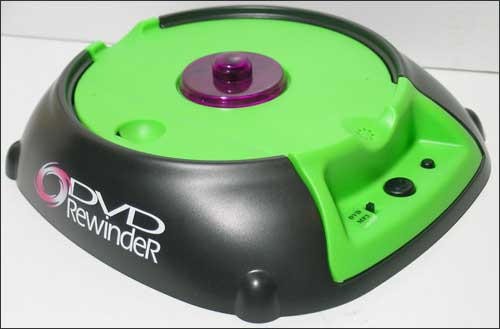
Sometimes one finds a solution to a problem that is not seeking an answer.
"Guaranteed Lowest Price on the Internet for DVD Rewinding
No More Embarrassing Fines or Hassles at your Video Rental Store !!!
No Fuss — No Waiting — Do It Online — Do It Now!
Rewind your DVDs
See all Topics
by dklippert
Speed the process
Sometimes one finds a solution to a problem that is not seeking an answer.
"Guaranteed Lowest Price on the Internet for DVD Rewinding
No More Embarrassing Fines or Hassles at your Video Rental Store !!!
No Fuss — No Waiting — Do It Online — Do It Now!
Rewind your DVDs
See all Topics
by dklippert
Duel Masters and more schemes
Earlier versions of PowerPoint were restricted to only one master design scheme per show. We strained to get around that by linking shows and pasting backgrounds over the designs.
PowerPoint 2002+ changed that by allowing more than one design scheme.
A PowerPoint master with the first name of "
Echo
", runs a nice tutorial site named
EchosVoice.com
.
She has written a step-by-step tutorial to create
Multiple Masters for PPT 2002 and 2003
.
Makes you want to dance. (Echo's own image)

Also:
Presentations.com:
Make maximum use of the multiple slide master
[
Edited entry from 2/18/2004
]
See all
Topics
by dklippert
Private Character Editor
Windows XP has its own, hidden, character creator, called the Private Character Creator .
Using Private Character Editor (PCE), you can create up to 6,400 unique characters (such as special letters and logos) for use in your font library. PCE contains basic tools for creating and editing characters, along with more advanced options.
If you want to create a new private character using an existing character as your model, you can copy the existing character to the Edit grid and then modify it to suit your needs, or you can display the existing character in a Reference window alongside your Edit grid for use as a visual reference. You can use any character from any font that is installed on your computer.
The Private Character Editor is accessed at Start>Run and enter "Eudcedit" without the quotes.
After you have constructed and saved the design of your choosing, you can access it from the Character Map by selecting Start>Run "Charmap".
Drop the Font selection list down and choose All Fonts (Private Characters), then click on the character you have created, copying and pasting it into any document.
Hermann Zapf designed some of the 20th century's most important fonts, including Palatino and Optima. He also produced a collection of decorative symbols called "dingbats", modeled after the accidental lead drippings collected by old style typesetters.
Also:
Private Character Editor — Eudcedit
By Vic Laurie
Keyboard Utilities for Windows
Alan Woods
[Edited entry from 2/19/2004]
See all Topics
by dklippert
A CSS exercise
FrontPage does include a Photo gallery template, and you can also save a PowerPoint show as a web page.
For another take on the problem, here are the instructions needed to create a gallery using CSS.
Click here to see what it might look like:

How to Create a Photographic Gallery Using CSS
By Stu Nicholls
See all
Topics
by dklippert
Show the star
Here's a hint that I had forgotten about.
You can tie the result of a cell to an AutoShape.
This displays the value in a more dramatic manner.

Thanks to AutomateExcel.com for the reminder.
See all Topics
by dklippert
A baker's dozen of ideas
Here is a collection of tips about how to display information in Headers and Footers.
Field codes are demonstrated. Remember that the brackets {} must be inserted with Ctrl+F9, not directly from the key board.
Here's one suggestion
Display the word "more" at the bottom of every page except the last page.
Insert an "if" field into the footer.The field in this case will be a compound entity that consists of two fields nested within a third field.
{ IF { PAGE } = { NUMPAGES } "" "more" }
- Position cursor where you want the field.
- Press Ctrl+F9 to insert the field braces.
- Type the field expression as it appears below, using Ctrl+F9 and arrow keys as needed to keep text within the various braces as you type.
{ IF { PAGE } = { NUMPAGES } "" "more" }- Select the entire expression.
- Right-click the selection and choose Toggle Field Codes.
(or use Alt+F9)
WordMacros.com:
Headers and footers and page numbers
Also see:
Don't get framed
See all Topics
by dklippert
If you have a need to protect the contents of your email messages, these links should point you in the right direction.
Outlook 2003 supports the following features for cryptographic messaging:
Digitally sign an e-mail message. Digital signing provides nonrepudiation and verification of contents (the message contains what the person sent, with no changes).Encrypt an e-mail message. Encryption helps to ensure privacy by making the message unreadable to anyone other than the intended recipient.
There are additional features that can be configured for Outlook 2003 for security-enhanced messaging, if your organization chooses to provide support for them, including:Sending an e-mail message with an S/MIME receipt request. This helps to verify that the recipient is validating your digital signature (the certificate you applied to a message).
Adding a security label to an e-mail message. Your organization can create a customized S/MIME V3 security policy which can add labels to messages. An S/MIME V3 security policy is code that you add to Outlook that runs automatically to add information to the message header about the sensitivity of the message content. For example, an Internal Use Only label might be applied to mail that should not be sent or forwarded outside of your company.
Overview of Cryptography in Outlook 2003
Slipstick.com:
Encryption and Message Security Tools
TheTechGap.com:
Digital IDs in Outlook
Verisign:
Digital IDs
See all
Topics
by dklippert
Data bits and pieces
While a few of us may be guilty of constructing databases on the run, and then trying to clean up the mess later, the wise ones plan ahead.
What information will you need in the future? What reports are going to be requested? If you're the bean counter, do you need to count all the legumes?
"Data modeling is probably the most labor intensive and time consuming part of the development process. Why bother especially if you are pressed for time? A common response by practitioners who write on the subject is that you should no more build a database without a model than you should build a house without blueprints.
The goal of the data model is to make sure that the all data objects required by the database are completely and accurately represented. Because the data model uses easily understood notations and natural language, it can be reviewed and verified as correct by the end-users.
The data model is also detailed enough to be used by the database developers to use as a "blueprint" for building the physical database. The information contained in the data model will be used to define the relational tables, primary and foreign keys, stored procedures, and triggers. A poorly designed database will require more time in the long-term. Without careful planning you may create a database that omits data required to create critical reports, produces results that are incorrect or inconsistent, and is unable to accommodate changes in the user's requirements."
University of Texas at Austin
Introduction to Data Modeling
By Tim McLellan
AgileData.org:
Data Modeling 101
See all
Topics
by dklippert
Google dictionary
"To see a definition for a word or phrase, simply type the word "define," then a space, and then the word(s) you want defined. If Google has seen a definition for the word or phrase on the Web, it will retrieve that information and display it at the top of your search results.
You can also get a list of definitions by including the special operator "define:" with no space between it and the term you want defined. For example, the search [define:World Wide Web] will show you a list of definitions for "World Wide Web" gathered from various online sources."
Also check out http://wordweb.info/

"WordWeb Pro is a quick and powerful international English thesaurus and dictionary for Windows. It can be used to lookup words from almost any Windows program, showing definitions, synonyms and related words. There are also many proper nouns and usage examples. You can search for words matching a pattern, find and solve anagrams, and optionally search a large number of extra word lists."
[Edited entry from 2/9/2004]
See all Topics
by dklippert
It's Probably Because People No Longer Really Listen
Yes, now we can add Iraq to the evils perpetuated by PowerPoint.
"Not only is it easier to throw together a stack of PowerPoint slides than it is to write that 10,000-word document, it is much easier to leave out or gloss over parts of the project that might not survive close scrutiny if they were described in complete sentences. Can you say "weapons of mass destruction?" If we cut to the heart of this current controversy about whether Iraq really had WMD, whether the U.S. honestly believed Iraq had WMD, and who got it wrong, I'm sure we'll end up with a guilty PowerPoint stack. In that stack, you'll find a slide containing the words "Iraq" and "WMD" but taken out of context, there is no way of knowing what the presenter even intended the slide to mean. Thus, we have plausible deniability through PowerPoint."
For eight years from 1987-95, Robert X. Cringely wrote the Notes From the Field column in InfoWorld, a weekly computer trade newspaper. He is also the author of the best-selling book Accidental Empires: How the Boys of Silicon Valley Make Their Millions, Battle Foreign Competition, and Still Can't Get a Date.
Most recently, Cringely is the host and writer of the hit PBS-TV miniseries "Electric Money."
Robert X. Cringely
(
www.pbs.org/cringely/
)
[
Edited entry from 2/10/2004
]
See all
Topics
by dklippert
What does it all mean
We live in a world based on jargon and acronyms. For a little relief, try this site.
Microsoft Office, Microsoft Windows, and Microsoft Windows Mobile-based devices are covered and more.
Microsoft Glossary Information Center
See all Topics
by dklippert
Roll your own
Sure,
Blogger
is great and free. Sure,
RadioUserland
is cheap and easy to use.
If you like the idea of building your own RSS feed, read on.
"Learn about RSS and how to programmatically create an RSS file for your FrontPage 2003 Web site. The download that accompanies this article contains a VBA project and an XSLT file that you can use to generate and display RSS feeds.
If you spend any time on the Internet, you have probably heard of RSS, and you may decide that you need an RSS feed for your Web site. An RSS feed is an Extensible Markup Language (XML) file that people can use to keep up to date with the content on a Web site. RSS feeds are frequently associated with weblogs (blogs), but you can use them for any Web site.
If you have a Web site that contains content that you frequently update, such as articles or stories, you may want an RSS feed to help your customers keep up with your updates. This article explains the XML behind RSS and provides a Microsoft Office FrontPage 2003 Visual Basic for Applications (VBA) project that you can use to programmatically generate an RSS feed for your FrontPage Web site. The download for this article includes an Extensible Stylesheet Language Transformation (XSLT) file that you can use to display the RSS XML file in a browser."
Microsoft Developers Network:
Creating an RSS Feed for Your FrontPage Web Site
See all
Topics
by dklippert
EXCEL
Put the Path in a Footer
Sometimes the old way is still useful
Pre 2002, Excel made it difficult to put the file path in the Header or Footer
After 2002, there is an icon to put the path in a header or footer. The code is
[File]
Still, you may find some use for the VBA code.
The following macro will insert the full path of a saved file in the center portion of the footer in the active
by dklippert
Free business advice
SCORE is a nonprofit organization providing small business advice and training.
SCORE's 10,500 volunteers have more than 600 business skills. Volunteers share their wisdom and lessons learned in business. Our volunteers are working/retired business owners, executives and corporate leaders.
- SCORE offers Ask SCORE email advice online.
- Face-to-face small business counseling at 389 chapter offices.
- Low-cost workshops at 389 chapter offices nationwide.
- "How to" articles and business templates
Here are some of the available templates:
A Business Plan for a Start-up Business
Microsoft Word
A Business Plan for an Established Business
Microsoft Word
Bank Loan Request for Small Business
Microsoft Word
Break-Even Analysis
Excel
Competitive Analysis
Microsoft Word
Financial History & Ratios
Excel
Loan Amortization Schedule
Excel
Opening Day Balance Sheet
Excel
Personal Financial Statement
Excel
Projected Balance Sheet
Excel
Start-up Expenses
Excel
4-Year Profit Projection
Excel
12-Month Cash Flow Statement
Excel
12-Month Profit and Loss Projection
Excel
12-Month Sales Forecast
Excel
See all Topics
by dklippert
OUTLOOK
Protect Your Address
Keep the bots at bay
"Spam is an incredible problem and it is getting worse - your e-mail address is a commodity and if you put it on a web page, it WILL eventually be found, spammed and sold to other spammers. The problem is that you have a web page and you need to make it possible for people to send you e-mail from your page but you don't want to get bombarded with
by dklippert
Free Basic Instruction
Microsoft has developed a very good collection of tutorials and samples for Office applications. They're located at Office.Microsoft.com
Even if you haven't upgraded to 2003, these suggestions will work with most earlier versions.
For Access look at:
Access 2003
If you have avoided Access in the past, a least glance at "Getting started with Access and Database applications"
Also:
These are 30 to 55 minute demonstrations.
"When you click Practice in Access at the bottom of this page, a practice database will download to your computer and open in Access, and a separate window with practice instructions will appear alongside."

[Edited entry from 2/8/2004]
See all Topics
by dklippert
Your spy dollars at work
The World Factbook provides a 'snapshot' of the world.
The online Factbook is updated regularly - generally weekly - throughout the year.
A 30Meg zipped version is also available.
The World Factbook is in the public domain and may be used freely by anyone at anytime without seeking permission. However, US Code prohibits use of the CIA seal in a manner which implies that the CIA approved, endorsed, or authorized such use."
When you find yourself worrying about the local car wash spilling drainage into the storm sewer, look at some of these
environmental concerns
:
Azerbaijan
Local scientists consider the Abseron Yasaqligi (Apsheron Peninsula) (including Baku and Sumqayit) and the Caspian Sea to be the ecologically most devastated area in the world because of severe air, soil, and water pollution; soil pollution results from oil spills, from the use of DDT as a pesticide, and from toxic defoliants used in the production of cotton
[
Edited entry from 2/17/2004
]
See all
Topics
by dklippert
Live on tape
On occasion, Microsoft presents Webcasts on interesting subjects.
Here's one on how to find and fix problems with PowerPoint presentations.
"This Support WebCast will define troubleshooting issues in Microsoft PowerPoint and provide an overview of when and how to use available resources such as product Help and Microsoft Knowledge Base articles. We will also discuss how to determine where a problem is occurring and how to troubleshoot specific issues such as printing, opening a file, installation, movies, and starting the program."
Troubleshooting fundamentals in Microsoft PowerPoint
Here is a list of available downloadable webcasts
On-demand Webcasts
See all Topics
by dklippert
Space image wallpaper
NASA is wandering around space snapping photos with an advanced form of a Brownie SureShot.
Here is a collection of interstellar portraits and space art the can be used as wallpaper to be viewed as you warp thought the Internet.

Veil nebula
See all
Topics
by dklippert
Fancy functionals
Here is a discussion about how to design a form for use on the web.
"Computers are supposed to make our lives easier, not more difficult. As usability-conscious designers, we can make our users' lives easier by thinking about the way people interact with our websites, providing clear direction, and then putting the burden of sorting out the details in the hands of the computers—not the users.
It's that last part that we're going to focus on here. We've all heard and read about big usability mistakes time and time again: "Don't use images or flash for navigation," "Don't use Javascript for links," and I certainly hope we're all applying those lessons in our work. It's often the smallest usability quirks, however, that create the biggest annoyances for users, especially when it comes to HTML forms. Follow these guidelines, and you'll be off to a good start."
Sensible Forms
Brian Crescimanno
See all Topics
by dklippert
Simple obfuscation
The kid said,
"Daddy, I know the secret password!
It's star, star, star, star!"
****
You can use functions to hide parts of sensitive data.
Social Security Number 555-55-5555
=CONCATENATE("***-**-", RIGHT(B2,4))
Combines the last four digits of the SSN with the "***-**-" text string
(***-**-5555)

Credit Card Number 5555-5555-5555-5555
=CONCATENATE(REPT("****-",3), RIGHT(B3,4))
Repeats the "****-" text string three times and combines the result with the last four digits of the credit card number
(****-****-****-5555)
Microsoft Office Online:
Display only the last four digits of identification numbers
See all
Topics
by dklippert
Minimize white space
When a document is formatted with columns, the text is often Justified. This can lead to a messy layout of words and letters.
"When justifying text in Microsoft Word use the hyphenation feature to improve the look of your page. (Without hyphens). . . unnecessary 'white space' is distributed throughout. When hyphenation is turned on the overall typographic color of the page is much more even. To enable this feature in Microsoft Word do the following: After you have justified the columns in your document, choose from the "Tools menu" > Language > then from the dropdown menu, choose "Hyphenation", then choose "Automatically hyphenate document"

BTW, this goes along with one space after punctuation.
Bill Hill - There is only one space after a period
In Woody's Office Watch look for #2:
"SQUISHED" JUSTIFICATION IN WORD
See all
Topics
by dklippert
A lie will set you free
Dodgeit.com
allows you to create throwaway email addresses. It then delivers the email that comes into the resulting mailbox as an RSS feed that you and everyone else who can guess at your throwaway email address can read.
Pick a throwaway address, say:
NotMyAddress@dodgeit.com
Give that address out to inconsequential sites.
Check
NotMyAddress
from homepage of
Dodgeit.com
.
Subscribe to an RSS feed to keep an eye on the mailbox.
Also see:
Protect Your Address
[
Edited entry from 2/7/2004
]
See all
Topics
by dklippert
Another look at parameters
The ability to use dynamic criteria in a Query makes Access even more valuable.
David Badurina operates
Davidbase.com
.
He has produced an
Access Parameter Query Tutorial
video that walks the viewer gently through the process.
The site also has information on Excel and Word.
(Parameter queries are also referenced here:
Parameter v. Form
)
How to create a parameter query
[
Edited entry from 2/16/2004
]
See all
Topics
by dklippert
Weather maps from around the world
Want to see what the weather is like on the other side of the earth, or next door?
From Aruba to Zambia.
Rather than wait on an all weather channel or sticking your head outside, try this site:

See all
Topics
by dklippert
POWERPOINT
Animate Charts
Make data more moving
Wipe away the drool that develops when looking at Office 12 formatting and deal with what we've got.
"You can add some animation to your chart for dramatic effect. You can animate the chart as a whole or animate elements of the chart."
In normal view, display the slide that has the chart you want, and then select the chart.
On the Slide Show
by dklippert
Or at least nearby
It'll cost about $1,000, but think about the bragging rights!
"I love the fact that more and more devices are sporting built-in Wi-Fi. The lone hitch: Wi-Fi is useless without a hotspot.
What if you could marry the short-range power of Wi-Fi with the huge coverage areas of high-speed cellular services such as EV-DO to create a portable hotspot?
Since EV-DO works at freeway speeds, you could even give Internet access to an entire road-trip caravan.Now I can surf for as long as three hours without being tethered to anything but a cell signal. The project isn't cheap, but prices for the components and service are sure to come down in the next year or so. In the meantime, you can find me in the hills around Southern California. I'll be the one surrounded by PSP-packing hikers."

Popular Science:
Be Your Own Hotspot
By Mike Outmesguine
See all
Topics
by dklippert
So cool!
The following macro has little or no practical computing value, but it can add a "way cool" element when a worksheet is unhidden.
There are three states that a worksheet can be in; Minimized, Maximized, and Normal.
This macro will gradually resize a worksheet from small to Maximized. The worksheet appears to be growing:
Sub SheetGrow()Dim x As IntegerWith ActiveWindow.WindowState = xlNormal.Top = 1.Left = 1.Height = 50.Width = 50For x = 50 To Application.UsableHeight
.Height = x
Next xFor x = 50 To Application.UsableWidth
.Width = x
Next x.WindowState = xlMaximized
End With
End Sub
From AutomateExcel.com:
ActiveWindow.WindowState
(By Mark William Wielgus)
See all
Topics
by dklippert
Put the horses back in the barn
Word 2003 keeps track of direct formatting applied to a style. This can lead to what has been referred to as "runaway" styles". Pre 2003 you could find styles by using "What's This?" (
Shift+F1
) and pointing at the text.
Word now has Format>Reveal Formatting in a task pane.
(BTW, turn on the "
Distinguish Style Source
" option at bottom of task pane.)
You can no longer update the style using the Style Box. Before, you could make a change, click on the style in the Style Box on the Formatting toolbar and receiving the Modify Style dialog.
To go back to the ways things were in the good old days and help defeat runaway styles, go to Tools>Options.
On the
Edit
tab, uncheck:
"
Keep track of formatting
"
Allows Word to keep track of your formatting as you type. This enables you to easily apply the same formatting elsewhere.
and check:
"
Prompt to update style
"
Specifies that Word prompts you when you directly modify text that contains a style and then select the same style again. When prompted, you can either update the style based on recent changes or reapply the formatting of the style.

Thanks to
Trish Krokosh
from the
WOPR lounge.
Here's a link to some code that will clear extra style appendages:
Macro to Delete CharChar styles
ComputerCompanion.com:
Make Word 2003 Workable
[
Edited entry from 2/6/04
]
See all
Topics
by dklippert
The Walla Walla syndrome
More than one copy of Contacts can be produced when, for instance, a user synchronizes a PDA with Outlook.
Microsoft has a cash reserve of about $50 billion. The money was accumulated over time by, among other things, selling software.
They don't work for peanuts.
I would like to introduce Fr. Simon Rundell of the Parish of the Holy Spirit, Southsea, Portsmouth, England.
He offers a tool to delete duplicate entries in Microsoft Outlook. Calendar items, Tasks, Contacts, notes and mail folders.
He doesn't work for fruitcakes.
"... available free for download as prayerware - Free to download, use and distribute, as long as you pray for me, Fr. Simon Rundell, Fr. Michael Lewis and our ministry at the Holy Spirit, Southsea."
The Hlyspirit.or.uk no longer hosts the utility. You can still get it through Slipstick.com.
Whatever currency they normally take is waived for this free download.
(Slipstick has other anti-duplicateware at
Duplicate Checkers
[
Edited entry from 2/15/2004
]
See all
Topics
by dklippert
Control display
If you have left the personalized menus enabled, you don't have to wait the default amount of time before you can access infrequently used features. Instead, you can display a full menu by double-clicking the menu name when you open it.
If you dislike the new menus, which initially show only the most recently used menu items, you can revert to the standard menu behavior. Right-click on the menu bar and choose Customize from the shortcut menu. Then, click on the Options tab of the Customize dialog box.

Choose either "Always show full menus" or "Show full menus after a short delay". You can also reset the menus to their original state by clicking the "Reset menu and tool bar usage data" button.
See all Topics
by dklippert
By Mark Obmascik
ISBN 0743245458
Free Press; (February 4, 2004)
About the Author
Mark Obmascik was the winner of the 2003 National Press Club Award for environmental journalism. He has a story tellers ability to, not only describe the setting, but to draw the reader into the adventure.
Book Description
2.4 million people keep what is called a "life list" of birds they have seen. In the USA, some 50 million people lay claim to being bird-watchers or 'birders,' spending billions of dollars on birding-related travel and membership fees every year. A few compete in one of the world's quirkiest contests — the race to spot the most species in North America in a single year. And 1998 wasn't just a big year. It was to become the greatest birding year of all time.
Quote
"Every year on January 1, a quirky crowd of adventurers storms out across North America for a spectacularly competitive event called a Big Year — a grand, grueling, expensive, and occasionally vicious, "extreme" 365-day marathon of birdwatching.
For three men in particular, 1998 would be a whirlwind, a winner-takes-nothing battle for a new North American birding record. In frenetic pilgrimages for once-in-a-lifetime rarities that can make or break their lead, the birders race each other from Del Rio, Texas, in search of the rufous-capped warbler, to Gibsons, British Columbia, on a quest for Xantus's hummingbird, to Cape May, New Jersey, seeking the offshore great skua. Bouncing from coast to coast on their potholed road to glory, they brave broiling deserts, roiling oceans, bug-infested swamps, a charge by a disgruntled mountain lion, and some of the lumpiest motel mattresses known to man. "
PBS.org Newshour:
Conversation: 'The Big Year'
(with streaming video interview)
ChicagoPublicRadio.com:
Chicago Public Radio interview
[Edited entry from 2/21/2004]
See all Topics
by dklippert
How to check it
January is the month that bird watchers try to find as many birds as they can.
This is only one kind of list. This link helps you create a list of 453 Washington state birds and more.
There's also a list for a motorcycle first aid kit.
Also see:
Pack Light
And read this book to get yourself ready. (Maybe next year.)
The Big Year : A Tale of Man, Nature, and Fowl Obsession
See all
Topics
by dklippert
Be empowered
"Control Panel provides a set of special-purpose administrative tools so that users can configure the Windows, applications, and services environment. It includes default items in Control Panel for common tasks, for example, Display and Add Hardware. User-installed applications and services can also insert their own icons into Control Panel.
There are two view options for Control Panel: Category View and Classic View.
Category View displays Control Panel icons according to the type of task that the user wants to perform.
Classic View displays Control Panel icons in a view that is familiar to users of previous versions of Windows."
Go to View and choose how you want the contents to be displayed. "Icons" is the Classic view, but details will show the purpose of each entry.
For more information about Control Panel icons, see:
Microsoft Product Documentation:
Control Panel
See all Topics
by dklippert
No Internet age limit
You don't have to show a drivers license (expired or not) to wander through cyber space,but. . .
" . . I'm pissed as hell at how difficult software developers (hello Microsoft!) make their software. I'm pissed as hell at the amount of marketing junk which is loaded onto computers at the store. At every turn, my grandfather gets pop-up messages from AOL, Netscape, Real Media, Internet Explorer and more. I'm pissed that the desktop comes littered with promotionals for CompuServe and AT&T and Compaq which can be difficult to delete. It makes everything that much harder for a senior whose fingers are shaky, whose eyesight is poor and who has never operated anything more complex than a typewriter.
(by Amanda Erickson)

As the oldest Baby Boomers prepare to turn 60 in 2006, marketers and the media are waking up to the power of older consumers. Unlike today's seniors, Boomers are dedicated Internet users and broadband fans. As they approach the next phase of their lives, they will challenge companies to keep up with their ever-demanding ways, both online and off.
Also see:
King County Seniors on line
See all
Topics
by dklippert
Excel at Access
You can think of Excel as a collection of flat file databases. Combining Excel and Access can make use of the best parts of both applications.
"Microsoft Excel is great at a lot of tasks, but it has limits as a database manager. If your Excel data worksheets are beginning to get out of hand, it may be time to call in a little help from Access."
Creating Access Forms To Work with Excel Data
(Jim Uomini is a long-time trainer, courseware designer, technical writer, newsletter editor, and support manager. He currently manages the help desk for in-store systems at The Sharper Image.)
[
Edited entry from 2/5/2004
]
See all
Topics
by dklippert
Safe
Paul Cornell works for the Office Help team. He wrote a short paper on passwords used in Word and Excel:
Help Protect Word 2002 and Excel 2002 Files with Passwords
"Your organization may store Word and Excel documents in a central location such as a network server computer. However, you may not want all of your coworkers to have unlimited access to these documents. Setting the files to a read-only status does not prevent your coworkers from opening the documents, and denying your coworkers access to the network folder outright may be too restrictive in your organization's computing environment. One solution is to help protect individual Word and Excel documents with passwords."
Sorry
Passwords for documents are not, however, truly secure from a determined hacker.
There is a Knowledge Base article #822924 Overview of Office Features That Are Intended to Enable Collaboration and That Are Not Intended to Increase Security that reminds users that some passwords are not as strong as others.
For instance:
"When you are using the Password to Modify feature, a malicious user may still be able to gain access to your password. For example, if you save a word (.doc) file by using the Password to Modify feature enabled in Rich Tech Format (.rtf) a malicious user may be able to gain access to your password."
Here is a January 7, 2004 article from ZDNet.co.uk:
A simple hack to Word's password-protection feature means documents may not be as secure as users believe. No fix is on the way, says Microsoft
[Edited entry from 2/14/2004]
See all Topics
by dklippert
OUTLOOK
Spam Scam
Please forward
Here is a video by Spiros Ioannou that reinforces the "don't forward that to me" message.
E-mail scam video
See all Topics
by dklippert
Please forward
Here is a video by Spiros Ioannou that reinforces the "don't forward that to me" message.
See all
Topics
by dklippert
Alterations on the run
As you work with a form, you will, sometimes, find controls would benefit from minor tweaking. You may want to change the color of a text box, change the font that's used, or remove scroll bars.
You may have been told switch to Design view to make changes. However, you can display the property sheets for a control while you're in Form view.
To do so, click the Properties on the View menu, Right-click, or press [Alt][Enter].
As in Design view, the displayed properties relate to the control that is selected on the form. The property changes you make are reflected on the fly.
You will be prompted to resave your form when you close it.
See all
Topics
by dklippert
Free tool
Here is an online GIF image editor. You can create animated GIF files and save them to your site or your machine.
There is nothing to download. All the work is done on line.

"Create your own special effects with any GIF -- even animated ones! Resize it, colorize it, optimize it, and jazzercise it -- then save it and take it with you. You name it and you can do it!
It's simple! Using the easy-to-use pull down menus. Simply follow the instructions to load any GIF and then manipulate the image using the GIFWorks menus. It's that easy.
The GIFWorks interface uses standard HTML and JavaScript. It should work correctly in Netscape and Internet Explorer versions 3.x and greater."
See all
Topics
by dklippert
More PP bling
Face it; we've seen every graphic in ClipArt and every background color combination. Putting a frame around an ordinary object can make it pop.
Here is a link to instructions about how to frame your pictures. There is also a download for extra frames.

ComputerCompanion.com:
Create Picture Frames in PowerPoint
by Geetesh Bajaj
See all
Topics
by dklippert
Some things you may never have known
When you install Windows XP, you also get extra mini applications and tools. Most people know about MS Paint, and Calculator, but there are more.
Chris Pirillo put together a list a few years back.
Here are a few including an on screen keyboard.
(Type osk.exe at Start>Run)

Windows Tools You Already Own
DecentDownloads.x-istence.com:
Secret Windows Software
See all Topics
by dklippert
Tiny code snippets
Microsoft has included a number of code pieces that you can use without having to haul out the VBA editor. These codes handle such things as page numbers, Table of Contents, Merge data and more.
"Some 80-plus fields are built into Word that provide information about the file and the user; store, display, and manipulate reference information; and link the document to other applications - all without a bit of code."
Automate Word Documents with Minimal Code
By Cindy Meister
Cindy Meister is a Word MVP.
She also works with bobbin-lace. Here is a sample of a Honiton lace butterfly.
Also:
AddBalance.com:
Using { Fields } in Microsoft Word
GMayor.com
Formatting Word Fields with Switches
BetterSolutions.com:
Fields
[Edited entry from 2/24/2004]
See all Topics
by dklippert
Bring data to your desktop
This feature can make data acquisition a lot easier than Copy-Paste-Reformat-Try again.
"Generally, though, people tend to overlook the option of using the Web as a data source for Excel, be that source the Internet, an intranet, an extranet, or a Web Service. But they shouldn't. Web queries are an easy, yet remarkably flexible and predictable way of bringing data into Microsoft Excel from anywhere on the Web. You can point a Web query at any HTML document that resides on any Web server - or even on a file server, for that matter - and pull part or all of the contents back into your spreadsheet...When you start using Excel's Web queries, you will realize they are almost as limitless as the Web is.
On the menu bar, go to Data>Import External Data. Then, select Import Data to use an existing Web query or select New Web Query to build a new one.

Also see:
Vertex42.com:
Excel Web Query Secrets Revealed
MSDN.Microsoft.com/library
Integrate Far-Flung Data into Your Spreadsheets with the Help of Web Services
Different Ways of Using Web Queries in Microsoft Office Excel 2003
And:
Web Queries and Dynamic Chart Data in Excel 2002
[Edited entry from 2/13/2004]
See all Topics
by dklippert
How to read the code
Spam is as ubiquitous in email as it is in an
Hawaiian restaurant
.
These links may help you distinguish pork shoulder from the other stuff.
"This document is intended to provide a comprehensive introduction to the behavior of email headers.
It is primarily intended to help victims of unsolicited email ("email spam") attempting to determine the real source of the (generally forged) email that plagues them; it should also help in attempts to understand any other forged email.
It may also be beneficial to readers interested in a general-purpose introduction to mail transfer on the Internet. "
StopSpam.org:
E-mail Headers
"The ability to read and decipher email headers is a useful skill to learn for tracing messages to their original source and diagnosing many other problems. Headers may contain a lot of information but the most important information will always be contained in every email header."
University of Bath in Swindon:
Anatomy of an Email Message
[
Edited entry from 2/25/2004
]
See all
Topics
by dklippert
Time passes quickly
You can defend the Internet beginning in the early or late 60's. This link follows the history back to the invention of the "computer" in the 1700's to today.
Not the complete history but just the cool stuff. The Internet history from the perspective of a computer geek who likes knowing more than what the instructions simply tell us.
This will not be a complete list but a work in progress. Enjoy.
Netcraft survey reports there are more than 74 million web sites online, while in 1993 only 130 web sites existed online.
A Computer Geek's History of the Internet
Also:
Here's a nice site:
The Living Internet
The Internet SOCiety:
History of the Internet
Also:
Internet History
See all
Topics
by dklippert
Set new standards
You can change Access's default form.
To set up a custom template,
The next time you create a form, Access will base it on your form template rather than the typical Normal template.
The same thing can be done with Reports.

(The settings are saved in the Access workgroup information file, not in a particular data base)
Also:
MeadinKent.co.uk:
Making a report template
Here's a calendar from MeadinKent:
Calendar page (2005/06)
See all Topics
by dklippert
Do it yourself
Well, not exactly.
The Northwest has a great PBS radio station in KUOW.
Here is a story about how surgeons work, including a blow by blow description of a hip replacement operation.
. . . "this hour: the surgeon's hands. How do surgeons keep their hands healthy? What kind of training do they go through to keep their fingers tactile and sensitive? How important is touch to successful surgery? Are the hands of surgeons gifted? Over the past month, we've been talking with people who use their head and their hands in their work. Our 'How To' series continues today with surgeons.
Guests
Richard Ellenbogen, M.D. chairman of neurological surgery at the University of Washington School of Medicine, the Theodore S. Roberts Endowed Chair in Neurological Surgery, the Chief of Neurological Surgery at Harborview Medical Center
Eric Froines, M.D., F.A.C.S. chief of general surgery, Capitol Hill Specialty Center Group Health Permanente"
(scroll in to about 14 minutes)
For more information, here is a link to the University of Washington:
A Review of Total Hip Arthroplasty, Hip Resurfacing, and Minimally-Invasive Hip Surgery.
See all
Topics
by dklippert
Worth a lot more than you pay for it
Here is a site that gives presentation hints. Also, free clip art, free templates, a forum, and quotations.
"There are always three speeches, for every one you actually gave. The one you practiced, the one you gave, and the one you wish you gave."
-- Dale Carnegie

PresentationHelper.co.uk:
Presentation Helper
See all
Topics
by dklippert
(Uxoricide)
Big Sandy and His Fly-Rite Boys
ASIN B00004UDE3
Hightone Records August 15, 2000
About the Artist
"Hailing from Anaheim, California, Big Sandy (neé Robert Williams) draws from a number of influences--country, western swing, rockabilly, doo wop, R & B, and jump blues. The best Big Sandy songs are the sexy ones about seduction, innocent on the surface and a little dirty underneath. The retro appeal of the band is equivalent to a Model T or Vargas bombshell"
Recording Description
Groovin', jumpin', hot rods, Rock-a-billy.
One of the cuts -- When Sleep Won't Come (Blues for Spade) -- refers to the uxoricidal "Spade" Cooley.
Also see:
The Old Corral
Contents
- Night Tide - Big Sandy & His Fly-Rite Boys
- Between Darkness and Dawn
- Tequila Calling
- When Sleep Won't Come (Blues for Spade)
- If You Only Knew - Big Sandy & His Fly-Rite Boys
- Give Your Loving to Me
- In the Steel of the Night
- Man Like Me
- Hey Lowdown!
- My Time Will Come Someday
- I Think of You
- Nothing to Lose
- South Bay Stomp
- Let Her Know
[Edited entry from 2/22/2004]
See all Topics
by dklippert
Brand your own Explorer
Developers may consider it heretical, but the icon that appears in the upper right corner of Internet Explorer and Outlook Express can be changed.
You can use your own static logo and/or an animated one.
All it takes is MSPaint and Regedit.
For directions see:
Winguides.com
[
Edited entry from2/29/2004
]
See all
Topics
Sort by Trending

