Discussion Locked
Unofficial Microsoft Office Stuff
0 helpful
326 replies
Closed to new repliesThis discussion is closed. It stays readable, but it takes no new replies.
This is page 4 of the discussion. Read the opening post

After Hours
This is page 4 of the discussion. Read the opening post
by dklippert
A slide looks best when the objects line up correctly. While it can be done by trial and error, it is easier to use the Grid and Guides feature.
Go to View>Grid and Guides.

Choose to put a check to select Display grid on screen and/or Display drawing guides on screen.
If you like using guides, you can produce additional guides by holding the CTRL key while dragging on an existing guide.
Extraneous guides can be dragged of the screen.
See all
Topics
by dklippert
Fonts can be addictive. There can always be an imagined need for one more curly Q.
Here is a collection of possible links.
Luc Devroye joined the School of Computer Science at McGill University in 1977 as a young "snotnose."
" Please do not visit this disappointing web site. Most of the links are dead: they die faster than I can renew them, and there is nothing I can do about it short of giving up my daytime job and divorcing my family, and I love both of them too much for that.
Many link descriptions are boozy and fuzzy. Some opinions are simply pathetic, but I do not want to leave this world without making a fool of myself. To make up for the awful service, I am inviting any type lover visiting Montreal to my house for drinks."
Type Design, Typography, Typefaces and Fonts
See all
Topics
by dklippert
Pre-RSS, the predominate method of communication for members of a like minded group was through an emailed newsletter.
Word actually works fine with mail merge to email, but if you want to combine the data gathering and the distribution in a neat package, take a look at this tutorial.
Step 1 : Create a simple HTML Form where users can insert their email addresses and an ASP page which will receive the Form email address from the HTML page and insert it into the database.
Step 2 : Create a simple Access database to store user's email addresses.
Step 3 : A simple admin ASP page from where you can send email messages to all the users whose email addresses are present in the database.
Step 4 : An ASP page from where the users can delete their email addresses from the database if they later choose to.
Stardeveloper.com:
An ASP Tutorial to create your own News Letter
See all
Topics
by dklippert
Here is a downloadable compiled Help file covering the vagaries of Excel VBA.
You can use this file without having to, necessarily opening the application.
Excel 2003 VBA Language Reference
See all
Topics
by dklippert
How to turn off balloons for comments and track changes in Word 2002 and Word 2003
This article describes how to turn off the balloons that appear for comments and track changes in the right side margin of your Microsoft Word 2002 or Microsoft Office Word 2003 document.
To turn off or hide the balloons for comments and track changes in the right side margin of a Microsoft Word document, follow these steps:
- On the Tools menu, click Options.
- On the Track Changes tab, do one of the following:
- In Word 2003, change the Use Balloons (Print and Web Layout) box to Never.
- In Word 2002, click to clear the Use Balloons in Print and Web Layout check box.
- Click OK to close the Options dialog box.
Note This process only hides the balloons for comments and track changes. These steps do not remove any changes.
Frequently Asked Questions About Comments
Using Tracking and Reviewing Features in Microsoft Word 2002/XP Tutorial
[Edited entry from 4/6/2004]
See all Topics
by dklippert
To send an e-mail message to a number of people in your Contacts file, hold down the CTRL key and select the individual recipients.
Drag the selection to the Inbox icon on the
Outlook
bar.
A new blank pre-addressed e-mail form will open for you.
If you wish to schedule an appointment, drag the selection to the Calendar icon.
The definitive site for more information about
Outlook
is:
[
Edited entry from 4/24/2004
]
See all
Topics
by dklippert
You can show a custom Fiscal Year starting June, 1 and ending May 31.
BeginFiscalYr = DateSerial(Year(Date), 6, 1)
EndFiscalYr = DateSerial(Year(Date) + 1, 6, 1) ? 1
Also:
Calculating a future or past date in Access
See all
Topics
by dklippert
That innocuous little app, notepad, is not immune to problems.
Here's how to do it:

Most people will see empty squares, but if you have the 'SimSun" font installed, you'll see Chinese (CJK) characters.

Turns out it works with any sequence of 4, 3, 3, and 5 lower-case alpha characters [a-z] separated by a space,
"xxxx xxx xxx xxxxx"
also works.
Here's the techy explanation:
Some files come up strange in Notepad
Also:
Aftermarket Pipes:
This API can break
WinCustomize.com
How to Break Windows Notepad
See all Topics
by dklippert
When you prepared your talk you were sure that everyone would be excited to hear it.
"I sat in the back of the classroom, observing and taking careful notes as usual. The class had started at one o'clock. The student sitting in front of me took copious notes until 1:20. Then he just nodded off. The student sat motionless, with eyes shut for about a minute and a half, pen still poised. Then he awoke, and continued his rapid note-taking as if he hadn't missed a beat."
Perhaps you need more than PPT slides and a hoary joke.
"Adult learners can keep tuned in to a lecture for no more than 15 to 20 minutes at a time, and this at the beginning of the class. . .
As the lecture proceeded attention spans became shorter and often fell to three or four minutes towards the end of a standard lecture."Both of these studies note the severe lapse of attention 15 to 20 minutes into a lecture. Given that students have an attention span of around 15 to 20 minutes and that university classes are scheduled for around 50 or 75 minutes, instructors must do something to control their students' attention. We recommend building a "change-up" into your class to restart the attention clock.
Joan Middendorf and Alan Kalish
Teaching Resources Center
Indiana University
The National Teaching & Learning Forum:
The "Change-Up" in Lectures
See all
Topics
by dklippert
If you are tired of crunching down three keys to logon your machine, here is the way to get rid of Ctrl+Alt+Delete.
It does involve a registry hack so be careful and back up the entries before doing this.
For more tricks try Winguides.com:
Press Ctrl+Alt+Delete Before Logon
See all Topics
by dklippert
Here are a collection of tools that can be used to analyze your web site for validity.
Sorry, it doesn't check for source information reliability.
Readability Test
The readability test analyses a Web page to determine how readable it is.
CSS Analyzer
The CSS analyzer tests for basic accessibility errors such as color contrast and units of measurement.
Luminosity Contrast Ratio Analyzer (Beta)
Tests whether foreground and background colour combinations are sufficient using a new algorithm developed by Trace R&D Center.
Color Contrast Analyzer
The color contrast analyzer tests whether the contrast between the background and the foreground is sufficient.
Image Analyzer
The image analyzer tests Web pages to ensure that images have been specified properly.
Link Analyzer
The link analyzer lists all links on a page with an icon to indicate whether or not the link resolved successfully.
Juicystudio.com:
Quality Assurance
See all Topics
by dklippert
Though on reflection, it's not such a big deal. See John Walkenbach's comment at:
Excel 2003 Review
(If you don't have Office 2003 or an Active X browser, you can't see the information.
Here's the explanation: Troubleshoot why you can't see some pages on Office Online.)
There is, also, a Quick Reference card.
You cannot find the Excel List feature in the new Microsoft Office Excel 2007 Ribbon.
The Excel List feature still exists, but it has been renamed. Excel lists are now called Excel tables.
To create an Excel table (previously known as an Excel list), select the range that you want to turn into a table, and then do one of the following:
- On the Insert tab, in the Tables group, click Table.
- Keyboard shortcut In addition to CTRL+L, you can now press CTRL+T to create a table.

The List toolbar no longer exists (of course) and you can't insert SubTotals in a table.
Lists turned out to be another one time feature.
[Edited entry from 4/5/2004]
See all Topics
by dklippert
Unfortunately, Word's protection feature disables a huge number of important functions, even if you only protect a single section of a document.
Besides the spellchecker, many other items on the View, Insert, Format, Tools and Table menus are disabled, as well as most items on the Drawing, Database, Visual Basic and Picture toolbars.
This
MS Word MVP FAQ Site
article lays out the steps needed to
Enable the spellchecker in a protected document
.
In Office 2007 Protection is found on the Review tab:

[
Edited entry from 4/10/2004
]
See all
Topics
by dklippert
If the need should arise to clean out your calendar and start fresh, here's how.
You don't have to erase all appointments. You can choose which groups deserve oblivion.
For Microsoft Office Outlook 2003
After you delete all of the items in all of the categories, the Calendar folder is empty.
How to delete all Outlook Calendar items
Outlook 2007 appears to work the same way:

See all Topics
by dklippert
With all the news about database spying, here's some information about protecting your own Access db.
Don't tell the New York Times.
This is Margaret Blauvelt's TOC from Mendoclick.com:
- General Protection from Unauthorized Users
- Protect your Logon Identity
- How to Change your Password in Access
- User Logon, Security and Data Integrity
- The Access Workgroup Security File
- Object Permissions and User Logon
- Access Sessions and the Workgroup File
- Joining to another Workgroup Security File from within Access
- Opening a Database from the Command Line
- Opening a Database from a Shortcut
- Backup
- Compact and Repair
Mendoclick.com
Access Security for End Users
Support.microsoft.com:
Frequently asked questions about Access security warnings
For Access 2007:
Data Security in Microsoft Access 2007
See all Topics
by dklippert
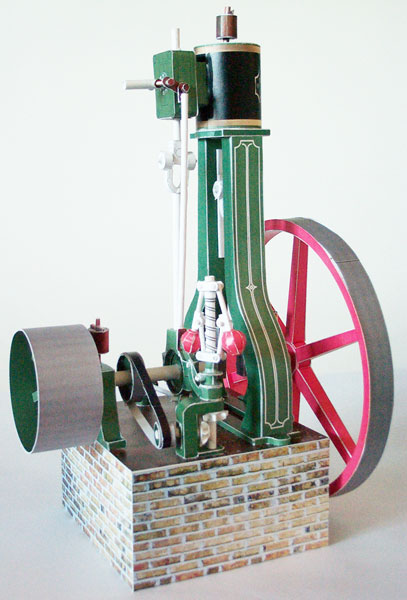
I find origami and paper sculpture intriguing.
Ed Bertschy provides a template that can be downloaded and printed on good paper to be used in the construction of a paper steam engine.
This paper steam engine is based on a Riches and Watts nominal 2 1/2 horsepower vertical A-frame double acting simple slide-valve steam engine circa 1870-75. The original engine was used to drive a water pump to irrigate the fields of Norfolk. If this model had a scale, it would be roughly 1:19. I had to double the size of the eccentric and strap in order to make it buildable. Everything else is close to scale, but changed in design and appearance because, well, paper isn't iron.
Everything will work on this engine, the flywheel turns, there really is a slide valve in the valve chest, the piston works, the cranks and the connecting rods, eccentric and strap all work if built carefully. The final model stands about 12 inches high. I hope you have as much fun building it as I had designing it.
See all
Topics
by dklippert
Is the Web any place for a PowerPoint Show?
How should a PowerPoint file be saved for use on the web?
The University of Wisconsin-Stout ran an experiment.
Tested Methods
Save as HTML or Web Page [Not Recommended]
PowerPoint Presentation (*.ppt) [Recommended]
PowerPoint Show (*.pps) [Not Recommended]
PowerPoint Animation (*.ppa) [Not Recommended]
Pack-n-Go [Not Recommended]
ASF - Streaming
by dklippert
Sometimes the performance of Windows XP can be tweaked by adjustinga few settings.

Pick one of these options:
Let Windows choose what's best for my computer
Restore settings to Windows choice.
Adjust for best appearance
Turn on all visual effects
Adjust for best performance
Turn off all visual effects
Or uncheck these settings:
See all Topics
by dklippert
The Web Workshop suggests that these four items are among the many you should make sure are used correctly on your web page:
[Edited entry from 4/3/2004]
See all Topics
by dklippert
While this problem is alleviated in Excel 2007 with its 1,048,576 rows by 16,348 columns, The old XL versions are still here.
Text files with a large number of records are better handled in a program like Access. Having said that, there can be times that these lists must be imported into Excel. If the file has over 65,536 records, the data will not fit on a single worksheet.
Here's a Microsoft Knowledge Base article with the macro code needed to bring oversized text data into Excel and split it into multiple worksheets:
Sub LargeFileImport() 'Dimension Variables Dim ResultStr As String Dim FileName As String Dim FileNum As Integer Dim Counter As Double 'Ask User for File's Name FileName = InputBox("Please enter the Text File's name, e.g. test.txt") 'Check for no entry If FileName = "" Then End 'Get Next Available File Handle Number FileNum = FreeFile() 'Open Text File For Input Open FileName For Input As #FileNum 'Turn Screen Updating Off Application.ScreenUpdating = False 'Create A New WorkBook With One Worksheet In It Workbooks.Add template:=xlWorksheet 'Set The Counter to 1 Counter = 1 'Loop Until the End Of File Is Reached Do While Seek(FileNum) <= LOF(FileNum) 'Display Importing Row Number On Status Bar Application.StatusBar = "Importing Row " & _ Counter & " of text file " & FileName 'Store One Line Of Text From File To Variable Line Input #FileNum, ResultStr 'Store Variable Data Into Active Cell If Left(ResultStr, 1) = "=" Then ActiveCell.Value = "'" & ResultStr Else ActiveCell.Value = ResultStr End If 'For Excel versions before Excel 97, change 65536 to 16384 If ActiveCell.Row = 65536 Then 'If On The Last Row Then Add A New Sheet ActiveWorkbook.Sheets.Add Else 'If Not The Last Row Then Go One Cell Down ActiveCell.Offset(1, 0).Select End If 'Increment the Counter By 1 Counter = Counter + 1 'Start Again At Top Of 'Do While' Statement Loop 'Close The Open Text File Close 'Remove Message From Status Bar Application.StatusBar = False End Sub
Importing Text Files Larger Than 16,384/65,536 Rows
Notice the code about 17 lines from the bottom of the macro.
'For xl97 and later change 16384 to 65536.
Also, after import, the data must be parsed. Use Data>Text to columns.
Also:
Daniel Klann:
Importing large text files (more then 65,536 rows) into Excel
If you have not worked with macros before, Dave McRitchie has a tutorial:
Getting Started with Macros and User Defined Functions
[Edited entry from 4/14/2004]
See all Topics
by dklippert
Backup/restore or transfer AutoCorrect, AutoText, Macros, and other critical files from one version of Word and Windows to another
From ProductivityTalk.com:
MS Word's critical files
Word comes with a supplemental macros template that includes the AutoCorrect Utility. The utility is used to backup and restore entries. If you only do the backup portion, it will create a regular Word document that you can print..
In Word 2002/2003: it's part of the support.dot (included on Office installation CD)
See all Topics
by dklippert
Hoax e-mail, at one time, threatened to overflow offices and homes with deleted electrons.
Some of the offers and "insights" seemed so real and they came from respected senders.
If you have doubts about claims that:
Or any other spam claims, take a look at:
BreaktheChain.org
Another spot to check is:
See all Topics
by dklippert
When you type an entry in a combobox control Access will typically attempt to complete the entry based on the control's lookup list.
This is controlled by the AutoExpand property, which is set to Yes (-1) by default.
Although such behavior is helpful, it can cause problems if your value list contains several items that are close in spelling, since it's easy for users to accidentally let Access choose the wrong item.
You can avoid errors by setting the control's AutoExpand property to No (0) in Design view or using VBA to set the property equal to 0.
Once you've made the change users are forced to type the entire entry or select an item using the combobox control's dropdown list.
(Works the same in Access 2007)

See all
Topics
by dklippert
Forget high school geometry. A triangle can have more than on ninety degree angle.

Here's how it was done:
"Caution!!!! Some of the optical illusions on this blog may cause dizziness or possibly epileptic seizures. The latter happens when the brain can't handle the conflicting information from your two eyes. If you start feeling unwell when using this website, immediately cover one eye with your hand and then leave the page. Do not close your eyes because that can make the attack worse."
See all
Topics
by dklippert
If you find the need for Armed Forces photos and art, here is the place to look.
Regardless of your opinion about their present mission, the military does present a spectacular visage.

"06/17/06 - An F/A-18E Super Hornet aircraft sits at the ready as storm clouds pass overhead aboard the Nimitz-class aircraft carrier USS Ronald Reagan (CVN 76) in the Philippine Sea June 17, 2006.
(
U.S. Navy photo by Photographer's Mate 2nd Class Aaron Burden
)All of these files are in the public domain unless otherwise indicated. However, we request you credit the photographer/videographer as indicated or simply "Department of Defense."
See all
Topics
by dklippert
The last entry posted here was back in July. There of course are many more postings.
This discussion is closed to new replies.
Sort by Trending