


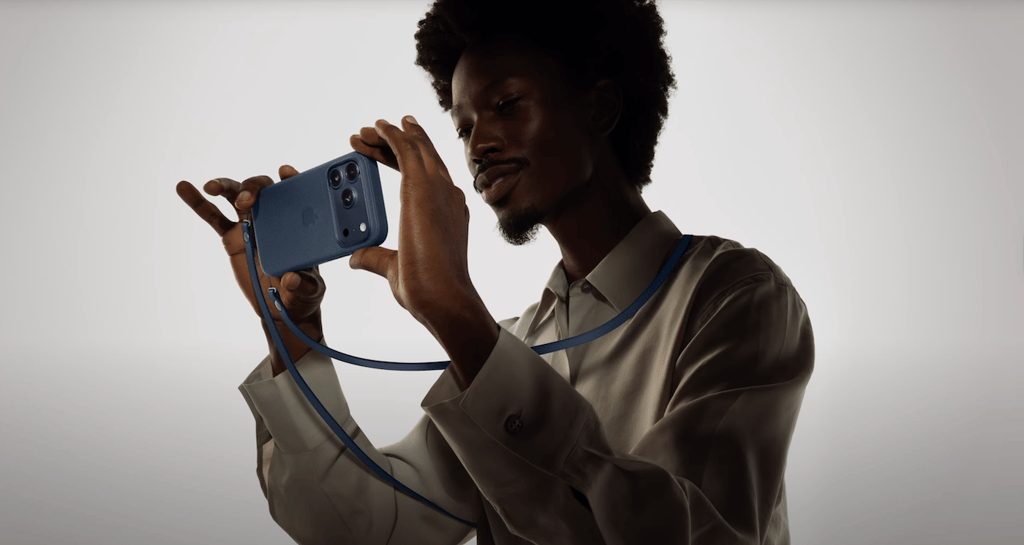
While the standard iPhone models pick up big upgrades this year, Apple still reserves a set of creator-class, performance, and workflow perks for its Pro lineup. The line between the base models and the Pros has never been clearer, focusing on tangible benefits for mobile professionals, content creators, and power users.
What exactly would you get if you chose an iPhone 17 Pro or iPhone 17 Pro Max over the less-expensive iPhone 17 or iPhone Air?
The differences go deeper than just an extra camera lens. We’re talking about professional-grade video formats like ProRes RAW, workflow tools like Genlock and ACES color support, superior thermal performance for sustained tasks, and I/O speeds that can keep up with a real production environment.
Here’s every key feature you gain by going with an iPhone 17 Pro model.
- 1. Vapor chamber cooling for higher sustained performance
- 2. A19 Pro with a 6-core GPU
- 3. Four studio-quality microphones
- 4. Triple 48 MP Pro Fusion rear cameras
- 5. Long-reach 100 mm and 200 mm optics
- 6. 16x optical-quality zoom range and up to 40x digital zoom
- 7. Second-generation sensor-shift OIS on the main camera
- 8. Lidar scanner
- 9. ProRes everything
- 10. Professional video workflow tools
- 11. 4K Dolby Vision at up to 120 fps
- 12. USB-C with USB 3 (up to 10 Gb/s)
- 13. The biggest iPhone display (Pro Max only)
- 14. The longest battery life (Pro Max only)
- 15. 2 TB storage tier (Pro Max only)
- 16. Pro-only ProRAW stills
- 17. Front-camera creator modes, consolidated
- 18. More memory headroom
- 19. Exclusive Pro finishes
- 20. Ceramic Shield back for enhanced durability
- Buying quick takes
1. Vapor chamber cooling for higher sustained performance
Apple redesigned the Pro chassis around thermals: a laser-welded vapor chamber is bonded into the aluminum unibody to move heat off the A19 Pro and into the frame. That means the chip can hold higher clocks longer before it has to slow down. In everyday terms, you’ll notice steadier frame rates during long gaming sessions and fewer “phone is hot” moments when exporting large edits or recording extended 4K footage.
The benefit isn’t just speed—it’s also consistency. Where iPhone 17 and iPhone Air rely on more traditional heat spreaders, the Pros stay closer to their initial performance curve after 10, 20, or 30 minutes of load. That also keeps skin temperature more comfortable when you’re navigating, streaming, or tethered to an SSD in the sun.
2. A19 Pro with a 6-core GPU
All four late-2025 iPhones use a powerful new generation of Apple silicon, but the chip inside isn’t the same across the board. The standard iPhone 17 features the A19 chip, while the iPhone Air and two iPhone 17 Pro models get the more advanced A19 Pro. However, only the 17 Pro and 17 Pro Max are equipped with the top-tier A19 Pro, which features a 6-core GPU instead of the 5-core GPU found in the Air.
The extra core boosts peak graphics throughput and gives Apple’s per-core Neural Accelerators more room to breathe for on-device AI. You feel it when scrubbing multilayer timelines, applying looks in Photos, or driving hardware-accelerated ray tracing in modern titles.
If you shoot and grade on the phone, the GPU uplift shows up as faster renders and fewer dropped frames on complex color pipelines. It also cushions Apple Intelligence features that run on-device, so they don’t compete as much with your creative workload.
3. Four studio-quality microphones
Like last year’s Pro models, the iPhone 17 Pro and 17 Pro Max use a four-mic array tuned for cleaner voice isolation, Spatial Audio capture, and better wind-noise handling. If you record stand-ups, interviews, or quick voiceovers, you get clearer takes before you ever touch an EQ. It also improves call clarity and voice memos in noisy environments.
Creators will notice one subtle win: when you rotate the phone or switch lenses mid-recording, the mic system keeps a stable stereo image and doesn’t “whoosh” as aggressively with gusts. The iPhone 17 and iPhone Air sound good, but the Pros sound broadcast-ready most of the time.
4. Triple 48 MP Pro Fusion rear cameras
Both Pro models run three 48-megapixel sensors (main, ultra-wide, and dedicated telephoto) so you keep high native detail and consistent color across focal lengths. That consistency matters when you intercut 0.5x, 1x, and zoom shots in the same sequence; edits match better, and you do less correction later.
By comparison, iPhone 17 uses a dual system (main + ultra-wide), and iPhone Air centers on a single 48 MP main with an optical-quality 2x crop. Those are excellent everyday cameras, but you don’t get true optical reach or the same flexibility for coverage.
5. Long-reach 100 mm and 200 mm optics
The telephoto’s tetraprism architecture on the iPhone 17 Pro and 17 Pro Max enables a true 100 mm (4x) optical view and an optical-quality 200 mm (8x) mode — the longest optical-quality reach on iPhone. Sports from the stands, speakers on distant stages, wildlife, architectural details — the 100–200 mm range is where digital crops fall apart on the non-Pro models.
The difference shows up most in texture: hair, fabric weave, typography across a venue. On iPhone 17 and iPhone Air, you’ll rely on cropping from the main camera, which is great up to 2x but softer as you push farther.
6. 16x optical-quality zoom range and up to 40x digital zoom
From 0.5x ultra-wide to 8x optical-quality telephoto, the Pros cover a 16x optical-quality span, giving you more usable framing without the watercolor look of heavy digital zoom. That range lets you stay in “real lens” territory more often, which is especially helpful for events and travel where you can’t move your feet.
When you absolutely need to reach beyond optics, stills on the Pros climb to 40x digital. It’s not for gallery prints, but it’s surprisingly serviceable for note-taking, whiteboards across a room, or license plates in reporting scenarios.
7. Second-generation sensor-shift OIS on the main camera
Apple’s 2nd-gen sensor-shift stabilization in the Pros’ main lens reduces micro-jitter and extends sharp handheld shutter times in low light. Night street scenes hold detail without bumping ISO as aggressively, and walking shots smooth out with less “jello” even before you touch stabilization in edit.
iPhone 17 and iPhone Air employ earlier-gen stabilization. They’re steady, but they don’t soak up the same wobble when you’re shooting at twilight or in a dim venue where a tripod isn’t an option.
8. Lidar scanner
Lidar remains Pro-only, and it’s not just for AR demos. It accelerates autofocus in low light by giving the camera a depth map to lock onto, improves subject separation for portraits, and turns the phone into a fast, accurate room and object scanner. If you work in real estate, facilities, set design, or interior planning, lidar-powered apps save time.
It also helps with 3D capture and measurement tasks — think quick volumetric scans of a product or verifying dimensions on a job site. Without lidar, iPhone 17 and iPhone Air must infer depth from parallax and machine learning; with lidar, the phone just measures it.
9. ProRes everything
On the Pros, Apple treats the phone like a real camera and post device. If your pipeline includes grading, conforming, or handoff to a finishing house, this is the dividing line between “can do” and “built for it.” After you understand what you gain, the formats fall into place:
- ProRes video up to 4K at 120 fps on the rear cameras when writing to external storage.
- ProRes up to 4K at 60 fps on the Center Stage front camera with external storage.
- ProRes RAW capture (rear and front) via compatible camera apps for maximum latitude.
- On-device ProRes decoding so you can review camera originals in the field without proxies.
The iPhone 17 and iPhone Air are excellent HEVC/H.264 capture devices, but they don’t shoot and can’t locally review ProRes. For clients who expect Log+ProRes or RAW, the Pros are the only fit.
10. Professional video workflow tools
Beyond codecs, the Pro models plug into professional color and multicam standards. Apple Log 2 increases headroom in highlights and shadows so skin, skies, and practicals grade cleanly rather than clipping. Academy Color Encoding System (ACES) support lets you drop iPhone footage into a color-managed baseline that plays nicely with cinema cameras.
Genlock is the sleeper feature for productions — synchronizing time across multiple cameras and external inputs. With supported hardware/software, you can keep multi-angle shoots in perfect sync, avoiding hours of manual alignment later. None of these tools exist on iPhone 17 or iPhone Air.
Must-read Apple coverage
- Nearly 7 in 10 iPhone Owners Plan iPhone 17 Upgrade
- Apple Prepares AI-Powered Siri Upgrade With Google Search Integration
- Apple’s Xcode 26 Beta Now Supports GPT-5 and Claude
- Apple’s Vision Pro Adoption Stalled As Content Released ‘Drip by Drip’
11. 4K Dolby Vision at up to 120 fps
Both Pros shoot Dolby Vision HDR at 24/25/30/60 fps like the others, and then go further: the main camera records 4K Dolby Vision at 100/120 fps in standard video, plus there’s a dedicated 4K Dolby Vision slow-motion mode up to 120 fps. That means you can capture fast action in HDR and decide in post whether it plays full-speed or as creamy slo-mo — without dropping to 1080p.
The iPhone 17 and iPhone Air top out with 4K at 60 fps in Dolby Vision and reserve higher frame rates for 1080p slo-mo. If your deliverables are HDR throughout, the Pros keep your whole timeline in 4K HDR, even for slow-motion segments.
12. USB-C with USB 3 (up to 10 Gb/s)
If you’ve ever waited on a giant offload, this is where the Pros pay for themselves. Their USB-C port supports USB 3 at up to 10 Gb/s, which is roughly 20× the throughput of USB 2 on iPhone 17 and iPhone Air. Pro workflows — direct-to-SSD recording, tethered shooting to a laptop, dumping a day of ProRes or a huge photo library — feel desktop-fast.
It’s also about reliability. High-bitrate external recording is less likely to hiccup, and you can move a full card’s worth of media during a coffee stop instead of a lunch break. If you’re on 17 or Air, plan for Wi-Fi or much longer cable transfers.
13. The biggest iPhone display (Pro Max only)
The iPhone 17 Pro Max alone ships with a 6.9-inch Super Retina XDR screen.
More pixels matter when you’re managing timelines, spreadsheets, remote desktop sessions, or live camera monitors. It makes split-screen note-taking and reference lookups feel less cramped and turns the phone into a more usable field monitor with apps like Final Cut Camera.
If you prefer a lighter device, iPhone 17 and 17 Pro (both 6.3 inches) and iPhone Air (6.5 inches) are excellent, but neither gives you the same working canvas — especially helpful for creators and admins who live in dashboards.
14. The longest battery life (Pro Max only)
With the iPhone 17 Pro Max, you get up to 39 hours of local video playback — the best number in the lineup. The regular Pro reaches up to 33 hours, already ahead of iPhone 17 (up to 30 hours) and iPhone Air (up to 27 hours).
If you shoot conferences, travel days, or tournaments, those extra hours translate into fewer panic charges and less time hunting outlets.
Charging parity is strong across models, but only the Pro Max pairs runtime with the biggest screen. If you’re torn between endurance and display size, this is the one that does both.
15. 2 TB storage tier (Pro Max only)
Only the iPhone 17 Pro Max can be configured with 2 TB. That’s not a vanity number if you’re capturing ProRes/RAW regularly, covering all-day events, or keeping large on-device AI models and datasets for offline work. It reduces how often you have to triage media on set and lets you carry more projects at once.
The rest of the lineup tops out lower: iPhone 17 at 512 GB, iPhone 17 Pro at 1 TB, and iPhone Air also at 1 TB. Heavy shooters and editors will appreciate the headroom.
16. Pro-only ProRAW stills
Apple’s RAW workflow on the Pros covers both sides of the phone. On the rear, all three 48 MP lenses can capture Apple ProRAW for DNG files with real editing latitude. On the front, the 18 MP Center Stage camera also supports ProRAW, so creator-facing product shots and portraits have the same flexibility as your rear-camera work.
If you rely on Lightroom, Capture One, or Photos for serious edits, ProRAW is the difference between “fixable” and “baked in.” The iPhone 17 and iPhone Air do not offer ProRAW capture.
17. Front-camera creator modes, consolidated
The Pro models don’t force a workflow compromise when you turn the camera around. The Center Stage front camera gains the same professional pipelines as the rear — ProRes, ProRes RAW (with supported apps), Apple Log 2, and ACES —so vloggers, hosts, and educators can record A-roll that drops straight into professional timelines. Stabilization and exposure behavior also match better with rear footage.
On iPhone 17 and iPhone Air, the front camera is capable but lacks the pro formats. That means at some point you’ll either turn the phone around or accept mixed codecs in post.
18. More memory headroom
The iPhone 17 Pro and Pro Max come equipped with 12 GB of RAM, a significant step up from the 8 GB in the standard iPhone 17, which unlocks a new level of performance. (The new iPhone Air also has 12 GB RAM.)
Apple’s iOS is famously aggressive about memory management, so you won’t see a raw “FPS boost” from extra RAM, but you will notice fewer app reloads and less state loss when you bounce between heavy tasks. Think Safari tabs staying warm, big PDFs not re-rendering every time you switch apps, and music or live-transcription apps hanging onto buffers while you open the camera or maps.
Where this extra RAM really helps the Pro models shine is in creator and power-user workflows. Large ProRAW edits, multilayer photo stacks, and longer ProRes clips can sit in memory alongside your editor without forcing background apps to close. Game engines that use higher-resolution textures and hardware-accelerated ray tracing have more headroom for assets, so scene swaps stutter less and reloads are rarer. On-device AI features also benefit because bigger models and context windows can remain resident without evicting your active app.
Future-proofing matters too. As third-party apps adopt richer Live Activities, offline transcription, and local generative tools, memory pressure rises. With 12 GB, the Pro models are simply harder to “push out of breath,” especially when you’re juggling navigation, messaging, camera, and a couple of pro utilities at once.
If your day involves lots of app hopping — or your nights involve long grading sessions on the phone — the extra RAM is one of those quietly transformative upgrades.
19. Exclusive Pro finishes
Deep blue, cosmic orange, and silver are Pro-only colorways this cycle. The finishes are more than aesthetics for some teams — they’re quick visual cues. In production and IT settings, it’s handy to spot who’s carrying a Pro camera rig or which devices have USB 3 and lidar at a glance.
20. Ceramic Shield back for enhanced durability
Apple extended its super-tough Ceramic Shield material to the back of the iPhone 17 Pro, Pro Max, and Air.
While all models in the lineup are protected by the new Ceramic Shield 2 on the front, only these three get the same advanced protection on the rear, which Apple claims offers 4x better resistance to cracks than the back glass on previous models. It’s a significant durability upgrade that provides extra peace of mind against accidental drops.
The standard iPhone 17, by contrast, uses a more traditional color-infused glass back. It’s a proven design, but it can’t match the shatter resistance of Ceramic Shield.
For users who are tough on their gear or simply prefer the feel of a caseless phone, the added resilience of the Pro and Air models is a practical feature that helps protect your investment.
Buying quick takes
If your workflow includes ProRes/RAW, Apple Log 2, ACES, lidar scanning, USB 3 offloads, or true long-reach optics, choose iPhone 17 Pro or 17 Pro Max. If runtime, screen real estate, or a 2 TB tier matters, pick the Pro Max. If you don’t need pro codecs or optical reach and you prioritize lighter weight and price, iPhone 17 or iPhone Air delivers the same 120 Hz, 3000-nit display tech — minus the pro pipelines.