


Apple originally offered its satellite features free for two years. Four years later, the company has added another year of complimentary access.
Apple has extended free satellite service for eligible iPhone 14, iPhone 15, and iPhone 16 users, keeping features such as Emergency SOS, Messages, Find My, and Roadside Assistance available without a separate charge when cellular and Wi-Fi coverage are unavailable.
For users who rely on their iPhone in remote areas or during emergencies, the extension removes one immediate question: Apple still is not asking them to pay for access.
Apple keeps adding one more year each year
The extension covers existing iPhone 14, iPhone 15, and iPhone 16 owners and applies to devices in supported regions, according to Digital Trends.
Because the feature activates when you buy a new iPhone and is supposed to last two years after that, iPhone 17 users are not included since they still have one more year of complimentary access left.
Depending on the user’s location and available services, an eligible iPhone can use satellite connectivity for emergency assistance, messaging, location sharing through Find My, and roadside assistance when cellular and Wi-Fi connections aren’t available.
An important technical distinction is that the iPhone 14 was the first iPhone generation to include the hardware needed for Apple’s satellite communication system. That is why iPhone 13 and older models cannot receive the feature, as they lack the dedicated satellite connectivity hardware required to communicate with satellites.
Why Apple still hasn’t priced satellite access
Apple has not publicly explained why it continues extending the complimentary period.
In 2022, when Apple introduced the feature with the iPhone 14, things were a bit different. The feature helped the iPhone 14 stand out, but it has since become far more common, with Google and Samsung now offering satellite communication on supported phones too.
That changes the feature’s position. What once helped distinguish Apple’s phone from its rivals is increasingly becoming part of the expected safety package on smartphones, making it harder to treat emergency satellite access like an ordinary subscription add-on.
More importantly, Apple has since expanded the package well beyond Emergency SOS, adding satellite messaging, Find My location sharing, and roadside assistance. If, when, and how Apple eventually turns those capabilities into a paid service remains to be seen.
Mobility must-reads
- Big Apple OS Makeover: Here’s What to Expect & When
- MWC 2025: Nothing Shows Off (3A) Phones With AI Organization Tool
- Bad News for App Developers: Most Apps Fail to Hit $1,000 Monthly Revenue Within Two Years
- Mobile Device Computing Policy
How to use Apple Satellite features
Using Apple’s satellite features is mostly the same regardless of what you’re trying to do:
- Open the relevant app — Messages, Find My, or the Roadside Assistance option.
- Try the normal action — send a message, share your location, or contact emergency services.
- Wait for the satellite option to appear when supported. This only shows when cellular and Wi-Fi aren’t available.
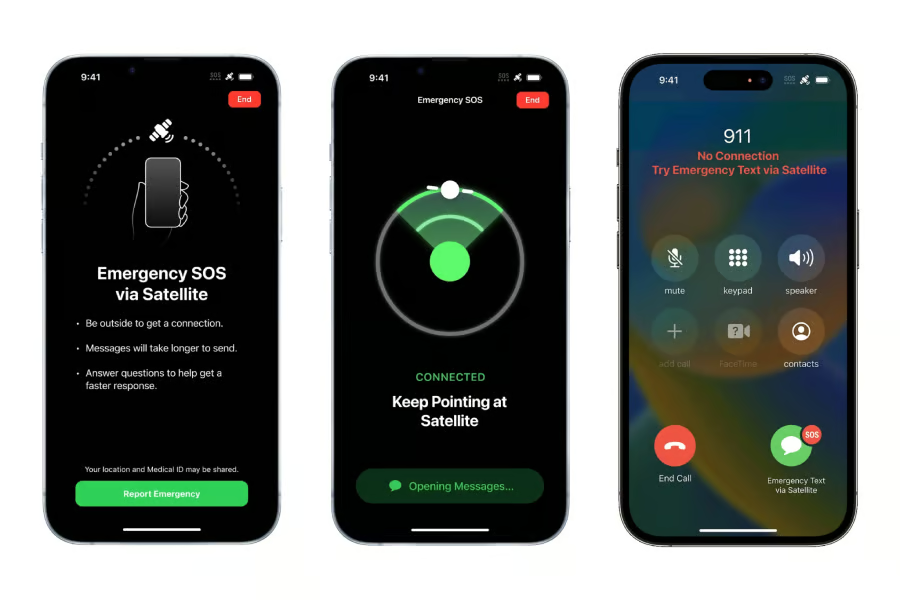
- Follow Apple’s on-screen instructions to point the iPhone toward the satellite and maintain the connection.
What happens next depends on the feature. For example, Emergency SOS guides you through an emergency questionnaire before connecting you to responders. You can also set up the information you intend to share beforehand via Medical ID, so once the feature triggers, that information goes with your distress call.
The feature also has a big limitation: line of sight. Apple recommends being outdoors with a clear view of the sky. Dense foliage, hills, mountains, and tall buildings can block the connection.
Satellite messages can also take longer to send because the connection has limited bandwidth. To get hands-on practice, Apple provides a satellite connection demo on supported iPhones so you can practice the process before you actually need it.
What this means for older iPhone owners
For owners of eligible iPhones, the practical takeaway is simple: another year of satellite communication comes without another iPhone purchase or a separate subscription. That gives people with the required hardware continued access to a feature that could become valuable when they are outside conventional internet coverage.
Owners of iPhone 13 models and older still cannot add the feature through software because those devices lack the necessary satellite hardware. Anyone considering an upgrade specifically for satellite connectivity should also check which features are supported in their country and by their carrier.
For now, Apple’s latest extension keeps one of the iPhone’s most important off-grid safety features free — while leaving the longer-term pricing question unanswered.
More news: Google has released Android 17 QPR1 alongside its September Pixel Drop, bringing Pixel users new VIP widget controls, expanded scam protections, and additional Pixel Watch features.