


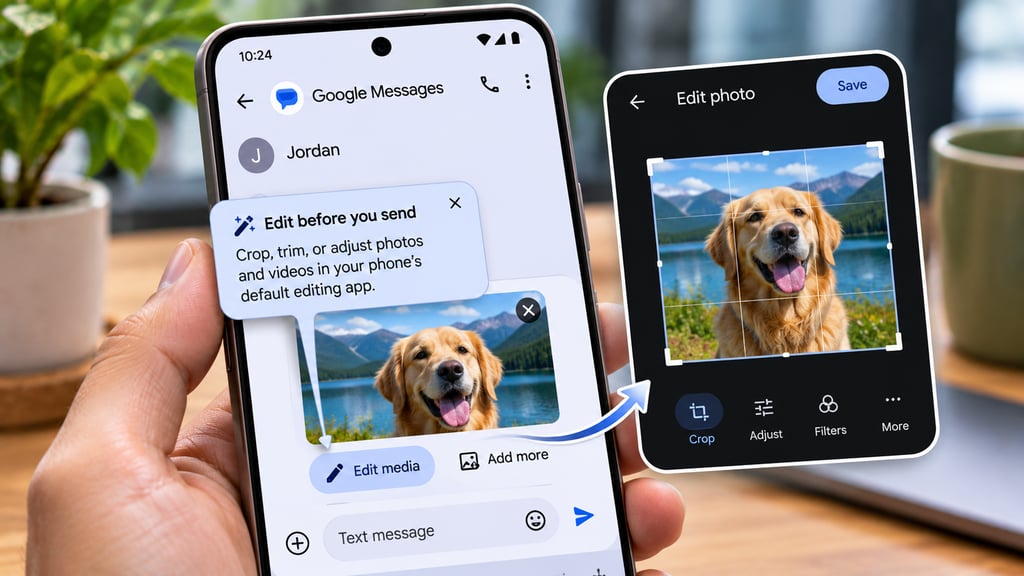
You’ve attached a photo to a message, only to realize it needs cropping. Or perhaps the video is a few seconds too long. In Google Messages, making those adjustments currently means opening another app, editing the file, and returning to the conversation to attach it again.
Google appears to be working on a shortcut that could eliminate most of those steps. Code discovered in Google Messages beta version v20261106 reveals an “Edit media” button that would let users crop, trim, or adjust photos and videos through their phone’s existing editing app.
The feature has not been publicly released, and Google has not announced a rollout date. However, the newly discovered code provides a detailed look at how it could work.
How Google Messages’ new Edit media button would work
A Nov. 9 APK teardown by Android Authority uncovered an unreleased editing shortcut and an onboarding prompt labeled “Edit before you send.”
Rather than creating a separate editor inside Messages, Google plans to connect users with the editing app already installed on their phones.
The proposed workflow is straightforward:
- Select a photo or video to attach in Google Messages.
- Tap the new Edit media button.
- Make adjustments in the phone’s default editing app.
- Return to the Messages draft with the edited media ready to send.
Google Messages would identify compatible editing apps based on the selected file type and use Android’s intent system to open the appropriate editor.
The code also references a separate output URI, allowing the edited file to return to the conversation without requiring users to save and reattach it manually.
Google Photos is one possible editor. Its crop tool received improvements earlier this year, including smoother animations and fixes for frustrating rotation and preview problems.
The exact editing options available would depend on the app handling the file.
What happens if no compatible editor is installed?
Google appears to have anticipated that problem.
The teardown uncovered a fallback message labeled “Editing isn’t available,” which prompts users to install an editing app.
That suggests the shortcut won’t operate independently of other media-editing software.
It also leaves some questions unanswered. Google hasn’t confirmed which editing apps will be supported, whether all photo and video formats will work, or how the feature will behave across different Android manufacturers.
For users who already rely on Google Photos or another editor, the main benefit would be convenience rather than an entirely new set of editing tools.
How Edit media differs from Google Messages Remix
Google Messages already offers a photo-editing feature called Remix, but it serves a different purpose.
Google introduced Remix in November 2025, using its Nano Banana image model to transform photos through generative AI.
Users can select an image, enter a prompt, and create a new version with different visual elements or styles.
Edit media appears designed for simpler adjustments, including:
- Cropping photos to remove unwanted areas or improve framing.
- Trimming videos to shorten clips before sharing.
- Adjusting media using whatever tools the phone’s default editor provides.
Remix creates AI-generated variations of images. Edit media would launch an existing editor for conventional adjustments, although that editor might offer AI-powered capabilities of its own.
For example, Google Photos includes an AI Enhance tool that can automatically improve lighting, color, and other image characteristics.
The Messages teardown does not indicate that Google is introducing a new generative AI model for the editing shortcut.
Google is simplifying more actions before sending
The proposed feature follows other changes designed to give users more control over content before sharing it.
Earlier this year, Google Messages began testing Tap to Draft, which lets users revise suggested Smart Replies before sending them instead of transmitting a response immediately.
Edit media applies a similar idea to photos and videos: make the adjustment before the recipient sees the result.
For someone sending a work-related image, a family photo, or a short video, that could mean fewer interruptions and less time spent moving between apps.
When will Edit media be available?
Google has not confirmed whether the feature will reach the public beta, much less the stable version of Messages.
Its appearance in beta code indicates development work, but users cannot assume the button will appear simply because they have installed version v20261106.
The final implementation could also change before release.
For now, users who need to crop photos or trim videos should continue editing them through their preferred gallery or media app before attaching them to Messages.
If Google activates the shortcut, its usefulness will depend on how smoothly it returns edited files to conversations and how consistently it works with the editing apps installed on different Android phones.
Also read: Google is adding automatic photo backups from Android phones to Windows PCs through Quick Share, reducing the need to transfer images and videos manually.