


You no longer need to know JavaScript to build a custom Google Workspace automation. Gemini can now write Apps Script code from plain-English instructions, helping users connect Gmail, Sheets, Docs, and Calendar without starting from a blank script.
Google announced the feature’s general availability on Nov. 16, following a gradual rollout that began Nov. 12. Eligible users can describe a task, review Gemini’s proposed code, and troubleshoot errors directly inside the Apps Script editor.
For businesses, this opens automation development to employees who don’t write code. But the generated scripts still run with real Workspace permissions, so IT teams need to decide which workflows employees can automate and which require technical review.
How Gemini creates Google Workspace automations
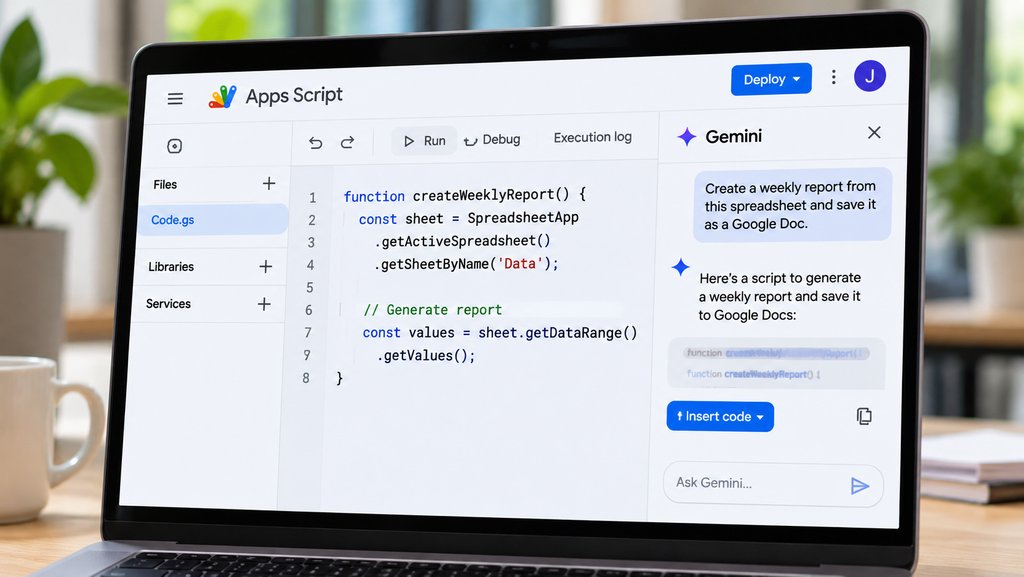
According to Google’s announcement, Gemini is available as a side panel inside the Apps Script editor.
Instead of writing JavaScript manually, users describe what they want to accomplish. Gemini generates code using the project’s existing files as context and can refine the script through follow-up prompts.
Google provides several examples:
- Gmail and Calendar: Create calendar events based on urgent emails.
- Google Sheets: Retrieve, clean, and organize data automatically.
- Sheets and Docs: Turn spreadsheet tables into formatted reports.
- Scheduled tasks: Add triggers that run automations at specified times.
Gemini suggests changes in code blocks that users can accept individually or all at once. This lets them inspect the proposed changes before applying them.
The company says automations can be created in minutes, although it hasn’t published independent testing establishing how accurately Gemini generates scripts across different tasks.
How to use Gemini in Apps Script
Eligible users can access the feature directly from Google Workspace.
- Open Google Apps Script or select Extensions > Apps Script from a Google Sheet, Doc, or Slide.
- Create a project or open an existing script.
- Find the Gemini side panel, which opens automatically for new projects.
- If it isn’t visible, click the Ask Gemini icon in the editor’s upper-right corner.
- Describe the automation you want to create.
- Review the generated code and accept or reject the proposed changes.
- Test the script and authorize only the permissions it needs.
For example, an employee could ask Gemini to create a weekly report from a spreadsheet and save the formatted result in Google Drive.
That automation may require access to Sheets, Docs, and Drive. Users should examine those permissions before authorizing the script.
Gemini also helps troubleshoot errors. When a script fails, users can select Fix errors in the Execution log to receive an explanation and a proposed correction.
The tool assists with debugging, but it doesn’t guarantee that the resulting code is secure, accurate, or suitable for production.
Who can use Gemini in Apps Script?
Google is rolling out the feature to the following subscriptions:
- Business: Standard and Plus
- Enterprise: Standard and Plus
- Education: Google AI Pro for Education
- Add-ons: AI Expanded Access
- Personal accounts: Google AI Pro and Ultra
Business Starter and Enterprise Starter aren’t listed among the eligible editions.
The rollout applies to Rapid Release and Scheduled Release domains, with feature visibility potentially taking up to 15 days from Nov. 12.
That means an eligible account may not immediately display the Gemini side panel.
The release adds another AI capability to Workspace, where users can already generate documents, analyze spreadsheets, and create content. TechRepublic previously compared Claude and Gemini across Docs, Sheets, and Slides, including their different editing and approval controls.
Apps Script takes a different approach by generating executable JavaScript that can connect services and perform actions automatically.
What IT administrators can control
Google says Gemini in Apps Script respects existing Workspace permissions and Apps Script service settings.
Administrators can manage access through:
- Apps Script service controls: Enable or restrict the service through the Admin console.
- Generative AI settings: Control access to Gemini features.
- Organizational units and groups: Limit availability to selected employees.
- OAuth app controls: Restrict applications and permissions.
- External URL allowlists: Manage which external services scripts can contact.
- Audit logs: Review relevant activity through Drive and OAuth logs.
Generated scripts operate using the account holder’s existing permissions and standard OAuth authorization.
This doesn’t automatically mean every generated script follows least-privilege principles. A script may request broader access than necessary or perform actions the user didn’t anticipate.
IT teams should therefore review both the generated logic and the permissions requested before connecting scripts to sensitive information.
Google has introduced similar administrator controls for other Workspace AI services. Its Google Pics rollout also required organizations to consider feature access and data governance before wider deployment.
Apps Script vs Workspace Studio: Which should you use?
Google now offers several ways to automate work using AI, but they aren’t interchangeable.
Gemini in Apps Script generates JavaScript that users can inspect, modify, and run. It’s useful when a workflow requires custom logic, API calls, or functionality beyond standard app features.
Workspace Studio focuses on building automated flows and AI agents across Workspace applications. Users can connect triggers and actions without directly managing JavaScript.
Workspace skills are reusable instructions that guide Gemini when performing recurring tasks. They can also be incorporated into Studio workflows.
Google’s broader Workspace AI expansion has introduced multiple automation capabilities, making it increasingly important to distinguish between tools that generate content, execute scripts, and coordinate workflows.
For straightforward tasks supported by Studio, a visual workflow may be easier to maintain.
Apps Script offers more flexibility when teams need custom behavior, but that flexibility also creates additional testing and maintenance responsibilities.
What businesses should do before enabling it widely
The immediate opportunity is to automate repetitive work without requiring every employee to learn JavaScript.
A useful first pilot might involve generating a weekly report from non-sensitive spreadsheet data. IT teams can then test the resulting script’s accuracy, permissions, error handling, and ongoing maintenance requirements.
Before expanding access, organizations should:
- Confirm eligible Workspace subscriptions and administrator settings.
- Limit initial testing to selected users or organizational units.
- Review generated code and OAuth scopes before execution.
- Test automations using nonproduction data.
- Establish ownership for scripts that other employees depend on.
- Monitor execution logs and investigate unexpected behavior.
Organizations should also decide who maintains generated scripts when workflows change or an API stops working.
Google has removed much of the initial coding barrier, but employees still need to understand what their automations are allowed to access and change.
For teams already using Workspace, Gemini in Apps Script offers a direct way to turn everyday requests into working automations. The safest starting point is a small, reviewable workflow with clearly defined permissions and a person responsible for maintaining it.
Also read: Google’s Gemini Agent can carry out assignments across workplace applications, offering another approach to automating multistep business tasks.