


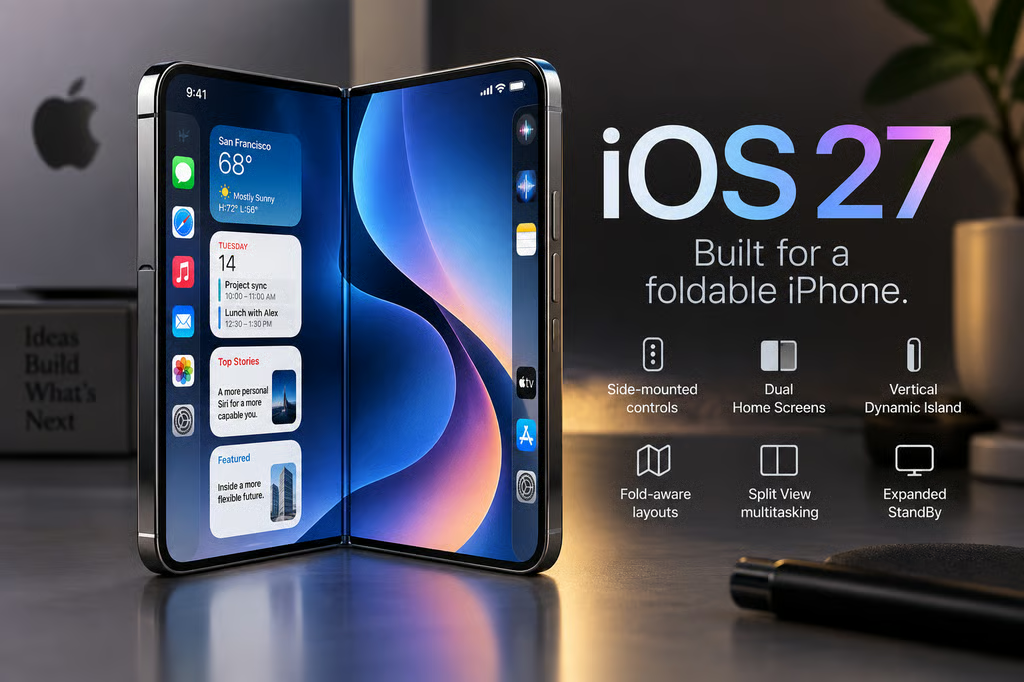
Apple’s first foldable does not simply stretch iOS across a 7.6-inch screen. iOS 27 changes where controls live, how apps resize, how multitasking works, and what happens when iPhone Duo is partially folded or sitting on a desk.
That gives Duo a different software model from a conventional iPhone. The interface has to respond to two displays, changing screen shapes, the hinge, and multiple app windows while keeping controls usable as the phone opens, closes, rotates, and rests at different angles.
| iOS 27 feature | What’s different on the iPhone Duo |
|---|---|
| Side-mounted controls | Lock Screen controls, the Dock, and navigation move to the sides |
| Dual Home Screens | Two Home Screen pages appear together when Duo opens |
| Vertical Dynamic Island | Alerts and Live Activities run along the side of either display |
| Fold-aware layouts | Apps can adapt to screen shape, orientation, hinge position, and fold angle |
| Split View | Two apps, or two windows of the same app, can run side by side |
| Expanded StandBy | StandBy works on either display without requiring a charging connection |
1. Controls move to the sides
Apple has moved Lock Screen controls, the Home Screen Dock, and app navigation to the sides of the display rather than keeping them along the bottom.
According to Apple’s iPhone Duo announcement, the change is designed to preserve vertical space. It also puts frequently used controls closer to the outer edges when the device is open.
For developers, this affects more than visual styling. Standard navigation components adapt automatically, while custom interfaces need to respect the Duo’s asymmetric safe areas so buttons do not collide with system controls, cameras, or other reserved regions.
2. Two Home Screens appear when Duo opens
Opening iPhone Duo reveals two Home Screen pages at once instead of simply enlarging a single page.
Today View sits on the left as a vertically scrolling collection of widgets, giving the inner display more of a tablet-like information layout without turning iOS into iPadOS.
That distinction is important. Apple is retaining the basic iPhone interaction model while using the additional width to surface more content at once, rather than replacing the familiar Home Screen with an entirely different interface.
3. Dynamic Island turns vertical
Dynamic Island has also been redesigned around the foldable shape.
On Duo, it runs vertically along the side of both the outer and inner displays and can expand to show Live Activities and alerts. The status bar also uses a new flexible circular design that fits into a corner of the screen with Wi-Fi, cellular, battery, and other information.
Those changes free the center of the wider inner display for content instead of stretching conventional iPhone interface elements across it.
4. Apps react to the hinge and fold angle
This is where Duo’s software becomes more than a bigger iPhone interface.
Content can change position as the phone folds, reorient when the device turns sideways, and move to the appropriate screen when Duo is flipped. Interactive elements can also move away from the display crease when the phone is partially folded.
Apple has already published developer guidance for iPhone Duo covering adaptive layouts, resizability, safe areas, fold-aware regions, and testing across different poses.
The fold itself can act as a division region that apps use when laying out content. Apple recommends letting system containers adapt automatically where possible rather than designing a completely different interface for every angle.
That reduces some of the developer burden the first-generation hardware might suggest. Existing apps can run on Duo without being rebuilt, but apps designed around flexible layouts and current SDKs can use the inner display more effectively.
5. Split View brings two-app multitasking to iPhone
Duo is the first iPhone to support two apps side by side through Split View.
Users can swap either app, save app pairs for later, open two windows of the same app such as Safari, or keep Siri AI visible alongside another app. Apple says all apps participate in multitasking on Duo, while apps already designed to resize should be better positioned to adapt cleanly.
The change gives the Duo a stronger productivity case against conventional iPhones and brings it closer to the workflows buyers may already associate with an iPad mini.
Apple is still taking a more restrained approach than Samsung. TechRepublic’s comparison with the Galaxy Z Fold8 found Samsung’s mature Multi Window, Taskbar, and DeX environment remains the deeper multitasking system.
6. StandBy no longer requires charging
StandBy changes more substantially on Duo than on Apple’s conventional iPhones.
Setting the device down can trigger StandBy on either the inner or outer display even when the phone is not connected to power. Duo can then function as a clock, photo display, or widget hub.
Apple has added Calendar and Weather faces alongside Clock and Modular, while the Photos face can display Shared Albums. Faces also gain additional colors, fonts, and complications.
The folding hardware makes that feature more useful because Duo can support itself at different angles instead of needing a separate stand.
Third-party apps are the next test
The six changes give iOS 27 a job Apple has never asked it to do before: preserve the familiar iPhone experience while continuously adapting to a device whose usable shape can change in someone’s hands.
Apple has already gone further on developer support than its launch announcement alone suggests, with Duo-specific design guidance, APIs, simulator support, and Xcode tools available or rolling out around launch. The remaining test will be how smoothly third-party apps make that transition once the hardware reaches customers.
iPhone Duo starts at $1,999. Preorders open October 16, availability begins October 23, and Apple says the phone will ship with iOS 27.1.
Also read: Apple Pencil support will come to iPhone Duo later in 2026, but it will not be available at launch.