


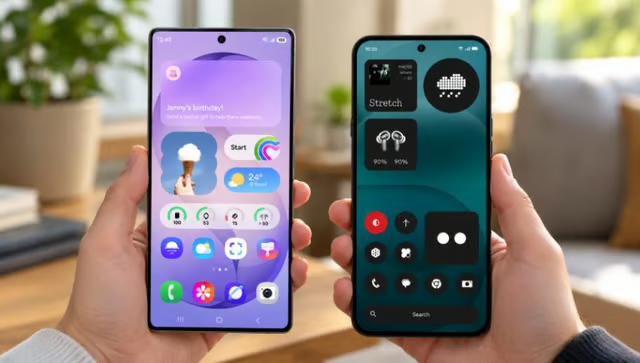
Android 17 looks different on a Samsung Galaxy phone than it does on a Nothing phone. Samsung packs more AI assistance into everyday tasks, while Nothing gives users greater control over how their interface looks and feels.
Samsung expanded One UI 9 to the Galaxy S26 series on Sept. 16 after its debut on the latest foldables. Nothing began rolling out stable Nothing OS 5.0 to Phone (3) on Oct. 12, with other eligible models following in stages. For buyers, the better update depends on which features their phone actually supports.
Both releases offer Android 17, but availability varies by device, region, and feature.
Samsung One UI 9 vs Nothing OS 5.0 at a glance
Samsung’s September announcement highlighted new Galaxy AI and privacy features in One UI 9, while Nothing’s official OS 5.0 guide detailed its customization options, Essential AI tools, and rollout schedule. Here’s how the two Android 17 interfaces compare:
| Android version | Android 17 | Android 17 |
| AI assistance | Now Nudge, Now Brief, Interpreter, Voice Recorder summaries | Essential Space, Essential Voice on select devices, Essential Apps Builder beta |
| Personalization | Quick Panel adjustments, widgets, foldable layouts | Wallpaper-aware themes, clock faces, Glyph controls |
| Multitasking | Multi Window; DeX on compatible hardware | Split-screen apps through Recents |
| Privacy | Security Brief; Privacy Alerts on supported models | Three-color activity indicators, permission controls |
| Rollout | Eligible Galaxy devices in stages | Phone (3) first; others through January 2027 |
Samsung has the edge in everyday AI assistance
Samsung said Now Nudge can suggest actions during supported conversations, such as saving a shared location or retrieving reservation details. Now Brief adds customizable daily-summary cards, while Interpreter’s Thread View makes earlier translations easier to review. Voice Recorder can present AI-generated summaries with headings and tables.
The company also upgraded Document Scan for difficult pages and added My FanCam, which automatically follows a selected person in recorded footage. These tools are useful for travel, meeting notes, and document-heavy work, but availability is not universal.
Now Nudge, Now Brief, and Interpreter require Samsung Account sign-in. Supported apps, languages, markets, and phones vary. Some features need internet access, and enhanced or third-party AI services may have different terms.
Nothing emphasizes design and capturing ideas
Nothing OS 5.0 adds wallpaper-aware colors, transparent widgets, new lock-screen clocks, and the ability to move several home-screen items together. Compatible phones also get a dedicated Glyph app and a home-screen Glyph Timer. The interface is designed for users who enjoy personalizing their phones rather than keeping a standard layout.
Essential Space organizes saved captures into Smart Collections, while Essential Apps Builder can create tools from natural-language prompts but remains in early beta.
Essential Voice also supports transcription and note formatting, although Nothing confirmed that it is available only on selected devices, including Phone (3), Phone (4a) Pro, and Phone (4a). The company added that updates to Essential Space and other system apps may arrive through Google Play rather than a full OS release
Multitasking and privacy offer different advantages
Both interfaces support split-screen apps. Nothing’s updated Recents menu makes the control easier to find, while Samsung offers established Multi Window tools and DeX’s desktop-style layout on compatible displays. DeX is not new to One UI 9, and DeX for PC is no longer supported on phones running One UI 7 or later.
Samsung’s Security Brief warns users about suspicious apps and unnecessary permissions through Now Brief. Its AI Privacy Alerts can also flag unusual background activity. TechRepublic previously covered the feature and found that Samsung’s compatibility list includes select Galaxy S phones, foldables, and tablets, but does not include the Galaxy A56.
Nothing uses color-coded activity indicators: green for sensitive access, blue for location sharing, and yellow for AI processing. It also has Android permission controls. Neither approach proves greater overall security.
Rollout dates are not feature guarantees
Samsung is bringing One UI 9 to more Galaxy phones, including the A56 in some markets as of Oct. 20. But getting Android 17 doesn’t guarantee access to every flagship feature. As TechRepublic’s breakdown of the Galaxy A56 update explains, some AI and privacy features remain unavailable.
For buyers comparing Samsung and Nothing, checking what their specific phone supports matters more than the operating system version alone.
Nothing will continue rolling out OS 5.0 to more phones through January 2027, but some older models won’t make the cut. Phone (1), Phone (2), and CMF Phone 1 have reached the end of major software upgrade support, although security updates follow separate schedules.
TechRepublic breaks down which Nothing phones are eligible and when they should receive the update, helping owners determine whether Android 17 is coming to their device or if they’ll need a newer model to experience it.
Overall winner: Samsung One UI 9
Samsung One UI 9 wins for productivity, especially on Galaxy devices supporting advanced multitasking, Galaxy AI, and additional privacy tools. These features make it the stronger choice for users who regularly manage documents, meetings, messages, and other work tasks.
Nothing OS 5.0 is the better choice for customization. Its personalized widgets, Glyph controls, and Essential tools appeal to users who prefer a simpler interface. However, some features remain limited to certain devices or are still in beta.
Here’s which operating system makes more sense for different users:
| Multitasking and productivity | DeX requires compatible hardware | |
| AI assistance and translations | Account, language, and device restrictions apply | |
| Home screen customization | Glyph features vary by model | |
| Organizing notes and information | Essential Voice has limited availability | |
| Privacy monitoring | Privacy Alerts support select Galaxy devices |
What's hot at TechRepublic
- Blackpoint Cyber vs. Arctic Wolf: Which MDR Solution is Right for You?
- Why AWS Sellers Choose Deepgram Over Other Voice AI Tools
- SS&C Intralinks DealCentre AI vs. Datasite: Which platform is built for the future of dealmaking?
- SS&C Intralinks FundCentre AI vs. Juniper Square: Which platform better supports modern private markets fund managers?
- Verito vs. Rightworks: Which IT Provider Is Best for Your Firm?
What to check before upgrading
Before buying a new phone or installing Android 17, consider three factors:
- Feature availability: Check whether your exact model supports the AI, privacy, and multitasking tools you want. Some features also have regional restrictions or require separate account access.
- Software support: Compare how many major Android upgrades and security updates each device has left, particularly if you plan to keep your phone for several years.
- App compatibility: Confirm that banking, authentication, VPN, and workplace apps support the update. IT teams should test company-managed devices before a wider rollout.
Back up important data before updating, especially if you’re switching brands and need to transfer authentication accounts.
Samsung offers the stronger overall experience for productivity, while Nothing stands out for personalization. Still, if your current phone handles your daily tasks and receives regular security updates, upgrading to a new device solely for Android 17 may not be worth the expense.
Leaning toward Samsung? Check which Galaxy phones are getting Android 17. If Nothing sounds like a better fit, see its rollout schedule and eligible models before making the switch.