


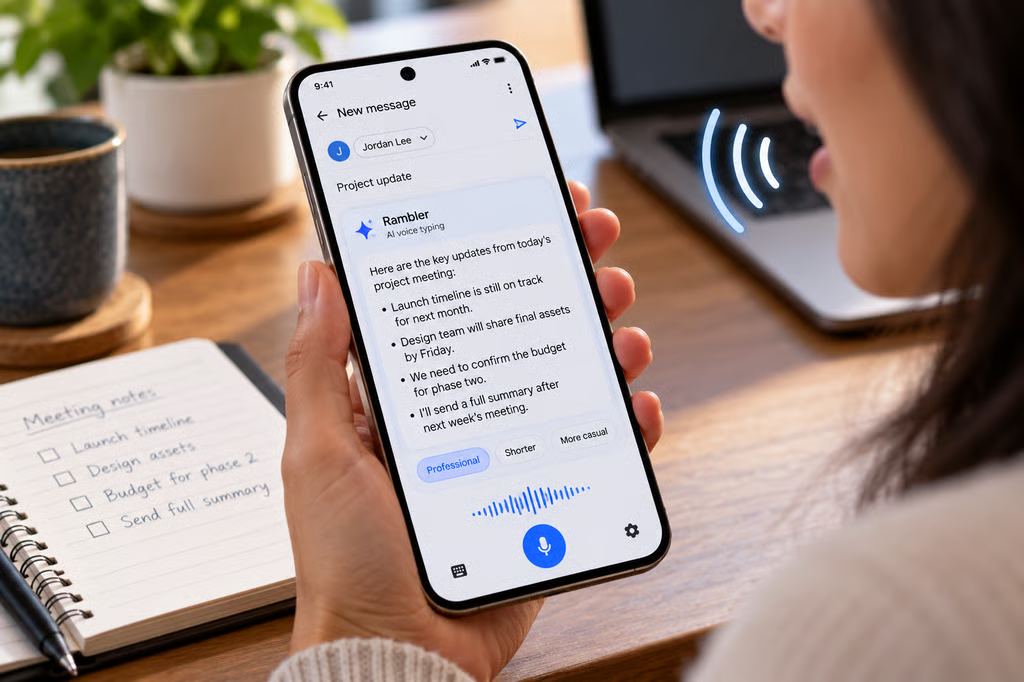
Google’s new Rambler voice typing feature does not simply write down everything someone says. It uses Gemini to remove filler words, clean up grammar and punctuation, and turn loosely spoken thoughts into more structured text.
That distinction matters when a dictated message or meeting note needs to preserve exactly what someone said. Rambler produces edited writing rather than a verbatim transcript, so users should review the result before treating it as an accurate record.
According to Google’s Pixel support documentation, Rambler is currently available on Pixel 11 series devices through Gboard. It can work anywhere Gboard accepts text, including Gmail, Google Messages, and note-taking apps.
How Rambler rewrites voice input
Traditional dictation generally tries to reproduce spoken words. Rambler instead processes the speaker’s intended message.
Google says it automatically removes filler words, formats grammar and punctuation, and turns natural speech into cleaner written text. Users can then continue speaking to revise what is already in the text field.
Voice commands can request changes such as making a message more professional, shortening it, replacing a word, or adding an emoji. Rambler can also switch between supported languages in the middle of a sentence.
The feature is part of Google’s broader Gemini Intelligence push on its newest phones. Google’s Pixel 11 lineup launched with Rambler alongside other Gemini-powered features designed to act on information across Android.
Google’s support documentation also fills in a major limitation that was unclear in its earlier announcements: Rambler needs an active internet connection for its full feature set.
It still works offline, but only basic cleanup, punctuation, and capitalization remain available. More advanced stylistic rewrites and conversational editing return when the phone reconnects.
Users can also switch back to Standard voice typing in Gboard settings when they want more conventional word-for-word dictation.
Google says Rambler currently supports Arabic, English, French, German, Hindi and other supported Indian languages, Italian, Japanese, Korean, Portuguese, Russian, and Spanish.
Privacy, review, and workplace use
Rambler does not silently send the rewritten message. After voice capture stops, its output appears in the current text field, where the user can read or change it before sending or saving it.
That review step is particularly useful for workplace messages, meeting notes, client communications, or other situations where changing the wording could change the meaning.
Google also provides more specific privacy information than its initial Rambler announcement did.
The company says audio input, text, and corrections to voice output are temporarily processed by Google. According to the support page, those inputs are not saved, stored, or shared and are deleted immediately after the processed text is delivered.
That means the earlier comparison with Pixel Recorder is unnecessary. Recorder uses a different voice-processing system, while Rambler’s own documentation now explains both its online and offline behavior.
Rambler can still make mistakes, and Google explicitly tells users to double-check its output. That is especially important because removing repetition or reorganizing a rambling explanation can create polished text that no longer preserves the speaker’s exact wording.
Organizations using Pixel phones for legal notes, HR communications, healthcare work, or other record-sensitive tasks should decide whether a rewritten summary is acceptable for the specific workflow. Where exact wording is required, Standard voice typing, a dedicated recording system, or another approved transcription process may be more appropriate.
Google also says Rambler is subject to usage limits, although its support documentation does not specify the thresholds.
For everyday emails and messages, Rambler offers a faster route from spoken thoughts to readable copy. For anything that needs to function as a record of precisely what was said, its rewriting is the feature users need to account for.
Also read: See how the Pixel 11 compares with the OnePlus 15 across performance, cameras, battery life, software, and price.