



A parent can now take over approval of new follow requests for their teen on X. The teen still gets to decide whether to link accounts in the first place.
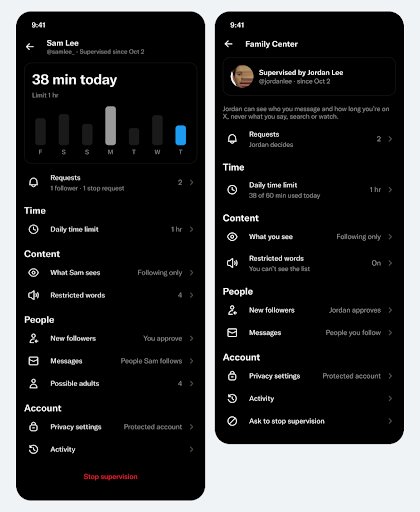
X began rolling out its first parental controls on Nov. 26 for users ages 13 to 17. The feature lets a parent or guardian set a daily time limit, restrict recommendations, and manage who can follow or message a teen after both agree to link their accounts.
The rollout adds supervision to X’s existing protections for known minors. X already makes their posts visible only to approved followers by default and limits incoming direct messages to accounts they follow. Linking gives an adult a say in how those settings are managed.
What changes when a teen links an account
According to X’s parental controls guide, a parent or guardian must be at least 18 and can supervise up to five teens. Each teen can link to one adult at a time. The adult starts by generating a QR code or link, and the teen has 72 hours to accept the invitation from their own account.
Once linked, the adult can manage several parts of the teen’s experience.
| Screen time | Review the past seven days of usage and set a daily cap in 15-minute increments. |
| Feed | Limit For You recommendations and videos to accounts the teen follows, filter specific words, and turn off sensitive media. |
| Followers and messages | Approve new followers, choose who can send direct messages, and see which accounts the teen chats with one-to-one. |
| Account privacy | Manage photo tagging, discovery by email or phone number, and location sharing on posts. |
For one-to-one chats, the adult sees the accounts involved. Message contents, searches, and viewing history stay private. The teen can see who supervises them, which settings are locked, and a shared record of changes. They can ask to end supervision, and the linked adult decides whether to approve the request. Supervision ends automatically when the teen turns 18.
Other platforms draw the line differently. Meta’s 13+ settings restrict the kinds of content teens see across Instagram, Facebook, and Messenger. The UK plans a midnight-to-6 a.m. social media curfew for 16- and 17-year-olds. The plan would also turn off autoplay and personalized feeds by default for that age group, with teens able to change those settings. X’s daily cap blocks access once the allotted time runs out and resets at midnight in the teen’s time zone.
What's hot at TechRepublic
- Blackpoint Cyber vs. Arctic Wolf: Which MDR Solution is Right for You?
- Why AWS Sellers Choose Deepgram Over Other Voice AI Tools
- SS&C Intralinks DealCentre AI vs. Datasite: Which platform is built for the future of dealmaking?
- SS&C Intralinks FundCentre AI vs. Juniper Square: Which platform better supports modern private markets fund managers?
- Verito vs. Rightworks: Which IT Provider Is Best for Your Firm?
What to check on both accounts after linking
Start with the account your teen actually uses. X uses the birth date on file and may ask for a selfie or ID check. Under Australia’s social media age rules, X must take reasonable steps to prevent Australians under 16 from creating or keeping an account. Once linked, have your teen open Parental Controls and confirm it names you as their supervisor.
Then pick the setting that addresses your main concern.
- Unwanted contact. For the most restrictive DM setting, allow messages only from accounts your teen follows. If you turn on follower approval, ask someone you both know who doesn’t already follow your teen to send a request. Check that it stays pending until you approve it.
- Feed recommendations. After changing the For You setting, compare the recommendations with your teen’s follow list. Posts and videos from those accounts can still show up, so review the list together.
- Late-night scrolling. Check the seven-day usage chart after a week. If you want a fixed bedtime cutoff, use your device’s bedtime settings too. X’s cap limits total daily use.
If you later turn off follower approval, your teen’s account stays protected. New follow requests go back to your teen.
Read more: X uses the birth date on file to determine who can use its parental controls, while Discord estimates users’ ages and may still ask for a selfie or ID when it needs more proof.