
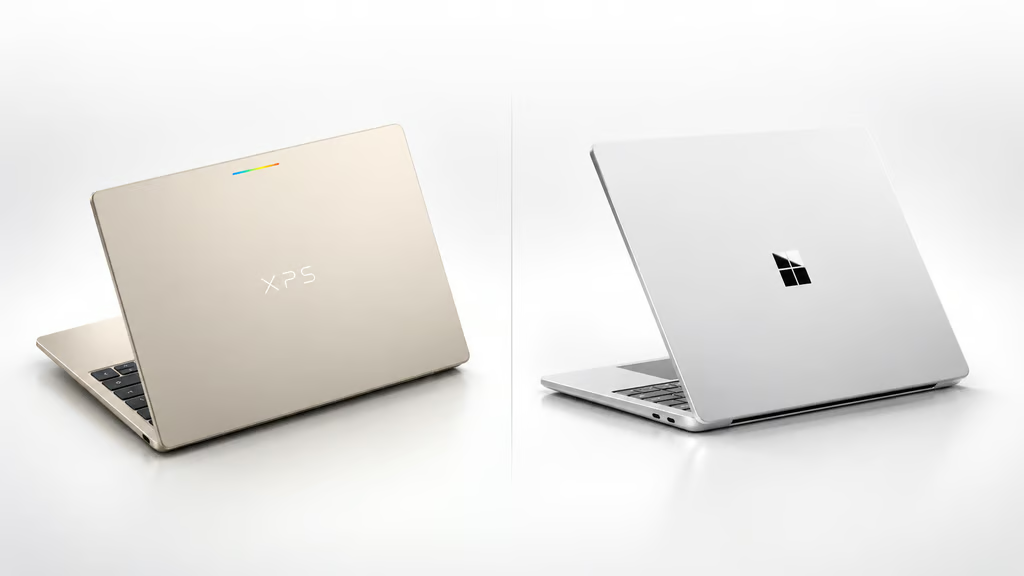


Dell just put the XPS name on Google’s new laptop platform — and undercut a discounted Surface Laptop 8 by about $400.
The XPS Googlebook starts at $999, while Microsoft’s 13.8-inch Surface Laptop 8 currently starts at $1,399.99. Both are premium Arm laptops, but the larger decision is whether Googlebook OS can replace the Windows applications, peripherals, and management tools an organization already uses.
Google opened Googlebook preorders on Sept. 21 with models from Dell, Acer, Asus, HP, and Lenovo. A Googlebook launch guide breaks down the wider lineup, pricing, and platform features.
Dell XPS Googlebook undercuts Surface by $400
The XPS Googlebook pairs a Snapdragon X Elite processor with 16GB of RAM, 512GB of storage, and a 13.4-inch 2.5K touchscreen with a refresh rate up to 120Hz. It weighs 2.2 pounds and has two USB-C 3.2 ports.
Google lists a $999 MSRP and rates battery life at up to 18 hours using controlled web-browsing tests.
Microsoft’s 13.8-inch Surface Laptop 8 uses newer Snapdragon X2 Plus or X2 Elite processors and offers up to 64GB of RAM and 1TB of storage. As of Sept. 28, the Microsoft Store lists selected Snapdragon X2 Plus configurations with 16GB of RAM and 512GB of storage at $1,399.99, down from $1,599.99.
| Dell XPS Googlebook | Surface Laptop 8, 13.8-inch | |
| Current starting price | $999 MSRP | $1,399.99 |
| Processor | Snapdragon X Elite | Snapdragon X2 Plus or X2 Elite |
| Memory | 16GB | Up to 64GB |
| Storage | 512GB | Up to 1TB |
| Display | 13.4-inch 2.5K, up to 120Hz | 13.8-inch 2304 × 1536, up to 120Hz |
| Weight | 2.2 lb. | 3.00 lb. |
| Ports | 2 USB-C 3.2 | 2 USB-C/USB4, USB-A, audio jack, Surface Connect |
| OS | Googlebook OS | Windows 11 |
Microsoft rates the 13.8-inch Surface for up to 20 hours of local video playback and 16 hours of active web use. Those figures are not directly comparable with Google’s 18-hour estimate because the companies use different tests.
Microsoft also announced a separate $1,199 13-inch Surface Laptop with Snapdragon X2 Plus on Sept. 23. That model is distinct from the 13.8-inch Surface Laptop 8; the new Surface Laptop and Surface Pro show Microsoft extending Snapdragon X2 across more of its Arm lineup.
How we compared them: We used current US manufacturer pricing and published specifications covering processor, memory, storage, display, weight, ports, battery claims, and operating system. We have not independently benchmarked these configurations head to head, so vendor battery estimates are treated as manufacturer claims rather than comparable test results.
Googlebook OS vs. Windows shapes the decision
Google says Googlebook OS combines Android technology with desktop foundations from ChromeOS. It supports desktop Chrome and extensions, Android apps, Android-phone integration, and an isolated Linux environment.
A recent Googlebook versus Chromebook comparison explains where the new platform departs from the traditional Chromebook model.
Organizations considering a switch should verify Windows-dependent applications, endpoint-security agents, VPN clients, printers, docks, and specialized hardware before standardizing on Googlebook OS. Identity, single sign-on, enrollment, policy controls, support terms, and repair workflows also need testing.
That price advantage is easier to justify for organizations centered on browser-based, Android, or Linux-friendly workloads. The Surface costs more but brings newer Snapdragon silicon, broader configuration options, and Windows compatibility.
The final choice comes down to whether the savings outweigh the cost of leaving Windows.
Read more: Android integration can reshape a laptop purchase, and these laptops for Android users compare how Googlebook, Windows, and ChromeOS handle apps, files, notifications, and cross-device features.