


- Best overall EDR for businesses: CrowdStrike Falcon Insight XDR
- Best for small businesses: SentinelOne Singularity Endpoint
- Best for Microsoft-centric businesses: Microsoft Defender for Endpoint
- Best for extensive security coverage: Trend Micro Vision One
- Best for basic endpoint protection: Bitdefender GravityZone
As more businesses continue to adopt hybrid work arrangements, it’s becoming increasingly important for company endpoints to be secured and protected against threats and malicious actors. Whether it’s company-issued laptops or the data stored therein, taking a proactive approach to protecting these endpoints helps keep businesses safe from data breaches or costly cyberattacks.
Fortunately, various endpoint detection and response solutions are available in the market today — specially designed to monitor user devices, detect threats of all kinds, and offer strong remediation and response capabilities to thwart these threats.
In this article, we take a look at the best EDR software available today.
Best EDR software for businesses: Comparison table
| Forrester Wave Q4 2023 results | Ease of use (Gartner Peer Insights) | Free trial or demo | Price starting at | |
|---|---|---|---|---|
| CrowdStrike Falcon | Leader | 4.7 out of 5 | Free trial upon request | $184.99 per device per year |
| SentinelOne Singularity | Strong Performer | 4.8 out of 5 | Demo upon request | $79.99 per device per year |
| Microsoft Defender for Endpoint | Leader | 4.3 out of 5 (Ease of deployment; no ease of use rating) | Free trial available | $54.75 per user per month (Microsoft 365 E5 bundle) |
| Trend Micro Vision One | Leader | 4.5 out of 5 (Ease of deployment; no ease of use rating) | Demo upon request | Contact Trend Micro for pricing |
| Bitdefender GravityZone | Leader | 4.6 out of 5 | Free trial upon request | $199.49 per year for 10 devices |
CrowdStrike Falcon Insight XDR: Best overall EDR for businesses

Considered one of the market leaders in the EDR space, I recommend CrowdStrike’s Falcon Insight platform for most businesses. It offers top-tier AI-powered detection capabilities, a lightweight and unified agent, and the ability to automate enterprise-scale tasks for improved efficiency and security.
In July 2024, CrowdStrike found itself in controversy as a faulty update to its Falcon Sensor software caused a global IT disruption affecting millions of Windows users. You can learn more about this in TechRepublic’s coverage of the CrowdStrike outage.
Despite the incident, I found that many users still trusted CrowdStrike as a top EDR provider. In a post found in the Cybersecurity Reddit community, one commenter said “CrowdStrike is and will continue to be by far the most effective EDR platform in existence.” This was in response to someone asking if they would continue to use CrowdStrike following the outage.
In 2023, CrowdStrike was named a Leader in Gartner’s Magic Quadrant for Endpoint Protection Platforms and garnered the top spot in both the Ability to Execute and Completeness of Vision criteria among 15 other solutions. These two markers mean that CrowdStrike’s EDR solution is best in class in terms of its product development, innovation, and customer base.
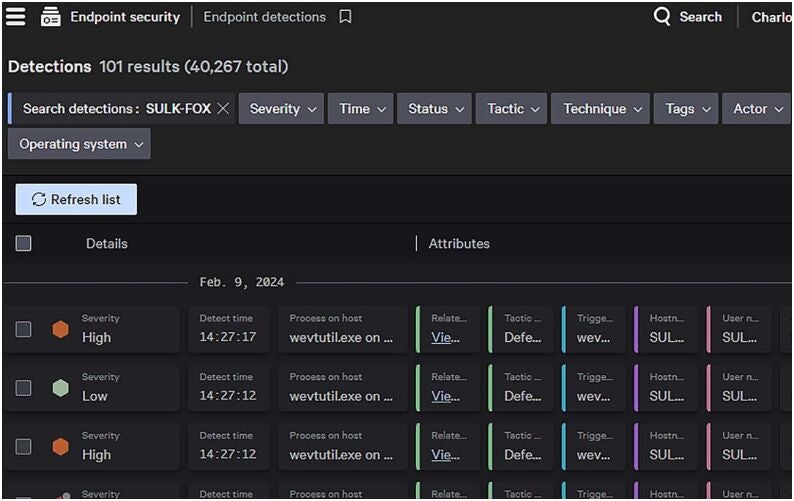
Users have also lauded the CrowdStrike platform for being light on resources and providing very low false positive rates.
Why I picked CrowdStrike Falcon
I chose CrowdStrike Falcon as my best overall solution due to its industry-leading features, performance, and strong customer reviews. Not only does CrowdStrike perform well in independent tests, it also receives high praise from its user base and is commonly tagged the “go-to” EDR software provider today.
While many EDR solutions can offer tons of features in their software, I think the real test is how many actual users recommend the product to other companies. In this aspect, CrowdStrike succeeds — even with its more expensive price tag.
Visit CrowdStrike
Pricing
CrowdStrike’s Falcon EDR solution can be purchased through its Falcon Enterprise and Falcon Elite subscription plans. Below is a quick overview of pricing and features for each:
- Falcon Enterprise: $184.99 per device; includes EDR, XDR, and next-gen antivirus.
- Falcon Elite: Contact sales for pricing; includes EDR, XDR, IT hygiene, and identity protection capabilities.
Features
- AI-powered detection system.
- Threat intelligence with 230+ adversaries included.
- Real-time response to threats.
Pros
- Very reliable detection.
- Lightweight; not resource-intensive.
- Intuitive user interface.
Cons
- On the expensive side.
SentinelOne Singularity Endpoint: Best for small businesses

For small businesses, I suggest trying SentinelOne Singularity Endpoint. While not as robust as CrowdStrike, SentinelOne offers more affordable pricing while still providing high-quality detection and response services. It includes static and behavioral detection, automated responses, and one-click remediation, making it easier for IT and security teams to keep infrastructures and endpoints secure.
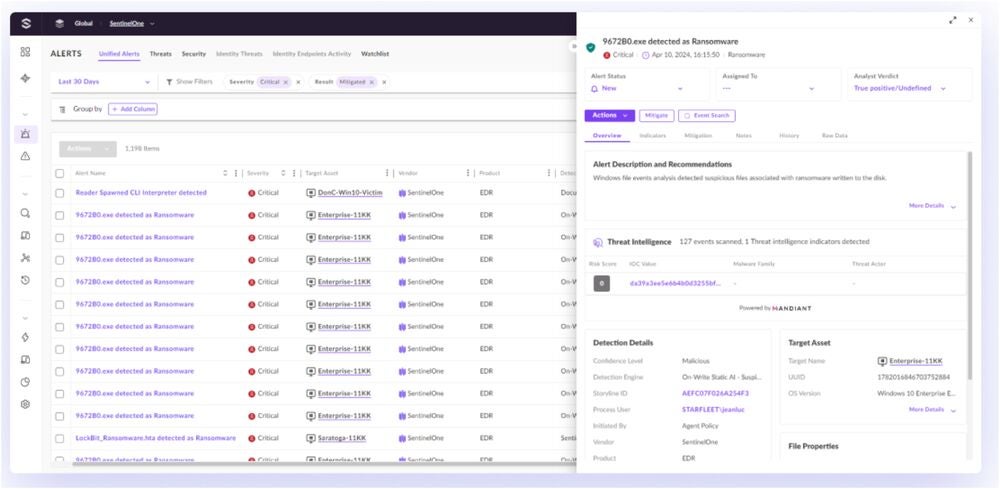
I particularly like SentinelOne’s Storyline feature that automatically correlates and contextualizes all software events in real time, offering a holistic view of threats that arise.
Why I picked SentinelOne Singularity
SentinelOne carved its name on this list for being a competent alternative to CrowdStrike, especially for smaller businesses that may not have the largest cybersecurity budgets to use for an EDR.
Like CrowdStrike, SentinelOne Singularity Endpoint also receives good marks from the community. In particular, users highlighted SentinelOne Singularity’s easy-to-use console and affordable overall pricing.
Visit SentinelOne
Pricing
SentinelOne offers its EDR solution through four subscription tiers, with varying feature inclusions for specific business sizes and needs. Below is a quick overview of each tier, with their corresponding pricing and feature differences:
- Singularity Control: $79.99 per endpoint; includes EDR, role-based access control, and multi-tenant management.
- Singularity Complete: $159.99 per endpoint; all Control features plus XDR and 14-day data retention.
- Singularity Commercial: $209.99 per endpoint; all Complete features plus 30-day data retention, threat-hunting, and identity threat detection and response.
- Singularity Enterprise: Call sales for pricing; all Commercial features plus network and vulnerability management, digital forensics, training, and guided deployment services.
Features
- Storyline context builder for all OS relationships and events.
- Automated threat resolution.
- Historical EDR data retention of up to three years.
Pros
- Affordable starting plan.
- Automated responses.
- Customizable automations.
Cons
- Customer support could be improved.
Microsoft Defender for Endpoint: Best for Microsoft-centric businesses

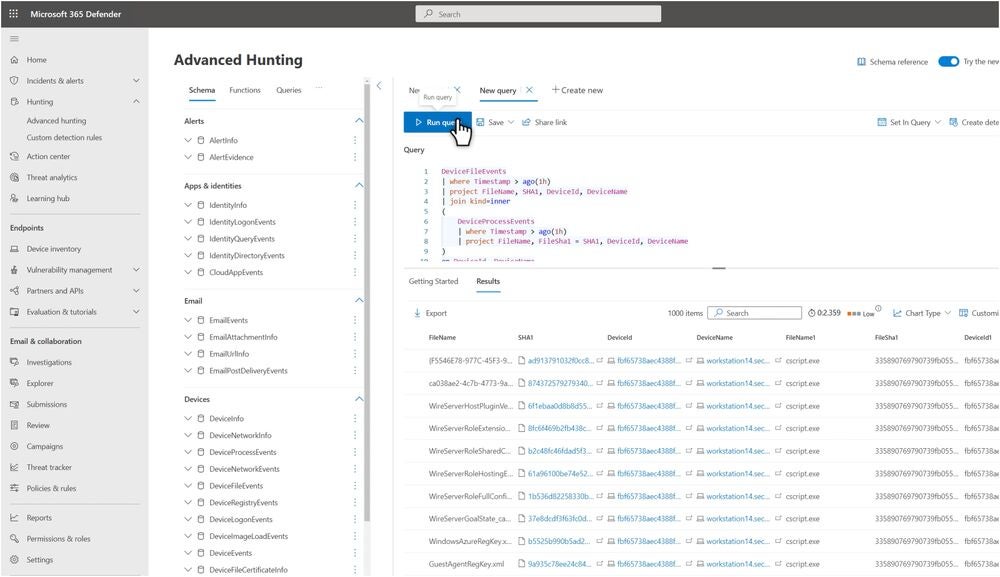
For businesses already deep into the Microsoft ecosystem, I find Microsoft Defender for Endpoint, or MDE, to be a no-brainer. It utilizes AI-based systems to stop cyber and ransomware attacks, includes automated investigation and remediation capabilities, and has access to a global threat intelligence database.
MDE is also highly rated by independent testing firms and was named a Leader in Gartner’s 2023 Magic Quadrant for Endpoint Protection Platforms.
Why I picked Microsoft Defender for Endpoint
I picked Microsoft Defender for Endpoint because of its strong integration with other Microsoft 365 products and its accessible inclusion in Microsoft’s E5 enterprise subscription. This makes it easy for pro-Microsoft businesses to integrate a proper EDR solution with their security setup, especially if they already have Microsoft licenses as part of their portfolio of software tools.
Visit Microsoft
Pricing
Microsoft Defender for Endpoint is split into MDE P1 and P2 plans. MDE P1 includes next-generation antimalware and endpoint firewall capabilities. Meanwhile, MDE P2 includes full EDR functionality, with automated investigations and remediation, among others.
For businesses that want Microsoft’s full-fledged EDR solution, I recommend using Microsoft Defender for Endpoint P2 or MDE P2. Right now, MDE P2 is bundled with the Microsoft 365 E5 enterprise software bundle:
- Microsoft 365 E5 (no Teams): $54.75 per user per month; includes MDE EDR, Microsoft Office software, scalable business analytics, and advanced security capabilities.
Features
- Simplified endpoint management dashboard.
- Copilot for Security.
- Global threat intelligence and analytics.
Pros
- Bundled with Microsoft 365 E5.
- Integrates well with other Microsoft security tools, like Intune and Defender for Office.
- Affordable, given additional software included.
Cons
- Can be resource-intensive.
Trend Micro Vision One: Best for extensive security coverage
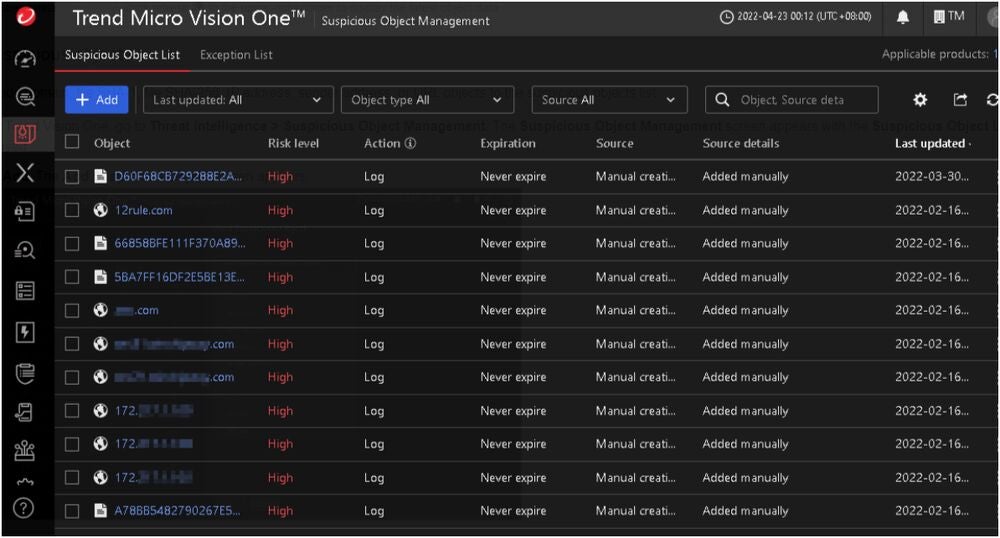
A veteran of the space, Trend Micro is still a good pick for businesses that want an all-in-one type of security software. Its Vision One solution provides tools to protect endpoints, emails, and networks via a single platform. It features broad extended detection and response, or XDR, sensor coverage, and analyst contextualization tools. It is built upon zero-trust networking principles.
Vision One recently received high marks in the Forrester Wave Endpoint Security Q4 2023 evaluation, wherein Forrester named the company a Leader in the endpoint security industry. In particular, Trend Micro’s “consistent protection of endpoints” and “granular application control platform” were highlighted in the assessment.
Why I picked Trend Micro Vision One
While not strictly an EDR solution, Trend Micro Vision One presents good value as an XDR that can provide comprehensive protection to multiple layers of an organization’s infrastructure. This means that Vision One protects not only endpoints but also other aspects of a technology ecosystem, such as the cloud, emails, and the like.
I have Trend Micro on this list, given its full focus on offering extended protection to businesses, moving from only endpoints with EDR to a wider scope with XDR.
Visit Trend Micro
Pricing
In terms of pricing, I suggest contacting Trend Micro directly via its official channels to get a clear estimate of costs. It has an accessible Contact page on its official website for more information, as well as free trials and video demos of its Vision One solution.
You can also book a meeting with Trend Micro through its website, allowing you to learn more about both pricing and Vision One’s feature set.
Features
- AI-powered XDR system.
- Single pane of glass for detection, investigation, and response.
- Custom playbooks and case management.
Pros
- Wide visibility across various layers.
- Flexible deployment options.
- Consolidates multiple security tools into a single platform.
Cons
- Technical support team is hit or miss.
SEE: SMB Security Pack (TechRepublic Premium)
Bitdefender GravityZone: Best for basic endpoint protection

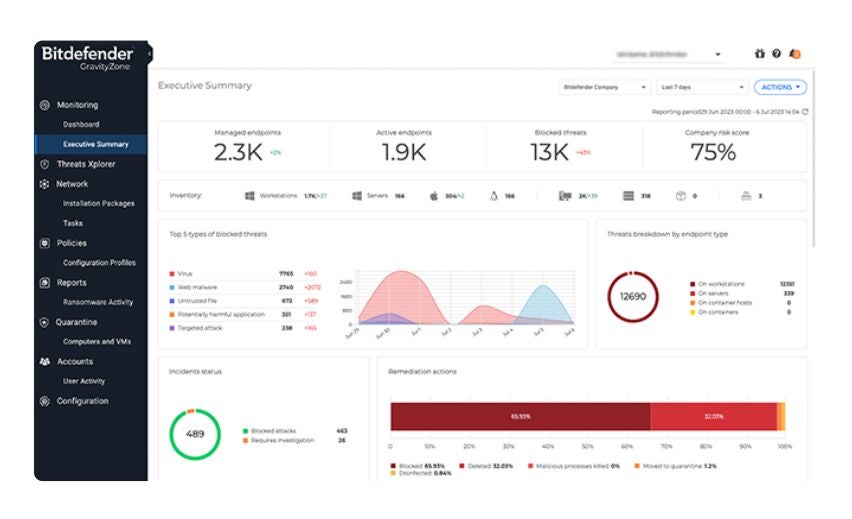
If all you’re looking for is basic endpoint protection, consider Bitdefender GravityZone. This option specializes in protecting against common attacks such as fileless attacks, ransomware, and phishing. It provides a single console for simple endpoint security management, advanced anti-exploit capabilities, and top-tier anti-malware protection.
This is confirmed in independent evaluations, with Forrester Wave’s Endpoint Security Q4 2023 tests finding that Bitdefender offers a “near-relentless focus on stopping threats” via its high-quality prevention engine.
Outside of GravityZone’s endpoint protection, I really like its flexible licensing and subscription model, letting businesses customize their plan according to their needs.
Why I picked Bitdefender GravityZone
I chose Bitdefender GravityZone for its strong threat prevention and highly customizable subscriptions. The fact that you can provide the exact number of devices or endpoints you want to be included in your GravityZone subscription is very user-friendly — particularly for businesses that want to save as much money as possible with their security solutions.
Visit Bitdefender
Pricing
Bitdefender GravityZone offers several subscriptions that can be customized depending on the number of devices and the length of the contract.
For its small business category, GravityZone is split into three solutions: GravityZone Small Business Security, GravityZone Business Security, and GravityZone Business Security Premium.
Below is a quick overview of each tier’s pricing:
- Small Business Security: Starts at $199.49 for 10 devices for 1 year; includes security overview of all endpoints, ransomware, and web-based attacks protection.
- Business Security: Starts at $258.99 for 10 devices for 1 year; includes all Small Business features plus web access control, device control, and endpoint risk analytics.
- Business Security Premium: Starts at $570.49 for 10 devices for 1 year; includes all Business Security features plus tunable machine learning capabilities, sandbox analyzer, and fileless attack defense.
Features
- Ransomware mitigation.
- Defense against fileless attacks.
- Purchasable security add-ons.
Pros
- Numerous subscription options for various business sizes.
- Straightforward user interface and deployment.
- Low impact on machines.
Cons
- Reporting could be more granular.
More cloud security coverage
- Blackpoint Cyber vs. Arctic Wolf: Which MDR Solution is Right for You?
- 6 Best Open Source Password Managers for Windows
- Unified by Design: The Smart Stack Advantage of NinjaOne and Microsoft Intune
- Free Business Email: I Found 8 Legit Ways to Get One
What are EDR solutions?
EDR software comprises security solutions designed to continuously monitor endpoints for suspicious behavior, identify potential threats or cyberattacks, and effect remediation techniques to address these issues.
With EDR software, businesses are protected from both known and unknown threats — as they utilize behavioral analytics to sniff out suspicious activity and maximize threat intelligence to counter known attacks. Some common threats addressed by EDR software are ransomware attacks, data exfiltration, fileless attacks, and zero-day exploits, among others.
In the business setting, EDR can help secure your employees’ devices, company laptops and smartphones, servers, virtual machines, and other relevant devices. This is especially impactful for organizations with a hybrid workforce, as EDRs provide a strong level of security despite having an IT infrastructure with endpoints scattered in different locations.
Key features to look for in top EDR tools
EDR software can vary quite a bit depending on the features they carry. Some are integrated with existing software ecosystems, like MDE with Microsoft. A few cater to smaller businesses with lower starting prices, like SentinelOne.
No matter the EDR vendor, there are key features everyone can expect out of most EDR solutions. Here’s each key EDR feature and what it provides for organizations:
Endpoint data collection
EDRs are purpose-built to gather security data on all endpoints connected to a network. This includes things such as files accessed or transferred, processes used, and connections established.
Endpoint data collection gives EDRs a bird’s eye view of an organization’s IT infrastructure, enabling visibility into possible vulnerabilities or threats within a system.
Threat detection and response
EDR solutions track down any suspicious activities within a network by looking at peculiar events, hidden vulnerabilities, or questionable items. One big difference between EDRs and traditional antivirus solutions is that EDRs can also look into fileless attacks, such as patterns and behaviors in a system, for possible threats.
EDRs also utilize advanced algorithms and machine learning technologies to look for indicators of compromise, hunting down both known and unknown threats. Once an EDR detects a threat, you can set it to have an automated response that will trigger an appropriate action.
Threat hunting and forensic analytics
EDRs typically include threat hunting and forensic investigation functionality, taking a proactive approach to defending against threats. EDRs are designed to understand past weaknesses, identify patterns, and proactively hunt down threats or malicious actors in the future.
This includes having smart forensics analytics, which helps security teams learn how certain threats become successful and subsequently make adjustments against them afterward.
Reporting and prioritization capabilities
Most EDRs also include extensive reporting and prioritization features. With EDR solutions, IT analysts can generate reports and summaries of an organization’s current state and security performance. These can be used for compliance and regulation reporting, eliminating the legwork needed to gather large volumes of security data.
EDR software also comes with alert prioritization capabilities, ensuring only the most urgent alerts are brought forward and reducing overall analyst fatigue.
Benefits of using EDR solutions
If you’re on the fence about investing in an EDR, it may be good to consider what benefits they can bring to your organization. Here are a few advantages to integrating EDR into your security suite:
Offers extensive visibility of your endpoints
With EDR, you have wide visibility of everything happening with your endpoints in real time. This includes file transfers or downloads, user behavior, network connections, and browsing history, to name a few.
With this collection of data points, your IT team will have an abundance of information to work with in strengthening your company’s security posture.
It can deal with complex and advanced cyberthreats
Since top EDR solutions use a combination of global threat intelligence and real-time information from endpoints, they’re able to combat more sophisticated attacks that are specifically designed to fly under the radar.
Through various technologies like behavioral analysis, AI and machine learning, and automated response, EDRs can handle a diverse range of attacks and threats, no matter the level of complexity.
Provides insight into how an attack happened
Your organization can also use EDR to track down the root cause of an attack and implement appropriate measures to prevent it from happening again.
This enables your business to adopt a proactive approach, both in preparing for similar threats and patching up existing vulnerabilities.
How to pick the right EDR solution for your business needs
With a number of quality EDR providers to choose from, choosing the best EDR solution for you may be confusing. However, there are a few things you can consider to help pick the right solution for you and your organization.
Consider company size and number of endpoints
The first thing to consider is the size of your company and how many endpoints you need to cover with an EDR.
Having a ballpark number of your endpoints will drastically reduce the amount of decision time needed, especially since some solutions and EDR subscriptions cater to specific business sizes over others.
Check your existing security infrastructure and tools
It’s also important to consider what types of security tools and infrastructure your organization currently has. This means looking into whether you only need an EDR solution or if your organization requires other security software as well.
This can help with your purchasing decision since most EDR providers offer other security solutions as well. In this situation, purchasing a bundle of security products may get you better deals in terms of net pricing and licenses.
Look into security reputation and independent test results
Another big consideration is an EDR provider’s security reputation and performance in independent testing. While many EDR solutions will advertise themselves as the “best product” available, checking independent evaluations from third-party firms is a great way to have a less biased view of how an EDR performs.
Additionally, researching an EDR vendor’s security reputation won’t hurt. Have they had any significant security incidents, like data breaches or major vulnerabilities? Are they trusted by their customers and user base?
In this regard, reading real user feedback is, in my opinion, one of the best ways to evaluate a product or service. This provides us with an idea of the real-world performance of these EDR solutions.
Maximize free trials and demos
You should also make the most of any free trials or product demos that these EDR vendors provide. Given the time and money commitment tied to buying and deploying these products, you want to ensure they’re the right fit for your organization before you move forward with a software purchase.
Both free trials and product demos can better understand whether an EDR meets your organization’s needs and requirements.
Keep in mind, however, that most enterprise-level EDRs will require some back and forth between you and the vendor’s sales team, so a bit of waiting time should be expected.
Explore integrations with third-party products
Finally, it’s a good idea to check if the EDR of your choice works well with third-party products already in your company’s product suite. You don’t want to invest in a solution that won’t jive well with the other tools in your workflow, but you eventually realize that it’s not a good fit for your needs after all.
Luckily, there are a fair number of integration resources and support documents available online that show which third-party software integrates with specific EDR solutions.
Methodology
My rundown of the best EDR solutions for businesses in 2024 involved an in-depth evaluation of each EDR solution’s security features, pricing, and overall value for money.
Research for this article was done through extensive analysis of official product documentation, independent test results and performance, and value proposition per product. In addition, I took heavy consideration of real user feedback and user testimonials found on reputable review sites to gain a better understanding of how each EDR solution fares during real-world usage.
Finally, I accounted for what type of business or organization would benefit most from each EDR solution listed above. Through this, my aim is to help businesses quickly find the EDR provider that best fits their current needs and circumstances.