


RingCentral vs. Zoom presents a tough comparison, as both providers offer business communication platforms well-known for their essential call management and team collaboration tools, including video conferencing software and artificial intelligence assistants. However, when it comes to pricing, features, security, and customer support, there are some differences between the two. So keep reading to learn more about when to consider Zoom vs. RingCentral.
Comparing RingCentral and Zoom
Before diving into my evaluation of RingCentral and Zoom, take a moment to explore the comparison table below. It highlights the key differences between these platforms and shares my overall ratings for each provider.
| Difference between RingCentral and Zoom |  |  |
| My rating (out of 5) | ||
| Monthly starting price | ||
| Key features |
|
|
| Integrations |
|
|
| Security and reliability | ||
| Customer support | ||
| For more information | ||
Zoom overview
Zoom is widely recognized as a leading video conferencing platform that also offers team collaboration tools, including chat, digital whiteboards, and note-taking capabilities. However, Zoom provides more than just unified communication solutions for remote workers. The platform also features business phone plans with both metered and unlimited calling options, enhancing its popular workplace offerings.
Zoom pros
✅ Metered and unlimited calling plans for customizable service
✅ Unlimited auto attendants and interactive voice response
✅ Automatic and manual call recording across plans
✅ Elevate audio calls to video conferencing
✅ 2,500+ apps and integrations in the Zoom Marketplace
✅ AI companion with automated meeting summaries and action items
Zoom cons
❌ Enhanced call queue analytics requires an additional subscription
❌ Access to priority support across channels requires purchasing a support package
❌ Single sign-on (SSO) is only available for Business, Education, or Enterprise accounts
❌ Viewing real-time reporting dashboards requires a Business, Education, or Enterprise account
RingCentral overview
RingCentral is a comprehensive business phone system recognized for offering cloud services, unified communication tools, and contact center plans tailored to businesses of all sizes and across various industries. Over the years, these offerings have expanded to include more support from artificial intelligence in the form of AI assistants, receptionists, and analytics. Therefore, RingCentral is an excellent choice for businesses that plan to scale and want a provider that will grow and develop with them.
RingCentral pros
✅ Access to over 500 third-party apps and integrations
✅ Unlimited domestic calling with up to 10,000 toll-free minutes
✅ Multi-level autoattendant with intuitive interactive voice response (IVR) designer and call queues
✅ AI assistant and receptionist for detailed call analytics
✅ 99.999% SLA uptime guarantee with high reliability
✅ 24/7 live chat and phone support with professional implementation services
RingCentral cons
❌ Limited SMS allotment for business messaging
❌ Most advanced features require additional subscriptions or incur monthly fees
❌ Expanding video conferencing past 200 participants requires an add-on
Pricing: Zoom wins
The main advantage of Zoom over RingCentral lies in the affordability of its business phone plans. While RingCentral provides a wide range of voice features and unlimited domestic calling, Zoom offers various plans with both metered and unlimited options. This flexibility means that you can select a plan that includes only the features you need, making Zoom a cost-effective choice.
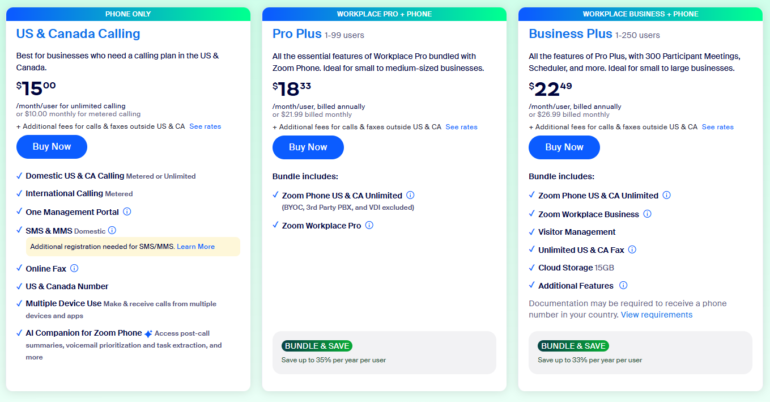
For example, Zoom users can choose between having a phone plan or combining their phone plan with Zoom Workplace for more team collaboration tools. In contrast, most RingCentral plans include a variety of features on the base plan that make it impossible to scale down the offerings if there are features you don’t need. If you prefer a tailored plan that aligns with your specific requirements, then Zoom is likely your best option.
Zoom pricing
Zoom offers two types of plans that include access to business communications. The Zoom Phone plans focus on providing telephony services, but you also have the option to combine them with a workplace subscription.
- Zoom Phone plans
-
- US & Canada Metered: $10/license/month
- US & Canada Unlimited: $15/license/month
- Global select: $20/license/month
- Zoom Phone + Workplace
- Pro Plus: $21.99 monthly ($18.33/user/month, billed annually)
- Business Plus: $26.99 monthly ($22.49/user/month, billed annually)
RingCentral pricing
- RingEX Business phone plans
-
- Core: $30/user monthly ($20/user/month, billed annually)
- Advanced: $35/monthly ($25/user/month, billed annually)
- Ultra: $45/monthly ($35/user/month billed, annually)
- RingCX Contact Center plans
-
- RingCX: $65/agent/month, billed annually
- Contact Center Enterprise: Contact sales for pricing
Features comparison: Zoom wins
Zoom and RingCentral both deliver comparable call-management capabilities, including access to auto attendants, call queues, and IVRs. However, the RingCentral plans bundle video meetings with the phone system, while Zoom Phone can be purchased standalone (phone only) or as part of a Zoom Workplace bundle.
Zoom differentiates with a deeper video stack (Meetings, Webinars, Events, Rooms) and a much larger integration marketplace (over 2,500 apps vs. RingCentral’s 500-plus). Continue scrolling for a more detailed breakdown of what each platform offers in terms of VoIP services, unified communication tools, third-party integrations, and AI.
| Zoom vs RingCentral | | |
| My rating (out of 5) | ||
| Call management | ||
| Video meeting duration | ||
| Meeting participant capacity | Business: Up to 300 participants | Ultra plan: Up to 200 participants |
| Collaborative notes | ||
| Live transcription | ||
| Artificial intelligence | ||
| Integrations |
VoIP phone features
Both RingCentral and Zoom offer call management features with access to domestic and international calling plans. As a well-established VoIP provider, RingCentral offers a cloud phone system featuring a multilevel auto attendant and IVR, along with an intuitive call flow designer that enables you to route calls through automated menus, voicemail boxes, and call queues.
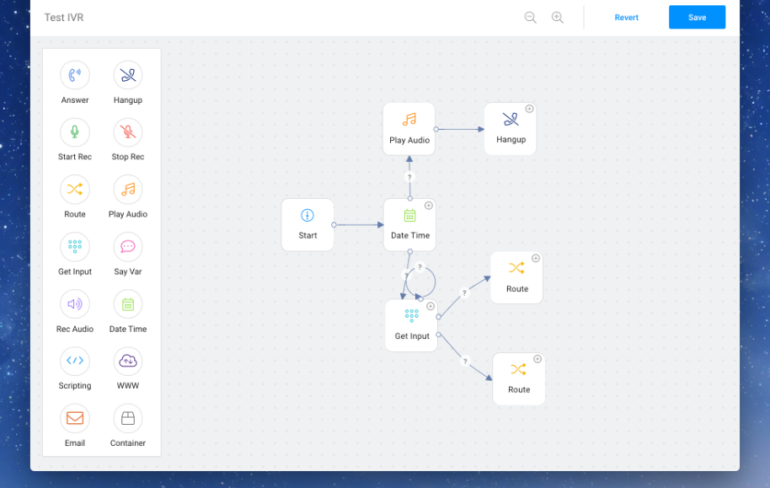
Similarly, Zoom offers business phone plans with unlimited auto attendants and an IVR. Zoom simplifies call management with access to automated call distribution (ACD), allowing calls to be distributed across call queues and routed to specific extensions. This means that both providers offer a solid foundation for managing incoming calls, messages, and inquiries through their respective phone systems. However, if you need larger-scale call management, RingCentral offers contact center plans with more advanced features.
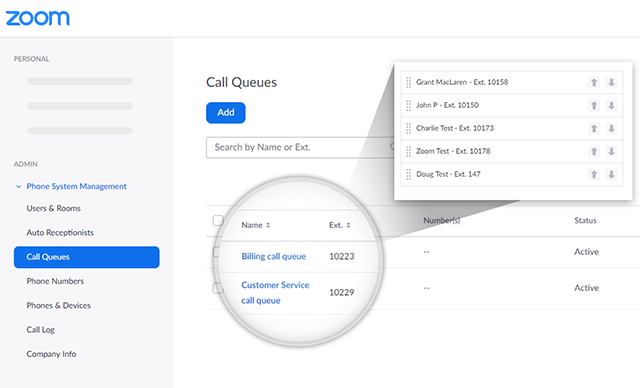
Both Zoom and RingCentral also provide access to multiple types of business phone numbers. For example, RingCentral offers local, toll-free, vanity, and international options, and Zoom provides local, toll-free, and international numbers, as well as vanity toll-free numbers. However, while Zoom offers call monitoring across its phone plans, RingCentral only provides features like call whispering and barge on its highest-tier plans.
Unified communication tools
Although both RingCentral and Zoom offer VoIP phone features, they also unify communication within a workspace through team collaboration tools like messaging, video conferencing, and file sharing. It is also in this area where key differences exist between the platforms, as each provider offers similar features but on different plans or with different modes of access.
For example, RingCentral offers a mobile and desktop app that enables team members to communicate with each other using chat, calls, text, video, and file sharing in a single, central space. By keeping communication in one workspace, it is much easier to collaborate on projects and access information using public or private groups, because you have centralized management of workspace tools.
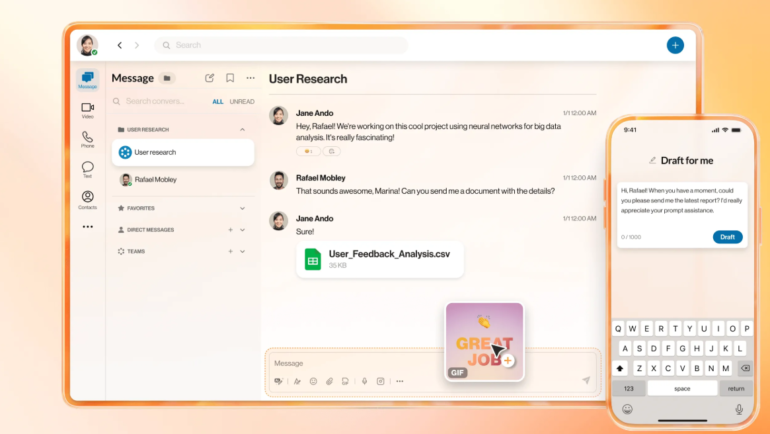
Zoom offers many of the same workspace tools as RingCentral, but most of them are included in the base plan. For example, while RingCentral doesn’t provide virtual fax or automatic call recording on its base RingEX plan, Zoom offers both features across its Zoom Phone and workplace plans. Additionally, Zoom provides team chat, calls, and video conferencing with a central workplace, along with productivity tools such as workflow automation, task management, and scheduling.

Video conferencing capabilities
While both RingCentral and Zoom offer video conferencing, Zoom’s Phone and Workplace plans support larger meetings, accommodating up to 300 participants for up to 30 hours. In comparison, RingEX plans limit video meetings to 200 participants on the highest tier, with a maximum duration of 24 hours. If you need the extra capacity, then Zoom is a better option. However, there are also similarities between the offerings.
For example, RingCentral and Zoom each offer closed captioning for video meetings, along with language translation and meeting transcriptions. There are also collaborative features available, including screen sharing, breakout rooms, and digital whiteboards, which are great for remote work and presentations. Additionally, both offer subscriptions for hosting larger meetings, webinars, and virtual events, as detailed below.
- RingCentral video collaboration plans
-
- Meetings: Free standalone service
- Townhalls: $40/organizer/month paid monthly ($30/organizer/month, paid annually)
- Rooms: $49/room/month paid monthly ($39/room/month, paid annually)
- Webinars and events: $119/organizer/month with an annual contract ($99/organizer/month, paid annually)
- Zoom meetings
-
- Webinars: Starting at $79/month for 500 attendees or $690/year
- Sessions: Starting at $99/month for 100 attendees or $990/year
- Events: Starting at $149/month for 100 attendees or $1,490/year
- Rooms: $49/month/room or $499/year/room
Third-party integrations
Although RingCentral is often praised for its integration capacity, in my evaluation, Zoom and RingCentral received the same overall rating for integrations, as both providers offer a wide range of third-party apps and workspace tools. Specifically, RingCentral offers over 500 third-party apps and integrations, including native integrations with popular customer relationship management (CRM) platforms such as Salesforce and HubSpot, as well as productivity apps like Google Workspace and Microsoft Teams.
Similarly, Zoom provides access to over 2,500 apps and integrations through the Zoom App Marketplace. You can also develop integrations with Zoom’s set of application programming interfaces (APIs) to help improve call management, customize virtual agents, or access details about meetings and webinars.
Artificial intelligence
RingCentral and Zoom each offer phone plans that are supported by artificial intelligence, with RingCentral offering an AI companion, receptionists, and analytics. Specifically, the RingCentral AI assistant offers various features, including assistance with calling, video conferencing, and team messaging, as well as automated meeting transcripts and post-call recaps.
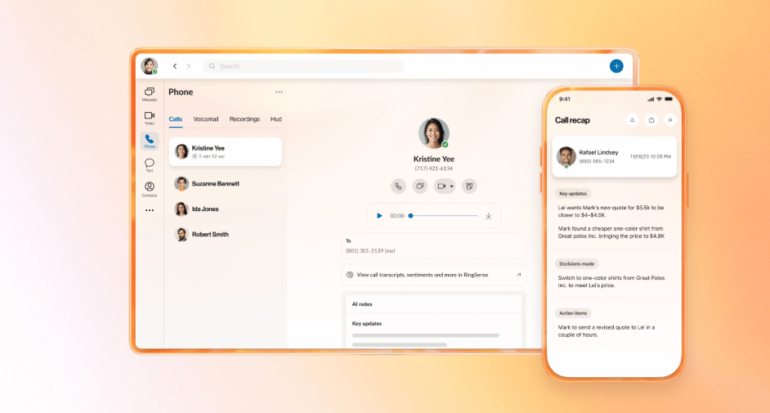
For add-on AI features, RingCentral offers an AI receptionist and RingSense. The AI receptionist acts as a virtual agent, which can be used to answer simple inquiries, such as frequently asked questions, and route calls through your IVR. In contrast, RingSense is used to generate customer insights from your interaction data, but both features are beneficial for managing complex call flows.
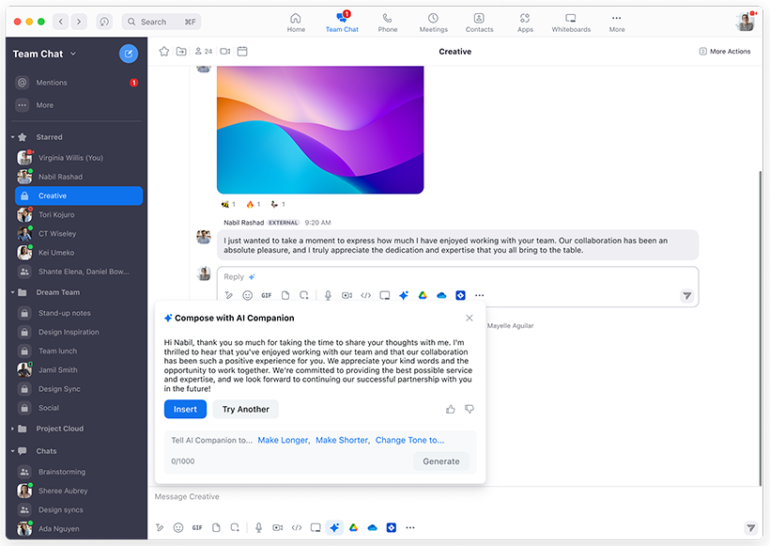
Similarly, Zoom offers a combination of standard and additional artificial intelligence features. The AI Companion provides post-call summaries, voicemail transcriptions, and task extraction for action items during video meetings. For team chat, the AI companion also assists in generating messages, resulting in faster and more efficient communication. However, for summaries of team messaging, users will need to purchase a Zoom Phone Power Pack add-on.
Security features: Zoom wins
The most significant difference in my ratings of RingCentral vs. Zoom lies in their security features, with RingCentral receiving a perfect score of 5 and Zoom receiving a score of 3.75 out of 5. While both platforms offer similar options, Zoom provides more advanced security features; however, these are primarily available on higher-tier plans rather than the base phone plans.
For example, Zoom’s workplace meetings include enterprise-grade security features such as a compliance manager and encryption keys. However, these features can only be accessed as add-ons for enterprise users. Additionally, features like single sign-on (SSO) are only available on Business, Education, or Enterprise accounts. Even when you do enable end-to-end encryption (E2EE), it creates limitations on Zoom’s functionality during meetings.
In contrast, RingCentral offers all of these security features across its plans, including SSO that seamlessly integrates with third-party apps, and E2EE is available for video conferencing, phone, and messaging without requiring an enterprise upgrade. Therefore, if you want security without sacrificing functionality, RingCentral emerges as the winner in this category.
Customer support: RingCentral wins
While RingCentral and Zoom both offer similar customer support features, there are key differences that give RingCentral a distinct advantage. Both companies provide 24/7 support via live chat and phone, as well as comprehensive support centers that feature self-service resources. These resources allow users to access information and gain knowledge about the platforms.
However, while RingCentral offers unlimited chat and phone support, as well as professional implementation services for its RingEX plans, Zoom’s global support prioritizes live phone and web chat, with additional support channels, such as web ticketing, only available through the purchase of a priority support package. Therefore, RingCentral wins out in this category because it offers more robust customer support across its plans, especially for businesses with more complex communication needs.
Zoom vs. RingCentral: Which should you choose?
Ultimately, the platform you select depends on your specific business communication needs. For companies that require unified communication solutions with strong call routing and analytics, robust security, and multi-platform customer support, RingCentral is a great choice. However, if you’re seeking affordable video meetings and diverse integration options, then Zoom is the right platform for you.
| Best for | | |
| Use cases | ||
| Pricing | ||
| Key features and video conferencing | ||
| Security and reliability | ||
| Customer support |
Related read:
- Zoom vs Google Meet (2025): Which Wins for Your Meetings?
- Nextiva vs RingCentral (2025): Which One Is Best for Your Business?
Methodology
To compare Zoom vs. RingCentral, I used a six-part evaluation criteria that examined the value each platform provides as a business communication tool. This process began by determining the market price for unified communication platforms, followed by an assessment of pricing and flexibility based on the scalability of each provider’s subscriptions, as well as access to free trials and annual discounts.
I analyzed several key features and functionalities, focusing on access to unified communication tools, including video conferencing and collaboration features, as well as business phone capabilities such as call management systems. I also reviewed overall integrations and assessed the reliability of services, including their service level agreement (SLA) uptime guarantees.
In terms of usage, I evaluated the security features provided by each vendor across their plans, concentrating on two-factor authentication, end-to-end encryption, and single sign-on capabilities. Then, I assessed ease of use based on the availability of a mobile application, the intuitiveness of the user interface, and whether technical skills are required to utilize each tool effectively.
Finally, I compared the availability of customer support for each provider, considering options such as live chat, email ticketing, and phone support. More points were awarded to providers offering 24/7 support within each plan, rather than requiring users to purchase a premium support package for hands-on assistance.
More about VoIP
- Nextiva Review
- RingCentral Review
- Nextiva vs RingCentral
- Best Interactive Voice Response (IVR) Software
Frequently asked questions (FAQs)
Does RingCentral have a free trial?
Yes, a 14-day free trial is available for the RingEX business phone plans, but there are some restrictions. For example, the free trial is only available for up to two devices and 20 phone lines.
Can you make phone calls with Zoom?
Yes, you can make phone calls with a Zoom Phone plan. However, not all Zoom plans include access to telephony services, so be sure to review the features of your plan before considering Zoom.
Is Zoom free to use?
It depends. If you need to use Zoom as a video conferencing platform, a Basic plan is available that offers free video conferencing and workspace tools. However, if you need a business phone system, a paid subscription plan is required to make phone calls.