


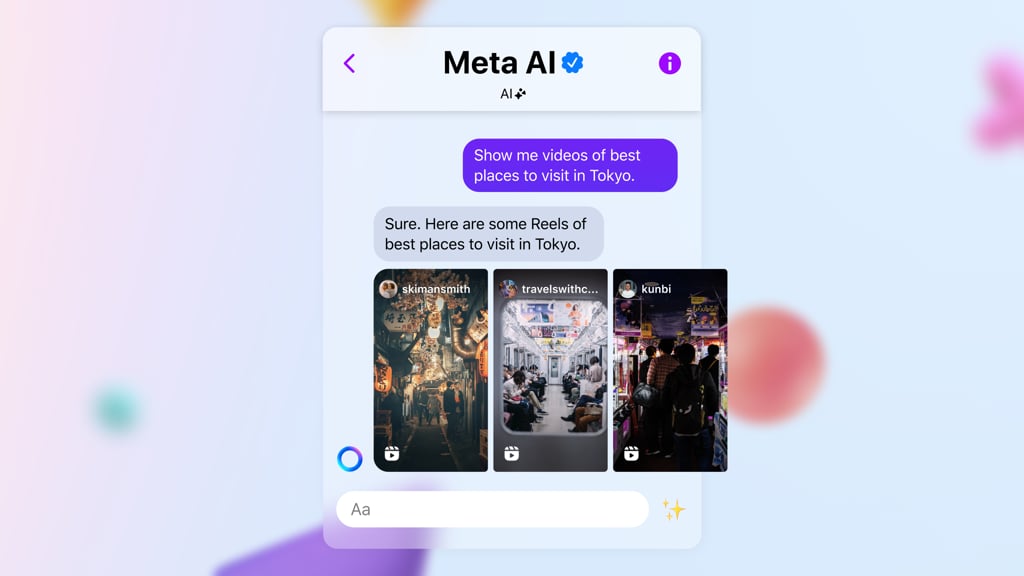
Meta AI may already be inside your messaging app. That does not mean it has the tools you need for work.
Meta’s generative AI assistant supports questions, writing, research, and creative tasks across its services. Its standalone app and website also offer planning and connected-service features, with availability varying by platform, market, and account.
Before uploading a document or connecting a calendar, check what that version can do and how it handles your information. This cheat sheet explains the features, costs, and privacy controls that matter.
Meta AI at a glance
The capabilities below span different Meta AI experiences. Not every feature is available in every app, country, or account.
| Developer | Meta |
| What it is | Generative AI assistant for conversation, research, content creation, and task assistance across Meta's services |
| Current AI models | Muse Spark for conversation and reasoning; Muse Image for visual creation; specialized model updates trained using Muse Wonder |
| Supported inputs | Text, voice, images, camera input, PDFs, spreadsheets, and other supported files |
| Research tools | Web search, research reports with citations, and document and data analysis |
| Creative tools | Image generation and editing; short AI video creation and remixing |
| Advanced tools | Multi-step planning, recurring tasks, daily briefings, slide creation, and connected services in supported experiences |
| Personalization and privacy | Conversation memory, personalized recommendations, account controls, and Incognito Chat |
| Social integrations | Facebook, Instagram, WhatsApp, Messenger, and Threads |
| Platforms | Web, iOS, Android, Mac beta, and compatible AI glasses |
| Pricing | Free access; Meta One Core from $7.99/month and Premium from $19.99/month in the US |
| Official website | meta.ai |
What does Meta AI do?
Meta AI supports requests that combine different activities, allowing users to move between tasks and refine the results through conversation.
Ask questions, write, and solve problems
Conversational tools help with everyday communication, learning, and technical questions.
- Writing and editing: Draft emails, captions, and messages, then adjust their wording, length, or tone.
- Learning and problem-solving: Explain unfamiliar subjects, perform calculations, and simplify complicated information.
- Coding assistance: Generate sample code, explain programming concepts, and troubleshoot errors.
Follow-up prompts let users build on previous answers. Voice conversations support spoken questions and interruptions, while camera-based assistance can interpret objects, signs, and surroundings on compatible devices.
Search, research, and analyze information
Research tools can retrieve current information, investigate multiple sources, and prepare reports with citations. Users can also redirect an investigation while it is underway.
Uploaded materials can be examined in several ways:
- Documents and PDFs: Summarize passages and extract important details.
- Spreadsheets: Interpret figures, identify patterns, and analyze data.
- Images and screenshots: Examine visual content and answer related questions.
Someone reviewing a service agreement, for example, could identify payment terms, cancellation conditions, and renewal dates without manually searching through the entire document.
Create and edit images and videos
Creative features support original content generation and modifications to existing visuals.
- Image generation: Create pictures from text prompts, combine visual references, and experiment with styles.
- Photo editing: Remove objects, change backgrounds, and adjust selected areas.
- Video creation: Generate and remix short clips through Vibes, which also includes a feed for discovering and sharing AI videos.
Meta’s image tools offer suggested presets for users who want to begin editing without detailed prompts. Vibes also allows creations to be shared through supported social platforms.
Plan tasks and work with connected apps
In supported markets, the Meta AI app and website offer planning features, recurring updates, slide creation, and connections to email and calendar services. Check availability in the version you intend to use.
- Scheduling and recurring tasks: Develop plans, arrange regular updates, and receive daily briefings.
- Connected services: Access authorized email and calendar information to review appointments and identify scheduling conflicts.
- Work materials: Generate slide presentations, schedules, and other planning materials.
Advanced functions in the standalone experience also allow users to modify a report, presentation, or plan while the assistant is preparing it.
Shop, discover places, and get recommendations
Shopping and discovery features draw on product information and relevant public social content to help people explore their options.
- Product searches: Find nearby Facebook Marketplace listings alongside items from online retailers.
- Shopping comparisons: Refine results by price, distance, style, and personal preferences.
- Local discovery: Explore businesses and places using public posts and community recommendations.
Someone furnishing an apartment, for example, could compare secondhand furniture available nearby with new products before making a purchase.
How does Meta AI work?
Meta AI is the assistant people interact with, while Muse Spark is the AI model family powering its conversational and reasoning capabilities.
Most processing occurs through cloud-based systems, with specialized models supporting different types of requests.
Models and technology behind Meta AI
Developed by Meta Superintelligence Labs, the Muse model family includes technologies for conversation, visual creation, and advanced reasoning.
| Model or technology | |
|---|---|
| Muse Spark | Core model family powering conversations, reasoning, and multimodal understanding |
| Muse Image | Generates and edits images using text prompts and visual references |
| Muse Wonder-trained models | Specialized improvements for complex reasoning, conversation memory, and responding to changing instructions |
According to Meta, specialized models trained using Muse Wonder are being introduced to Meta AI, improving how it handles earlier context and complicated requests.
Other related technologies include Muse Wonder and Wonder Full, advanced models available through developer services, and Muse Spark Open, an open-weight model for custom applications. These releases are distinct from the models users select inside the consumer assistant.
Meta also offers Muse, a separate personal AI agent designed to carry out more extensive tasks through connected applications.
Response modes
Meta AI offers two main modes suited to different requests:
- Instant: Provides quick responses for everyday questions and straightforward tasks.
- Thinking: Spends additional processing time on complex problems, calculations, and requests involving several steps.
For demanding questions, advanced reasoning can also involve multiple AI processes examining different aspects of a problem before preparing a response.
Where and how can you use Meta AI?
The assistant is accessible through existing Meta apps, dedicated software, and compatible smart glasses. Each platform offers a different way to start interacting with it.
| Platform | How to access Meta AI | Features and uses |
|---|---|---|
| Web | Visit meta.ai and sign in as prompted | Research, file analysis, creative projects, and advanced planning |
| iOS and Android | Install the standalone Meta AI app | Voice conversations, camera assistance, image creation, and Vibes |
| Open a dedicated AI chat or use @Meta AI in supported conversations | Answer questions, generate images, and coordinate group plans | |
| Access Meta AI through direct messages, search, or supported creative features | Develop captions, discover content, and create or edit visuals | |
| Open Meta AI through supported search and AI Mode experiences | Research topics using relevant public posts, Groups, and Reels | |
| Messenger | Open a Meta AI chat or invoke it in supported group conversations | Get recommendations, answer questions, and organize activities |
| Threads | Open a Meta AI direct message or use @meta.ai in supported public posts | Ask about discussions, explore shared content, and get contextual answers |
| Mac | Install the Meta AI desktop app (beta) | Get assistance with supported app windows, use voice dictation, and launch the assistant with Option + Space |
| Smart glasses | Pair compatible Ray-Ban Meta, Oakley Meta, or other supported glasses through Meta's companion app | Ask questions hands-free and receive camera-based assistance |
Meta AI does not have one universal activation process. It is already integrated into supported social and messaging apps, while standalone applications and smart glasses have their own sign-in or setup steps.
Available features vary by platform, region, and account.
How much does Meta AI cost?
Meta AI is free for everyday assistance. Users who want greater access to creative features can subscribe to Meta One, which combines expanded AI usage with benefits across the company’s social apps.
| Plan | Starting US price | Main benefits |
|---|---|---|
| Free | $0 | Everyday assistance and selected research and creative tools |
| Meta One Core | $7.99/month | Increased image and video creation, more creative-tool usage, and bundled app benefits |
| Meta One Premium | $19.99/month | Core benefits with higher AI generation allowances and additional creative access |
Separate Instagram Plus, Facebook Plus, and WhatsApp Plus subscriptions provide app-specific benefits. Meta One also offers creator and business plans with professional features and different pricing.
Prices and included benefits can differ by region and account.
Is Meta AI private, and how is personal data used?
Meta provides privacy settings for AI interactions, including controls affecting personalization and how information is used across its services.
AI conversations and personalized recommendations
Under Meta’s data policies, interactions with its AI features can help personalize content and ads in supported regions.
Cross-account use also depends on account linking. Meta says WhatsApp AI interactions are not used to personalize experiences across other accounts when the WhatsApp account has not been added to Accounts Center.
For example, questions about hiking equipment could influence related product suggestions. Meta says certain sensitive subjects, including health and political views, are excluded from AI-based advertising personalization.
The company also uses relevant conversation context and previously shared preferences to improve responses. Users can review available controls through Meta’s Privacy Center, advertising settings, and account preferences.
Incognito chats and privacy controls
Incognito Chat provides a separate conversation mode within supported versions of WhatsApp and the standalone Meta AI mobile app.
Meta says messages are processed in a secure environment designed to prevent the company from reading their contents. Conversations are not saved and disappear by default.
People sharing confidential information or using connected services should also review the applicable permissions and privacy policies before granting access.
What are the competitors to Meta AI?
Several established generative AI assistants offer similar capabilities, although their tools, models, and integrations differ.
- ChatGPT: OpenAI’s assistant supports writing, research, coding, file analysis, and multi-step workflows through dedicated applications and connected tools.
- Claude: Developed by Anthropic, Claude offers document analysis, coding, and professional task assistance, with tools for managing projects and creating interactive content.
- Google Gemini: Google’s assistant combines research, content creation, and multimodal capabilities with integrations across Android and Google Workspace, including Gmail, Docs, and Drive.
Meta AI offers a different experience because its capabilities are distributed across several familiar applications. Before choosing it over another assistant, users should consider whether the features they need are available where they intend to use them and whether those tools justify any additional subscription costs.
Want to get more from Meta AI and other assistants? TechRepublic readers get free 7-day access to The Neuron Academy, our practical learning platform with AI tips, tricks, and prompting techniques to help professionals use AI more confidently at work. Browse all lessons →
Let us teach you How to Talk to AI for free! Try our six-minute course at The Neuron Academy and learn a few simple ways to write better prompts and get more useful results from AI, or browse our other AI course for free for seven days. Check out all the lessons here →