


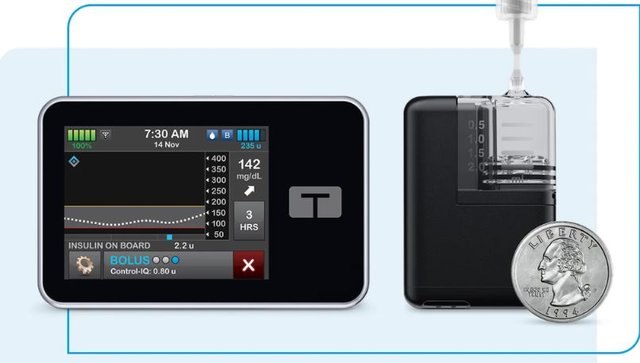
An insulin pump that people depend on to manage diabetes is now the subject of the US Food and Drug Administration’s most serious type of recall.
In a Nov. 25 safety notice, the FDA said Tandem Diabetes Care had reported 1,248 critical injuries associated with a fault affecting its Mobi insulin pump. No deaths had been reported as of Oct. 28.
Among the concerns is a malfunction that can interrupt treatment even when there is nothing blocking the flow of insulin. Patients who rely on the device need to know when an alarm could indicate a problem with the pump itself.
The first thing to check in the Tandem Mobi insulin pump recall is your pump’s serial number. Some units need to be replaced. Other Tandem Mobi pumps with Interoperable Technology can remain in use under updated instructions.
A motor fault can trigger false blockage alarms
Tandem Mobi delivers insulin beneath the skin and communicates with compatible continuous glucose monitors. When paired with compatible glucose monitoring technology, the system can automatically adjust insulin delivery based on glucose readings.
An investigation detailed in the FDA’s recall database found that increased friction within the pump’s drive mechanism can reduce the power available to its motor. If the motor runs too slowly, the device may mistakenly detect a blockage, known as an occlusion, even when insulin can flow freely.
Once an occlusion alarm sounds, insulin delivery remains suspended until the user acknowledges the warning and resumes treatment. Repeated interruptions can cause dangerously high blood sugar, potentially leading to medical intervention or hospitalization.
Replacement eligibility depends on the pump’s serial number
A total of 80,938 devices are listed in the Class I recall. Tandem began notifying customers on Sept. 23, issuing separate instructions based on which units they own.
Users can locate their serial number by opening the mobile app and navigating to Settings > Pump > Pump Info. Compare it against the replacement list available in the FDA’s safety notice.
| Included on the replacement list | Immediately request a return and replacement through the link in the customer notification letter or call 877-801-6901. |
| Not included on the replacement list | Continue using the device under the updated safety instructions. Contact customer support if blockage alarms become unusually frequent or repeatedly interrupt therapy despite troubleshooting. |
Regardless of replacement eligibility, patients should respond to every alarm by following the user guide. Instructions include inspecting the cartridge, tubing, and infusion site for damage or obstructions, correcting any identified problem, and resuming treatment.
Customers should also enable mobile app notifications and have a backup method of administering insulin as directed by their healthcare provider. Anyone continuing to use a unit identified for replacement should regularly monitor their blood sugar for unexpected highs or lows.
What's hot at TechRepublic
- Blackpoint Cyber vs. Arctic Wolf: Which MDR Solution is Right for You?
- Why AWS Sellers Choose Deepgram Over Other Voice AI Tools
- SS&C Intralinks DealCentre AI vs. Datasite: Which platform is built for the future of dealmaking?
- SS&C Intralinks FundCentre AI vs. Juniper Square: Which platform better supports modern private markets fund managers?
- Verito vs. Rightworks: Which IT Provider Is Best for Your Firm?
A disconnected smartphone can complicate alarm recovery
Imagine waking up to an insulin pump alarm only to find that your phone has run out of battery. With the Mobi system, losing access to your smartphone can complicate the process of getting treatment back on track.
According to Tandem, the pump normally continues its programmed insulin delivery when disconnected from the mobile app. However, if an alarm interrupts treatment during a disconnection, users cannot dismiss the warning directly on the pump and must restore the connection before resuming delivery.
Before heading to work or going to bed, I’d recommend checking three aspects of your setup.
- Confirm the connection. Open the app and verify that current pump information is visible. If a Pump Disconnected banner appears, check that Bluetooth is enabled and bring your phone within five feet of the device, with no obstructions between them.
- Review your notification settings. Even if you receive glucose alerts on a smartwatch, keep the pump’s companion app running in the background. Tandem’s safety guidance also advises using audible pump alarms during sleep unless your healthcare provider recommends otherwise.
- Keep your phone accessible. Charge it before a long commute or overnight stay, and make sure anyone responsible for assisting with your diabetes care knows how to access the connected app.
Checking these settings will not correct the motor fault, but it can prevent an additional technical problem from delaying your response. If you cannot resume insulin delivery, follow the backup treatment plan established with your diabetes care team and seek medical assistance promptly.
More on wearable tech: Samsung may skip its 2027 Galaxy Watch launch, potentially leaving smartwatch buyers waiting until 2028 for a new model.