


NinjaOne and Kaseya are two of the leading endpoint management solutions in the industry. However, while both are feature-rich platforms, their overall visibility, control, and automation capabilities vary for different use cases.
Key takeaways:
- When comparing NinjaOne vs Kaseya, consider both your current IT management requirements and growth plans.
- NinjaOne is popular for its ease of setup and scalability across all business sizes without operational complexities.
- Kaseya is a solid RMM that offers advanced patch management and scripting capabilities.
NinjaOne vs Kaseya Comparison
 |  |
|
| Our score (out of 5) | ||
| Pricing | ||
| User interface | ||
| Ease of deployment | ||
| Automation | ||
| Onboarding | ||
| Support quality | ||
NinjaOne vs Kaseya: Pricing & Plans
Both NinjaOne and Kaseya offer custom-based pricing and a 14-day free trial, although the former provides more transparency.
NinjaOne pricing
NinjaOne’s custom quote is based on per endpoint, making it a better choice for MSPs. Modular add-ons are included in the final pricing, so you only have to pay one bill for features you actually need.
- Onboarding, training and ongoing support: Free and unlimited
- Maintenance fee: Free
- Free trial: 14 days
- Contract type: Annual; monthly available for MSPs
Kaseya pricing
It was challenging to find pricing information for Kaseya’s range of IT management solutions, although its website mentions 14-day free trials for its products. While third-party sites claim to offer custom tiered plans and per-endpoint pricing, we suggest contacting Kaseya directly instead.
- Onboarding, training and ongoing support: Fee not disclosed
- Maintenance fee: Not disclosed
- Free trial: 14 days
- Contract type: Likely annual (based on user reviews)
More cloud security coverage
- Blackpoint Cyber vs. Arctic Wolf: Which MDR Solution is Right for You?
- 6 Best Open Source Password Managers for Windows
- Unified by Design: The Smart Stack Advantage of NinjaOne and Microsoft Intune
- Free Business Email: I Found 8 Legit Ways to Get One
Return on Investment
One key factor we did not want to overlook in this criteria is the return on investment. Based on real-life user feedback and industry analyses NinjaOne often delivers a faster ROI, particularly for organizations seeking rapid deployment and ease of use. Users unanimously credit NinjaOne for its intuitive interface, streamlined setup process, and straightforward deployment which contribute to quicker realization of value.
NinjaOne vs Kaseya: Key Features
Both NinjaOne and Kaseya offer extensive IT management solutions. As an endpoint management platform, NinjaOne is noted for its user-friendly interface and efficient automation capabilities, making it a strong choice for teams seeking simplicity and speed. Kaseya, meanwhile, offers extensive customization and scripting options, appealing to IT teams that require granular control and advanced automation capabilities.
Here’s how NinjaOne and Kaseya’s endpoint management features stack up against each other:
Endpoint task automation
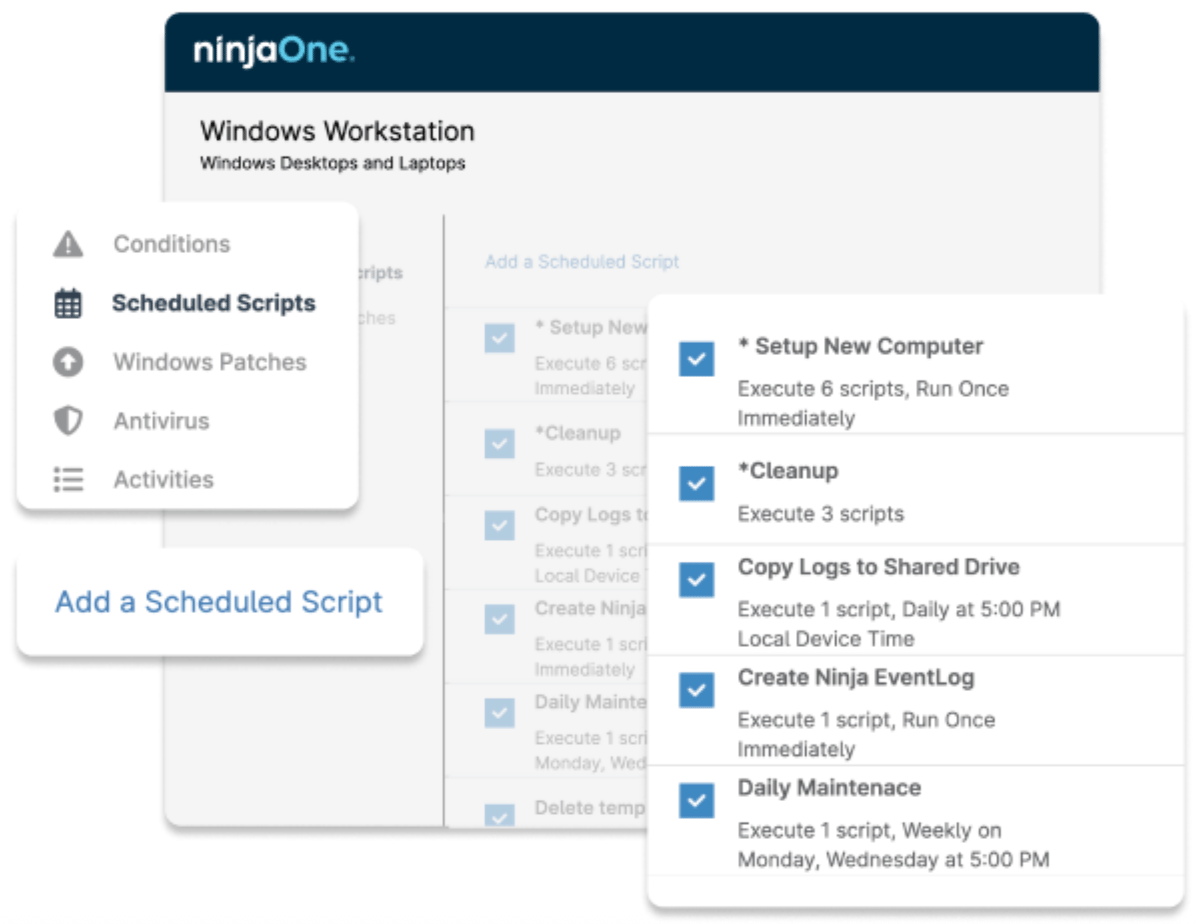
NinjaOne’s automation platform provides users with mature scripting capabilities and policy framework, allowing flexible roll out changes across a distributed ecosystem when needed. Initiate backend automations on-demand, on a fixed schedule, or automatically when system performance or state conditions are met.
However, if what you need is no-code scripting, Kaseya is a solid alternative. Its Agent Procedure Editor supports both layered scripting and conditional logic, and is accessible from the VSA Desktop and mobile app.
Best business software
- Blackpoint Cyber vs. Arctic Wolf: Which MDR Solution is Right for You?
- SS&C Intralinks DealCentre AI vs. Datasite: Which platform is built for the future of dealmaking?
- Unified by Design: The Smart Stack Advantage of NinjaOne and Microsoft Intune
- Still Not Backing Up Microsoft 365 Data? Here’s Why That’s a Risky Move
- Verito vs. Rightworks: Which IT Provider Is Best for Your Firm?
Patch management
NinjaOne excels with fast, automated patching across Windows, macOS, Linux, iOS and Android mobile devices, and third-party applications. It supports pre- and post-patch scripting, and comes with a built-in Patch Intelligence AI that supports patch approvals and bulk deployment based on severity. The system is cloud-native and designed for ease of use, making it the better option when it comes to agility and responsiveness.
Kaseya’s patch management also allows users to approve (or block), schedule, and install patches.
However, its automation policy is separate, supporting exemptions, so you get more granular control over patching workflows.
Software management
Both platforms support software deployment and management across endpoints, including updates and uninstall options. However, many teams prefer NinjaOne as it is easier to configure and operate for most users, while Kaseya’s workflow is more complex.
That said, we appreciated Kaseya’s dedicated software management module, which provides granular controls over installation policies, scan settings, and update actions. This provides IT teams with enhanced security and compliance while also minimizing disruption. If you don’t mind a more complex workflow, Kaseya can provide you with additional customization.
Auto-remediation
When it comes to auto-remediation, NinjaOne is the more accessible option of the two. It utilizes prebuilt conditions, predefined scripts, and one-click automation to resolve frequent issues, such as service failures or software reinstalls, making it ideal for lean teams.
Similarly, Kaseya’s auto-remediation tools also allow administrators to build multi-step logic based on dynamic conditions in addition to executing predefined scripts. Although, if you need a low- to no-code workflow, Kaseya is a great option.
Secure remote access
NinjaOne Remote offers fast, one-click access to any Windows or Mac device, enabling technicians to connect and troubleshoot without delay. It supports remote viewing for Android and iOS devices. NinjaOne provides security with robust encryption, access controls, and privacy safeguards. Features such as multi-screen navigation, live chat, background mode, Quick Connect, and visual session indicators enhance both the user experience and technician efficiency.
On the other hand, Kaseya’s Live Connect is also a powerful solution for deep system access and diagnostics. However, we find the interface is somewhat outdated and suffers from a slower connection flow, which many users say impacts daily usability. If you need a system that can adjust video quality to accommodate bandwidth, NinjaOne’s remote access feature is still your best option.
Must-read security coverage
- UK Police Convicts Pair in £5.5 Billion Bitcoin Launder Case
- Blackpoint Cyber vs. Arctic Wolf: Which MDR Solution is Right for You?
- How GitHub Is Securing the Software Supply Chain
- 8 Best Enterprise Password Managers
Monitoring and alerting
Both platforms offer robust real-time monitoring and alerting capabilities. NinjaOne excels in clarity and faster response times through its unified dashboard, where it monitors all your endpoints. It also allows you to set customizable alerts based on system health and performance, using over 100 built-in templates or your own rules.
Kaseya is also a strong option for complex IT environments. Like NinjaOne, it also supports tools for creating custom thresholds, processing triggers, and setting alerts per device, group, or role. However, most real-life user feedback claims that the system has a steep learning curve which may not be ideal if you are searching for fast and seamless migration.
Hardware and software inventory
Both NinjaOne and Kaseya’s hardware and hardware and software inventory management tools provide real-tile visibility into every device in your IT environment. This includes metrics, installed software, and hardware details. That said, Kaseya does not have the built-in warranty management (for tracking warranty status) that NinjaOne offers.
Kasya is a great alternative if you need network topology mapping and advanced audit capabilities that help visualize infrastructure and dependencies. However, please note that the map is not auto-populated and will require manual set up.
Device reporting
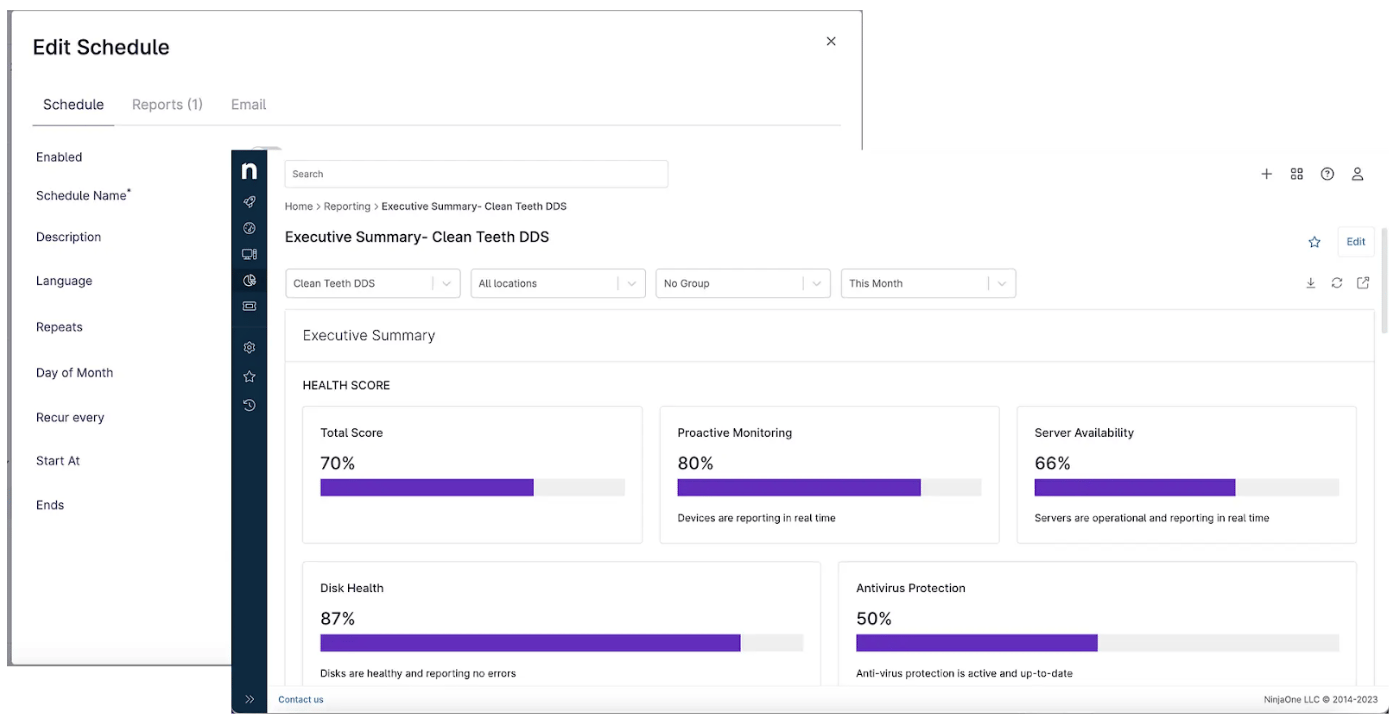
NinjaOne’s reporting clearly demonstrates IT performance with summary and tabular reports, featuring editable visual charts and exportable data tables. You can customize by filtering data by location, device group, timeframe, or using custom fields to reflect your environment’s unique needs. Reports can be scheduled and bundled for automated delivery, ensuring stakeholders and clients stay consistently informed.
While some users find the interface less intuitive, Kaseya’s report template and report designer feature can provide you with a variety of tailored report types. Its reporting tools offer great value, with customizable reports that pull data from raw metrics, historical trends, and scripting output, all from a single dashboard that manages your preferences with a click of a button.
NinjaOne vs Kaseya: Security integrations
Both platforms offer similar capabilities in terms of how they work with security. Therefore, choosing between NinjaOne and Kaseya based on security criteria alone will depend on your specific organizational needs, such as the importance of mobile device management versus advanced threat detection.
| |
|
| Vulnerability management | ||
| AV/EDR integrations | ||
| Data loss prevention/BCDR | ||
| Network monitoring |
NinjaOne security
NinjaOne excels in user-friendly security setup, automated endpoint protection, real-time visibility, and lightweight yet effective network monitoring, making it ideal for MSPs and IT teams. It provides layered endpoint protection through automated and reliable OS and third-party app patching, policy enforcement, and optional EDR integrations, including SentinelOne, CrowdStrike, and Bitdefender.
To ensure strong data loss prevention, NinjaOne is designed to provide comprehensive device and application management and native back up system via a centralized cloud-based platform. It also offers remote access capabilities for Android, iOS, and macOS endpoints. Additionally, NinjaOne’s dedicated Network Monitoring Solution (NMS) provides real-time visibility into SNMP-enabled devices, offering customizable alerts and automated remediation to address network issues proactively.
Kaseya security
On the other hand, Kaseya is a good option if you require detailed network topology insights. It also comes with a catalog of 250 third party patching licenses with a sleep-proof feature that helps mitigate security risk by maximizing patch compliance.
NinjaOne vs Kaseya: Support & reliability
Both NinjaOne and Kaseya VSA offer comprehensive onboarding and post-sales support. NinjaOne emphasizes ease of use, rapid deployment, and consistent 24/7 support with fast first response time, while Kaseya provides structured training programs that require in-depth training and a layered approach to compliance and support.
| |
|
| Onboarding | Free, unlimited onboarding, streamlined setup | Paid onboarding, structured documentation guides and learning modules available |
| Training | Free, NinjaOne Academy, webinars, knowledge base | Kaseya University, Learning Hub, certifications |
| Compliance | Supports HIPAA, ISO/IEC 27001, NIST CSF, robust security controls | Supports HIPAA, ISO/IEC 27001, NIST CSF, layered compliance approach |
| Support hours | 24/7 local support in 7 languages, 30 minute average first response time | Support via Helpdesk, live chat, various support tiers |
| Knowledge base | NinjaOne Dojo with self-help articles and documentation | Extensive online help, user guides, community forums |
NinjaOne support & reliability
NinjaOne provides an onboarding and support experience tailored for ease, speed, and customer satisfaction. It’s free, and a guided setup enables most users to be fully operational within days. For ongoing education, you can choose from NinjaOne’s free training on-demand, NinjaOne Academy, rich documentation, and live events.
What sets NinjaOne apart is its strong reputation for proactive customer engagement and strong community. Its product roadmap and platform improvements are consistently shaped by honest user feedback, leading to frequent feature upgrades, UI refinements, and responsive support that evolves with customer needs.
Kaseya support & reliability
Kaseya, on the other hand, delivers a highly structured onboarding experience with extensive training programs through Kaseya University and in-depth support tiers. Its learning infrastructure includes certification paths, compliance check tools, and integrations across its broader IT management suite ideal for experienced or specialized IT teams.
However, it’s important to note that Kaseya’s onboarding is a paid service, and while Kaseya provides comprehensive resources, some users report a steep learning curve, which may require more time and technical expertise to fully realize the platform’s capabilities.
NinjaOne vs Kaseya: User Experience
We searched popular review platforms and IT forums to compare what real-life users think of NinjaOne and Kaseya, and here’s what we found:
NinjaOne user experience
Overall, NinjaOne is well-regarded for its user-friendly design and proactive approach to addressing customer feedback. Users consistently praise NinjaOne for its intuitive interface, robust automation, and responsive customer support. Many highlight its ease of use and efficient patch management as standout features.
We also found many users in online forums recommending NinjaOne for its “speed” and modern UI. However, some note limitations in customization options and reporting capabilities, suggesting room for improvement in these areas.
Kaseya user experience
Users commend Kaseya for its robust automation capabilities, comprehensive feature set, and reliable remote access tools, which collectively enhance IT management efficiency. The platform’s scripting and workflow automation are particularly appreciated for streamlining routine tasks. The latest feedback even described the system as providing efficient and seamless onboarding.
However, some users report a steep learning curve and occasional sluggishness in the interface, suggesting that the user experience could be more intuitive. Unlike with NinjaOne, we found that unsatisfied users raised concerns about Kaseya in online forums. Reviews also show that response to billing concerns, overall support quality, and the frequency of feature updates could be improved to better meet user expectations.
What's hot at TechRepublic
- Blackpoint Cyber vs. Arctic Wolf: Which MDR Solution is Right for You?
- Why AWS Sellers Choose Deepgram Over Other Voice AI Tools
- SS&C Intralinks DealCentre AI vs. Datasite: Which platform is built for the future of dealmaking?
- SS&C Intralinks FundCentre AI vs. Juniper Square: Which platform better supports modern private markets fund managers?
- Verito vs. Rightworks: Which IT Provider Is Best for Your Firm?
Should You Use NinjaOne or Kaseya?
Because no IT team is the same, the primary answer is that your choice should be based on your specific operational requirements and your desired balance between ease of use and depth of functionality. That said, it’s also essential to make sure that you find an endpoint management solution that grows with your needs.
When to choose NinjaOne
| Pros | Cons |
|---|---|
| Modern, intuitive interface | Lack of granular control in some areas |
| Fast onboarding and deployment | Needs a highly-customizable reporting system |
| Easy-to-use, yet powerful automation scripting | Lack of “Force Apply” function for occasional failed updates |
| Excellent client support and fast response time |
NinjaOne is the ideal choice for IT teams and MSPs seeking seamless visibility, control, and automation across all endpoints, regardless of scale. Its intuitive platform stands out for ease of use, fast onboarding, and low-friction setup, making administration simple even as environments grow more complex. With responsive support and a reputation for being easy to do business with, NinjaOne provides a scalable and reliable solution that evolves in tandem with your IT needs.
When to choose Kaseya
| Pros | Cons |
|---|---|
| Easy to use Procedure Builder | Reports of occasional system downtime |
| Highly customizable reporting | Learning curve for some complex features |
| Granular control and configuration | Outdated UI/UX |
| Extensive resource and knowledge base | Customer support quality and response time needs improvement |
If you need deeper customization that comes with a more complex workflow, Kaseya is a sound alternative. While its learning curve is steeper, Kaseya provides powerful tools for those who prioritize flexibility, granular control, and an all-in-one platform approach. Kaseya offers deep automation, scripting, and integration across IT systems, ideal for experienced teams managing complex infrastructures.