Go Premium
Popular Topics
Top Products AI Developer Payroll Security Events Project Management Accounting CRM Academy Cloud Innovation Cheat Sheets Big Data
View All Topics
Resources
The Enterprise Guide to Scalable AI The AI-Ready Workplace Hub The IRIS Reality Check TechRepublic Premium TechRepublic Academy Newsletters Resource Library Forums Sponsored 


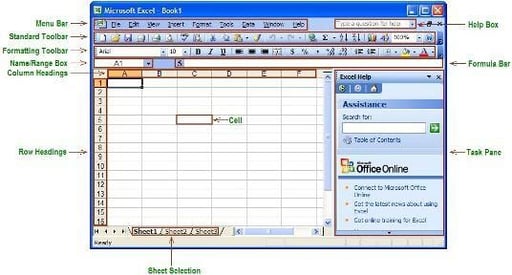
 If you’ve used Microsoft Office products before, such as Word or PowerPoint, you probably have an idea about the purpose of some of the buttons and menu options available to you in Excel. However, if you’re new to Excel, you might be looking at something totally unfamiliar.