


An AI assistant can recommend a retailer’s product before the shopper ever visits its website. For ecommerce teams, that makes accurate product information important well beyond the storefront.
AI search for ecommerce involves making product pages accessible, maintaining reliable catalog information, and supplying data to supported shopping services. Retailers also need to know whether their products are mentioned in AI answers, cited as sources, or visited by potential buyers.
Follow these eight steps to check the technical setup and measure results. External AI discovery is treated differently from the search function inside an online store.
Key takeaways:
- Structured data, crawler access, and merchant feeds help AI search platforms discover ecommerce products, but do not guarantee recommendations.
- Accurate product descriptions, pricing, availability, and third-party information support AI-assisted product discovery and purchasing decisions.
- Retailers should measure AI product mentions, citations, and external referrals separately from internal site-search performance and actual sales.
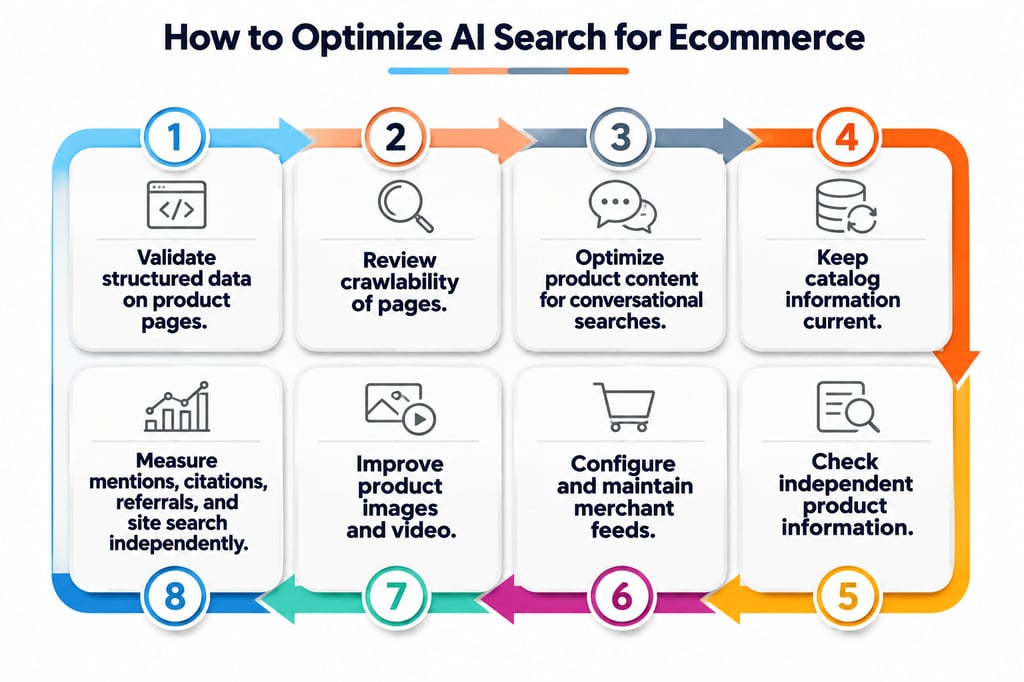
- Step 1. Validate structured data on product pages
- Step 2. Review crawlability
- Step 3. Optimize product content for conversational searches
- Step 4. Keep catalog information current
- Step 5. Check independent product information
- Step 6. Configure and maintain merchant feeds
- Step 7. Improve product images and video
- Step 8. Measure mentions, citations, referrals, and site search independently
- Implementation checklist and 90-day rollout
- Protect customer information and correct inaccurate answers
- Frequently asked questions
- How ecommerce teams should prioritize their next steps
Step 1. Validate structured data on product pages
Structured data helps search engines interpret a listing’s name, price, availability, and other attributes. According to Google’s merchant listing documentation, retailers can use Product markup with a nested Offer for items sold online. Eligible fields and rules depend on the type of merchant listing. Passing Google’s validation does not establish eligibility for recommendations from other AI services.
Start with a sample encompassing bestsellers, product categories, and variants:
- Test the markup. Enter live URLs in the Rich Results Test and identify errors affecting supported search features.
- Match the visible details. Compare name, image, offers.price, priceCurrency, and availability with the product page. Check SKU or GTIN information when applicable.
- Inspect delivery. Confirm that the HTML response contains JSON-LD. If it does not, examine the page after JavaScript rendering.
curl -sSL ‘https://www.example.com/products/headset’ | grep -i ‘application/ld+json’
Replace the sample address with a live URL. A match confirms only that the returned HTML contains the specified text; it does not validate the markup. Repeat the tests after changes to product templates or schema mappings.
Step 2. Review crawlability
Search crawlers need access to public product and category pages. Use Similarweb Site Audit to find indexability and technical SEO issues across the storefront, then investigate individual URLs through Google Search Console’s URL Inspection tool.
Focus on three checks:
- Indexing. Verify successful HTTP responses, canonical URLs, sitemap entries, and the absence of accidental noindex directives.
- Crawler permissions. Inspect robots.txt, CDN settings, and firewall rules. OpenAI identifies OAI-SearchBot for search discovery and distinguishes it from GPTBot, which is associated with training, and ChatGPT-User, which handles certain user requests. See its crawler documentation.
- Rendered content. Confirm that essential product text and links are accessible when JavaScript is involved. Check server logs for blocked requests or recurring errors.
A command-line probe can expose a user-agent-specific HTTP response.
curl -I -A ‘OAI-SearchBot’ ‘https://www.example.com/products/headset’
Step 3. Optimize product content for conversational searches
Shoppers often specify a use case instead of typing a category name. Someone searching for a headset might ask whether it supports Microsoft Teams, works with a particular laptop, and fits a $300 budget. Product pages should answer those questions with verifiable information.
- Collect buyer language. Examine support tickets, sales inquiries, reviews, and site-search terms. Existing AI in ecommerce workflows may also reveal recurring customer needs.
- Answer purchasing constraints. Include compatibility, dimensions, certifications, materials, warranty terms, and limitations where relevant. Avoid unsupported performance claims.
- Add focused FAQs. Address questions absent from specification tables, using short answers next to the affected product or category.
Customer-facing FAQs can improve understanding, but FAQPage or QAPage markup is not an AI recommendation shortcut. Google discontinued its FAQ rich-result feature in 2026.
Step 4. Keep catalog information current
A product’s stock status, price, or available variants can change between crawls. Retailers using several inventory management systems or sales channels should designate one authoritative record for each field.
- Set a refresh schedule. Align updates with sales activity, using more frequent checks for fast-moving SKUs and promotions.
- Catch discrepancies. Compare storefront details against structured data and exported records after imports, price changes, or inventory adjustments. Log mismatches by product identifier.
- Handle discontinued listings. Redirect a retired URL only to a genuinely equivalent replacement. Otherwise, maintain an accurate unavailable-product page or return 404 or 410 when the item is permanently removed.
Keep shipping and return conditions current as part of the same catalog-maintenance process.
What's hot at TechRepublic
- Blackpoint Cyber vs. Arctic Wolf: Which MDR Solution is Right for You?
- Why AWS Sellers Choose Deepgram Over Other Voice AI Tools
- SS&C Intralinks DealCentre AI vs. Datasite: Which platform is built for the future of dealmaking?
- SS&C Intralinks FundCentre AI vs. Juniper Square: Which platform better supports modern private markets fund managers?
- Verito vs. Rightworks: Which IT Provider Is Best for Your Firm?
Step 5. Check independent product information
Shopping assistants can reference reviews, manufacturer materials, distributor listings, and comparison pages. Incorrect model numbers or outdated specifications on these sites may persist after the merchant fixes its own catalog.
Audit third-party information for priority products, focusing on specifications, product identifiers, seller details, and destination URLs. Begin with authorized resellers and comparison pages that discuss the current model. When asking for a correction, provide the relevant manufacturer documentation and explain whether an error involves a replacement model, regional version, or discontinued item.
Genuine customer reviews can supply additional context. Avoid fabricated endorsements and paid favorable mentions, and respect a publisher’s independence when requesting factual corrections.
Step 6. Configure and maintain merchant feeds
Merchant feeds deliver catalog records to eligible shopping platforms. Google Merchant Center and Microsoft Merchant Center support product submissions, although their fields and validation rules differ. Google’s Content API for Shopping reached its sunset in August 2026, so developers should migrate older connections to the Merchant API.
OpenAI also publishes product feed specifications for ChatGPT commerce discovery. Availability and onboarding conditions should be checked before developing a direct integration; submitting data is different from access to in-chat checkout.
- Select a supported connection. Use the ecommerce platform’s maintained connector or an API integration appropriate to each destination.
- Map the records. Assign stable IDs to SKUs and variants, with the correct images, landing pages, and relevant attributes.
- Check ingestion. Examine platform diagnostics for rejected items, processing delays, and mismatched listings after updates.
A feed URL returning 200 OK only confirms accessibility. It does not establish that the receiving service accepted its contents.
Step 7. Improve product images and video
Media should represent the item a customer will receive. Include views of the front, back, distinguishing features, and scale where relevant. Variant-specific images can prevent confusion about colors, sizes, or included accessories.
Write descriptive alt text for accessibility, provide responsive image sizes, and compress files without obscuring details. Make sure the main image loads from a crawlable URL and changes to the correct picture when a shopper selects another variant.
Product videos can demonstrate setup or operation, with captions for essential explanations. Present specifications and compatibility information in text as well, since images and video may not convey every detail.
Step 8. Measure mentions, citations, referrals, and site search independently
AI visibility is not a single metric. A product can appear in an answer without receiving a citation, and a referenced page may attract no visitors. Track each outcome separately.
| Measurement | What to record | Where to check |
|---|---|---|
| Product and brand mentions | Appearances in answers to a defined set of shopping prompts | Similarweb AI Brand Visibility and repeatable manual tests |
| AI citations | Merchant and third-party URLs linked or referenced in AI answers | Citation analysis in AI visibility tools |
| External AI referrals | Identifiable visits, landing pages, orders, and attributed revenue | Similarweb AI Chatbot Traffic and GA4 |
| Internal site search | Search terms, zero-result queries, product selections, and search-assisted purchases | Ecommerce analytics and GA4 events |
Monitor external AI discovery
Build a fixed sample of customer questions spanning product categories, budgets, and compatibility needs. Record the assistant, country, date, mentioned items, and cited pages for each test. Repeat each prompt under consistent conditions and record whether the recommended products and cited sources change between runs.
Use referral-source and landing-page reporting to identify visits from AI services, then compare them with completed purchases. Traffic estimates from external tools and observed GA4 sessions serve different purposes. Google’s generative AI performance reports in Search Console provide a separate view of eligible appearances in its search features.
Verify internal search events
GA4’s Enhanced Measurement can record view_search_results when a site-search results URL contains a recognized query parameter such as q, s, search, query, or keyword. Check the data-stream settings and run a test query in DebugView to confirm that search_term is collected. Storefronts using JavaScript-based search without a matching URL parameter may need a custom event.
Record zero-result searches and product clicks through platform reporting or additional instrumentation. Keep these measures apart from chatbot referrals, which originate outside the retailer’s search interface.
Implementation checklist and 90-day rollout
Use a staged rollout to assign owners and establish a baseline without promising a fixed improvement timeline.
| Timing | Deliverables | Responsible teams |
|---|---|---|
| Weeks 1 to 4 | Audit priority URLs, schema, crawl permissions, and catalog discrepancies | Development, IT, SEO, analytics |
| Weeks 5 to 8 | Update buyer-facing content, product media, and feed integrations | Merchandising, content, ecommerce operations |
| Weeks 9 to 12 | Establish repeatable AI visibility tests, referral reporting, and correction procedures | Analytics, marketing, ecommerce management |
Protect customer information and correct inaccurate answers
Structured data and public feeds should contain catalog details without exposing customer names, email addresses, order histories, or payment records. Review customer-generated material under applicable privacy and consent policies. Retailers also need to consider customer data in AI shopping when third-party services participate in purchases.
If an assistant recommends a discontinued item or states an incorrect price, record the answer and trace its source. Correct merchant-controlled records first, then contact external publishers when outdated information appears on their pages. Updated content will not necessarily appear in the next AI-generated response.
Frequently asked questions
How should product variants be represented?
Use identifiers and landing pages that distinguish purchasable variations, such as size or color. Check each destination’s product-grouping rules so inventory and pricing correspond to the correct offer.
How can retailers choose realistic prompts for testing?
Start with questions collected from customer conversations, then group them by budget, specifications, and intended use. Include both branded and unbranded queries. Preserve the original wording between tests to make changes easier to interpret.
How often should teams check merchant feeds?
Inspect diagnostics after major catalog imports or integration changes, and set automated alerts for rejection or synchronization failures. Products with volatile stock or pricing may need more frequent monitoring.
How ecommerce teams should prioritize their next steps
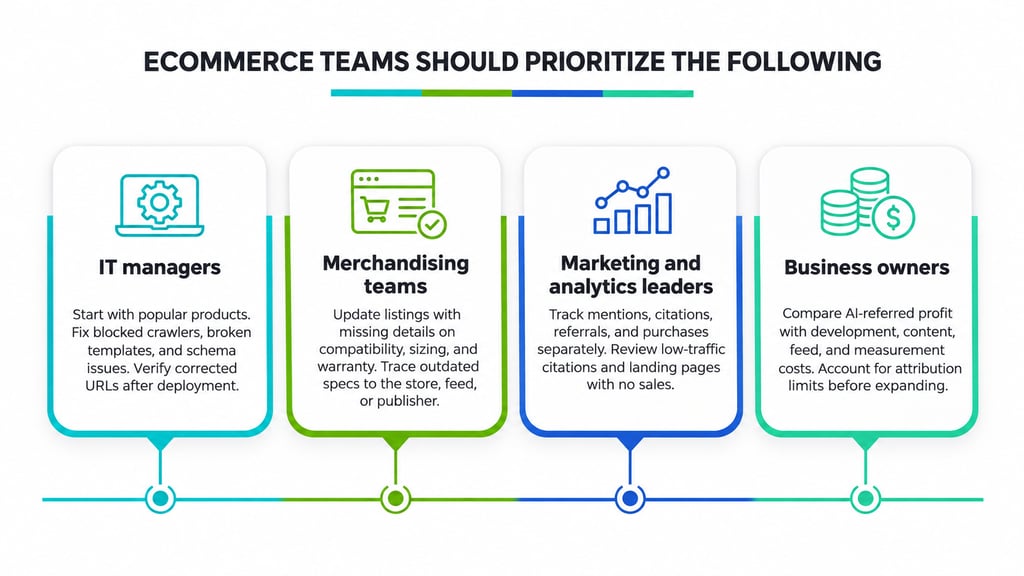
IT managers overseeing large catalogs should start with a representative set of popular products and identify failures affecting their accessibility. Blocked crawlers, broken templates, and incorrect structured data should be addressed before investing in additional visibility tools. Document affected URLs and verify corrections after deployment.
Merchandising teams should focus on information customers cannot find in existing listings. Recurring questions about compatibility, sizing, or warranty terms can inform product-page updates. When an AI assistant repeats an obsolete specification, trace the information to the storefront, merchant feed, or external publisher.
Marketing and analytics leaders should compare product mentions, citations, referral traffic, and completed purchases independently. Frequent citations with little traffic warrant a review of linked destinations, whereas visits without sales call for examining product pages and checkout performance.
Business owners should evaluate whether profit attributed to AI-referred orders justifies development, content, feed maintenance, and measurement costs. Since some AI-influenced purchases may remain unattributed, account for reporting limitations before expanding the program.
An AI recommendation only creates an opportunity to reach a customer. Accurate product information, accessible pages, and a functioning purchase process determine whether retailers can turn that opportunity into a sale.
Our Apple Black Friday roundup covers reported savings on popular devices, helping you decide whether to buy early or wait for better deals.